
Blog
How to Improve Website Speed: 15 Fixes That Move the Needle
Improve website speed with 15 fixes ranked by impact per hour: images, caching, compression, third-party scripts, fonts, and server response time.
Muhammad Zubair Akhtar
To improve website speed, I rank the work by impact per hour of engineering, then I stop when the next hour would only tidy a waterfall that is already fine. I am Zubair Akhtar, a senior software engineer in Lahore, Pakistan. The pages I ship are WordPress, Laravel, and Next.js. LCP, INP, and CLS have their own fix list in my Core Web Vitals guide, including the thresholds and the field-versus-lab rule. This article is the website speed optimization pass around that list: measure one URL, then apply fifteen changes from the highest return on an hour down to the changes that wait for a trace.
The labels below are qualitative. Effort means time to implement. I am not publishing a measured before-and-after for this domain.
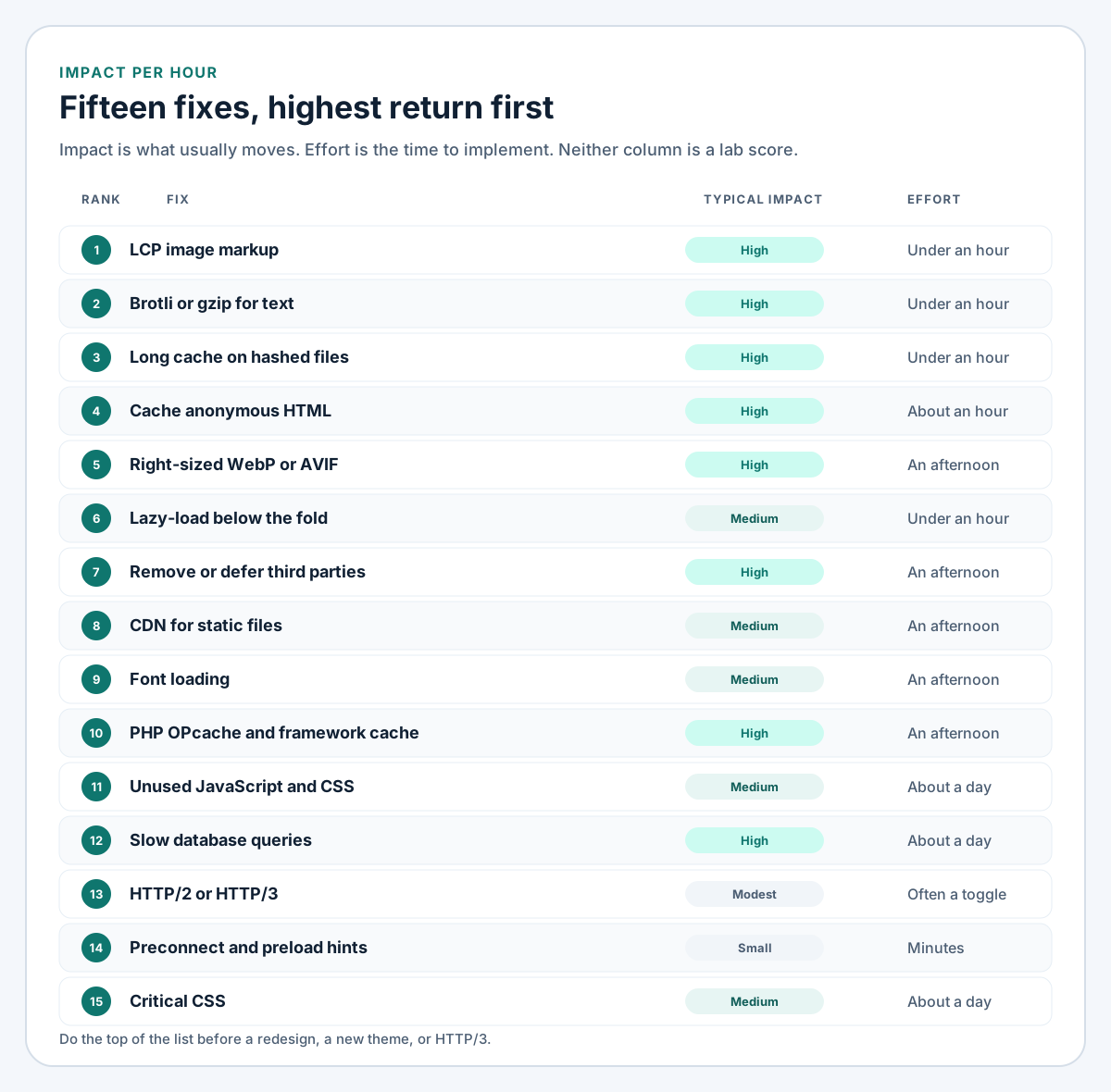
Figure 1. Highest return per hour at the top. Impact is qualitative. Effort is typical time to implement.
Measure the URL before you edit it
Field data and lab data answer different questions
Open PageSpeed Insights on one mobile URL. Google's description of the tool splits the page in two. The top block is field data from the Chrome UX Report: real Chrome users, 28 days, 75th percentile. That is the outcome. Lighthouse, underneath, is one simulated run. It names the element, the bytes, and the long task. A high lab score can sit beside poor field data, because those phones are slower than the laptop that ran Lighthouse.
web.dev's TTFB article calls 0.8 seconds or less a rough "good" range for time to first byte, and greater than 1.8 seconds poor. TTFB is not a Core Web Vital. I use it to separate server wait from the files that follow. An empty field section means too little Chrome traffic for that URL. Lighthouse can still name a cause. Change one thing, reread the lab the same day, and give field data the 28-day window.
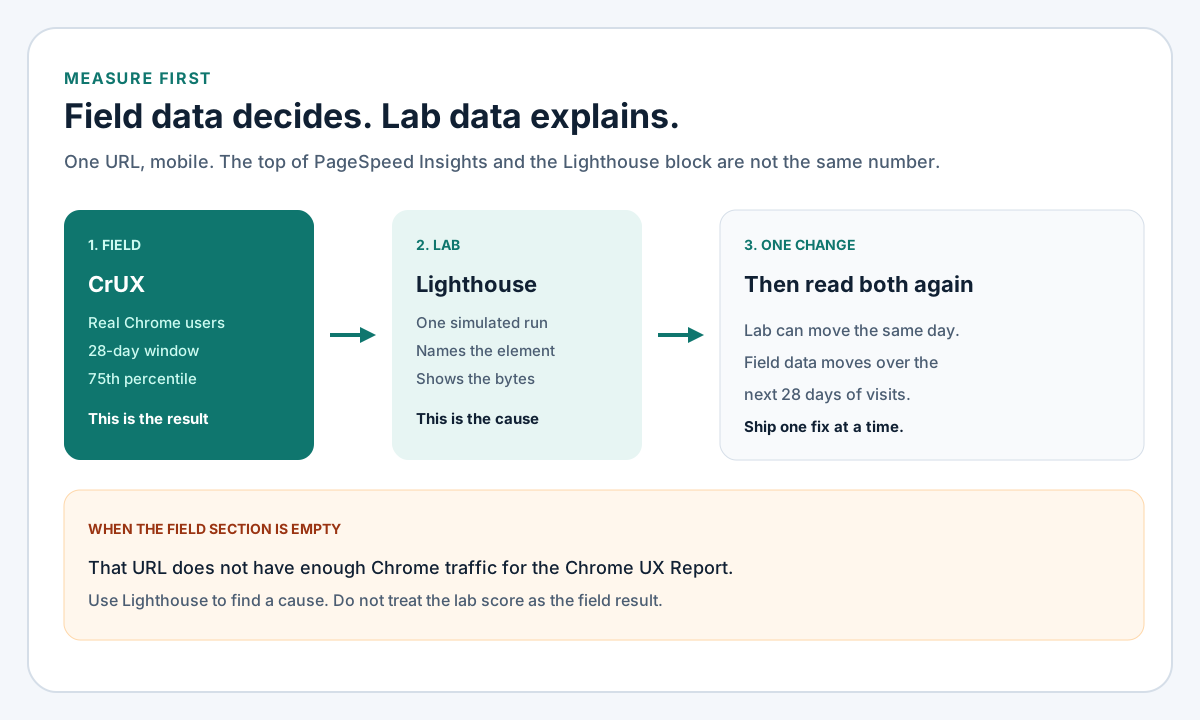
Figure 2. An empty field section means too little Chrome traffic. It does not promote the lab score.
For a written client report I use the technical SEO audit guide. Crawl, canonicals, and the sitemap are the technical SEO checklist.
How to improve website speed: fifteen fixes, ranked
Use this order unless the waterfall names a later row as the actual wait. A multi-second server time is fix 12 today.
| Rank | Fix | Typical impact | Effort |
|---|---|---|---|
| 1 | LCP image markup | High on image heroes | Under an hour |
| 2 | Brotli or gzip for text | High on transfer size | Under an hour |
| 3 | Long cache for hashed files | High on repeat views | Under an hour |
| 4 | Cache anonymous HTML | High on CMS TTFB | About an hour |
| 5 | Right-sized WebP or AVIF | High on bytes | An afternoon |
| 6 | Lazy-load below the fold | Medium | Under an hour |
| 7 | Fewer third-party scripts | High if a tag is heavy | An afternoon |
| 8 | CDN for static files | Medium to high if visitors are far | An afternoon |
| 9 | Font loading | Medium on LCP and CLS | An afternoon |
| 10 | OPcache and framework caches | High if PHP is the wait | An afternoon |
| 11 | Unused CSS and JavaScript | Medium to high | About a day |
| 12 | Slow queries and N+1s | High if the database waits | About a day |
| 13 | HTTP/2 or HTTP/3 | Modest | Often a toggle |
| 14 | One preconnect or preload | Small unless discovery is late | Minutes |
| 15 | Critical CSS | Useful on a large sheet | About a day |
1. Fix the LCP image in the HTML
web.dev's LCP guidance says lazy-loading the LCP image waits for layout. Set fetchpriority="high" on that image only. The same page says a high priority on more than one or two images makes the hint useless, and width and height let the browser reserve the box. Google's Fetch Priority article records a Google Flights experiment where that hint moved LCP from 2.6 seconds to 1.9 seconds, on that page.
<img
  src="/images/hero-800.webp"
  srcset="/images/hero-480.webp 480w, /images/hero-800.webp 800w, /images/hero-1200.webp 1200w"
  sizes="(max-width: 768px) 100vw, 800px"
  width="1200"
  height="630"
  alt="Workshop schedule for the current week"
  fetchpriority="high"
>
Leave loading="lazy" off this tag. Preload a CSS-background hero with the exact URL the stylesheet requests. A mismatch downloads a file nobody paints. The Next.js 16 hero props are in the Core Web Vitals guide.
<link rel="preload" as="image" href="/images/hero-800.webp" fetchpriority="high">2. Compress text with Brotli or gzip
HTML, CSS, JSON, and JavaScript compress well. WebP, AVIF, and woff2 do not need another pass. Stock nginx includes gzip, and it compresses text/html even when that type is missing from gzip_types. gzip_vary on sends Vary: Accept-Encoding. gzip_proxied any still compresses a request that arrived with a Via header.
gzip on;
gzip_vary on;
gzip_proxied any;
gzip_comp_level 5;
gzip_min_length 256;
gzip_types
    text/plain
    text/css
    text/javascript
    application/javascript
    application/json
    application/xml
    image/svg+xml;
Level 5 is the on-the-fly setting I paste. Brotli needs ngx_brotli, which the Ubuntu nginx package does not include. A CDN that negotiates Brotli can own that step, with gzip as the fallback:
brotli on;
brotli_comp_level 5;
brotli_types text/plain text/css text/javascript application/javascript application/json application/xml image/svg+xml;
If the app already sets Content-Encoding, compress in one place only. The TLS and proxy_pass block is the nginx setup guide. Run nginx -t after you add these lines.
3. Cache hashed static files for a long time
A fingerprinted URL (app.8f3a1c.js, /_next/static, Vite's /build) can be cached for a year, because the next deploy changes the name. That is the repeat-view win in HTTP caching.
location ~* \.(?:css|js|mjs|woff2|svg|webp|avif|png|jpe?g|gif|ico)$ {
    expires 1y;
    add_header Cache-Control "public, max-age=31536000, immutable";
}
immutable is only honest when the bytes at that URL will not change. A WordPress upload, or a logo replaced in place, needs a short max-age or a new filename. Confirm with curl -I. A sloppy regex can also stamp a year-long cache on HTML.
4. Cache HTML that is the same for every guest
A long cache on CSS does nothing for the document's first byte. A page cache stores HTML so the next anonymous visitor skips PHP. That is the usual TTFB drop on a WordPress or Laravel marketing page.
Skip cart, checkout, account, wp-admin, and any response that sets a session cookie. A two-minute public max-age is an example for a page that can be slightly stale, not a measured optimum. Purge on publish, and keep the TTL short enough that a missed purge still expires. WordPress uses a page-cache plugin or the host cache. Laravel uses a guest response cache or the reverse proxy. Static Next.js HTML is already built.
5. Resize images and serve a modern format
Fix 1 is the markup. This fix is the files: the widths the layout uses, in WebP or AVIF, described with srcset and sizes. sizes="100vw" on a narrow card downloads the wide file. I ship WebP when the pipeline already encodes it, and AVIF when the toolchain is already there. Keep masters out of the web root.
6. Lazy-load images that are below the fold
Browser lazy loading is enough. A JavaScript loader repeats a job the browser does.
<img
  src="/images/gallery-3.webp"
  alt="Finished cabinet in the workshop"
  width="800"
  height="600"
  loading="lazy"
  decoding="async"
>
Use it below the first screen on mobile and desktop. Hero, logo, and the first product image stay on fix 1.
7. Remove or defer third-party scripts
Sort the network panel by time and read the initiator. Chat widgets, heatmaps, A/B tools, and a tag manager full of tags often own the main thread. Name an owner before you delete one. Scripts that can wait use defer (order preserved). async runs on arrival.
<script src="/js/analytics.js" defer></script>For YouTube, a poster and a play button that inserts the iframe on click keeps the player off the first load. The bytes you skip depend on the embed, so I am not quoting a saving.
8. Put static files on a CDN
A CDN stores the files from fixes 3 and 5 nearer a distant visitor. HTML that still waits on PHP, and a huge hero, stay slow. Cache fingerprinted assets aggressively, and cache HTML only with the purge rules from fix 4. If TLS ends at the CDN, turn Brotli on there, then read Cache-Control from outside the origin. A page rule can replace nginx's header.
9. Load fonts without blocking the first paint
Self-host one or two woff2 files, with a unicode-range so a Latin page skips the rest of the family. Preload that one file. crossorigin is required even on your own origin, or the preload and the CSS request fail to match and the browser downloads the font twice.
<link rel="preload" as="font" type="font/woff2" href="/fonts/inter-latin.woff2" crossorigin>@font-face {
font-family: "Inter";
src: url("/fonts/inter-latin.woff2") format("woff2");
font-weight: 400;
font-style: normal;
font-display: swap;
unicode-range: U+0000-00FF;
}font-display: swap shows a fallback immediately. Match its size or the swap moves the layout. Metric overrides and next/font are in the Core Web Vitals guide. Preload one file, not every weight.
10. Turn on OPcache and the framework caches
When the server is the wait, website performance optimization starts in PHP. OPcache keeps compiled bytecode in memory.
opcache.enable=1
opcache.memory_consumption=128
opcache.max_accelerated_files=20000
opcache.validate_timestamps=0
validate_timestamps=0 ignores file edits until PHP-FPM reloads. Use it when deploys reload FPM. Leave validation on if people edit over SFTP.
composer install --no-dev --optimize-autoloader
php artisan optimize
php artisan optimize caches config, routes, events, and views, after the environment is in place. WordPress has no equivalent command. An object cache stores repeated queries. It does not replace the HTML cache in fix 4.
11. Trim unused CSS and defer unused JavaScript
Builders often print every widget's CSS on URLs that use none of it. Confirm the lab's unused-bytes note on that template, then stop enqueueing the file there. Deleting rules from a shared bundle because one URL looked idle breaks the next template. Defer a script that belongs to a below-the-fold widget, or load it only on that template. Critical CSS is fix 15, and it comes after this.
12. Fix queries that delay the first byte
A page cache hides database time from later guests and leaves it on the first miss and for logged-in users. The Laravel pattern I see most is an N+1. Eager load the relation.
$posts = Post::with('author')->latest()->limit(20)->get();Add an index after EXPLAIN shows a scan. On WordPress I use a query monitor in staging and remove it from production afterwards. The monitor is extra work per request.
13. Enable HTTP/2, and HTTP/3 where it is a toggle
HTTP/2 multiplexes files on one connection. It does not shrink unused JavaScript. Current nginx documents http2 on; in the HTTP/2 module. Older builds still use listen 443 ssl http2;. Match the form to nginx -v.
server {
    listen 443 ssl;
    listen [::]:443 ssl;
    http2 on;
    server_name example.com;
}
HTTP/3 is QUIC. Enable it at the CDN, or on nginx only when nginx -V shows the v3 module, with a QUIC listener and Alt-Svc. It comes after fixes 1 through 7.
14. Preconnect and preload only a resource you measured
Resource hints compete with the LCP resource. Add one when the waterfall shows a late discovery, and remove it if the next run is worse.
<link rel="preconnect" href="https://cdn.example.com" crossorigin>Preconnect only to an origin the first screen will request. Preload is for a file the parser finds late: the CSS-background hero, or the single font in fix 9. Preloading a stylesheet plus several fonts and images turns the hint into the delay.
15. Inline critical CSS after the cheaper fixes
Inline the header and hero rules, and load the rest of the sheet without blocking first paint. Do it when one CSS file blocks rendering and fixes 1 through 11 are done. A missing rule flashes unstyled content and can shift the layout.
How the same list looks on each stack
WordPress
On staging, deactivate plugins you cannot explain, then measure again. Keep security and backups, using the WordPress security checklist. Cache anonymous HTML, and exclude cart, checkout, account, and admin. A builder that prints CSS on every URL is fix 11. Put fixes 1 and 6 in the theme so a lazy-load plugin cannot mark the hero lazy on the next update. That work is WordPress development.
Laravel
OPcache, php artisan optimize, eager loading, and a guest-only response cache cover the slow Laravel pages I see most. The hero is still Blade, with the attributes from fix 1. I do that work as Laravel development.
Next.js
Render marketing pages statically when the HTML does not depend on the visitor. Keep the LCP image off the default lazy path, and let the image component own srcset. Self-host fonts with the framework helper. Compress at nginx or in the app, then check Content-Encoding so only one of them does it.
Where to start this week
- One mobile URL in PageSpeed Insights. Note whether field data exists.
- If LCP is an image, do fix 1.
- Gzip on, and Brotli where the edge already supports it.
- Long cache on fingerprinted files. Purgeable cache on anonymous HTML.
- Resize the hero. Lazy-load images that sit below the fold.
- List third-party scripts with their owners, then defer or remove the habitual ones.
- Queries, unused CSS, HTTP/3, extra hints, and critical CSS come after that.
FAQ
What should I do first to improve website speed?
Fixes 1 through 4 on one template, after you read the field block. They are markup and server config. Revisit the theme once the hero and the HTML cache are already in order.
Why can the lab score look fine while the field data does not?
Lighthouse is one controlled run. The Chrome UX Report is 28 days of visits at the 75th percentile. The field block is the outcome. The lab block names the element. The Core Web Vitals guide is the longer version of that split.
Does the UK spelling change the work?
Readers in the UK search for website speed optimisation. It is this same list. The spelling follows the country. The waterfall does not.
Will a WordPress caching plugin fix the whole site?
It can take PHP out of the path for anonymous HTML, which is fix 4. It will not resize a hero, remove a chat widget, or correct a lazy-loaded LCP image. Exclude cart, checkout, account, and admin.
Should HTTP/3 come before images and scripts?
Enable it when it is already a switch. Do that after the image, compression, cache, and script work. The protocol still carries the bytes you send.
Put the hour into the top of the list
The way I improve website speed is to measure one URL and change what the waterfall names, starting at the top of this list when the trace looks ordinary. A correct LCP image, compression, and a cache for anonymous HTML are usually that hour. The pass sits with my technical SEO services: measurement, template, and server config, from Lahore, on WordPress, Laravel, and Next.js. Send the PageSpeed Insights link and say whether the field section has data.