
Blog
Nginx Setup on Ubuntu for Laravel and Next.js (Reverse Proxy + SSL)
Nginx setup on Ubuntu with reverse proxy and SSL: production configs for Laravel PHP-FPM and a Next.js Node app on one VPS.
Muhammad Zubair Akhtar
An nginx setup on Ubuntu is the layer I put in front of almost every Laravel or Next.js site I ship on a VPS: TLS, host routing, and a reverse proxy to PHP-FPM or a local Node process. I am Zubair Akhtar, a senior software engineer in Lahore, Pakistan. This guide is the production-shaped config I use when both stacks share one machine, not a tour of every nginx module.
The goal is one clear pattern: nginx listens on 443, Laravel is reached through fastcgi_pass, Next.js is reached through proxy_pass to 127.0.0.1:3000, and Certbot owns the certificates. If you want that wiring done as part of a Laravel engagement, that is my Laravel development services work.
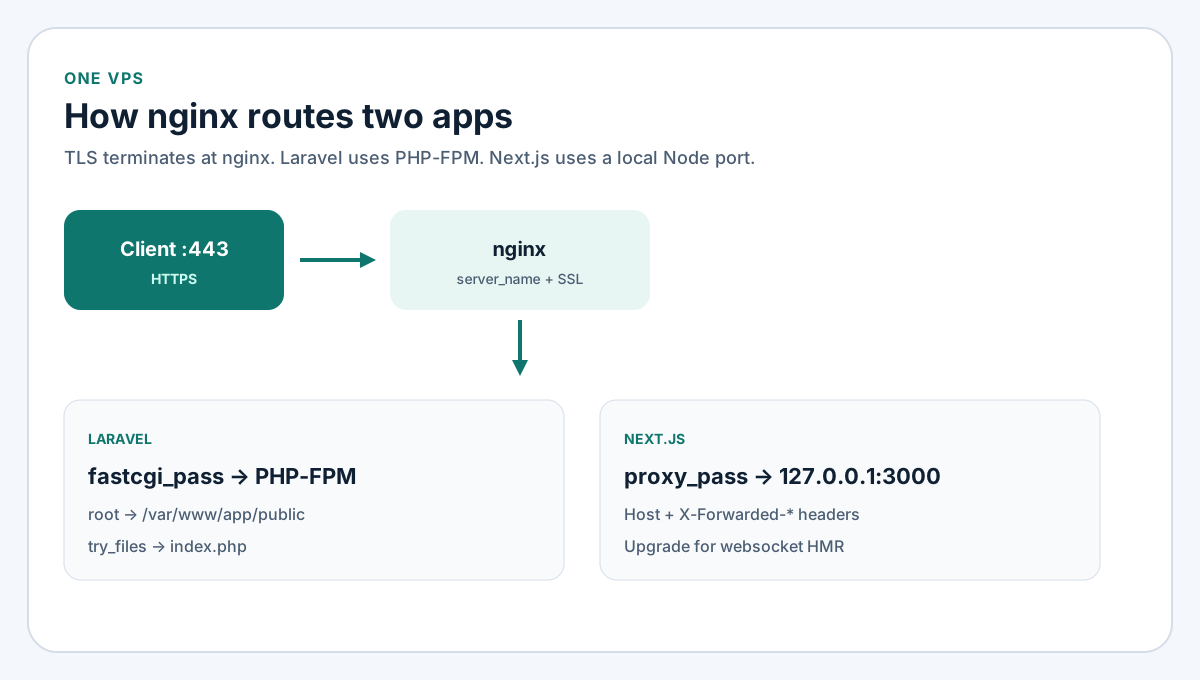
Figure 1. TLS ends at nginx. Laravel goes to PHP-FPM. Next.js stays on a localhost port.
What this nginx setup covers
Stack assumptions
I wrote these snippets against Ubuntu 22.04 or 24.04 LTS, nginx from the Ubuntu packages, PHP 8.2 or 8.3 FPM for Laravel, and a Next.js app started with node or pm2 on port 3000. Swap the PHP socket path and the Node port if your install differs. I am not claiming these files were tested on your exact VPS in this writing session; treat them as the template I paste and then verify with nginx -t, a browser request, and the app logs.
What stays out of this page
This is not a Forge vs DIY cost comparison, a Docker compose file, or a full Core Web Vitals pass. It is the reverse proxy and SSL layer. After the site answers on HTTPS, I still run the technical SEO checklist for robots, canonicals, and the sitemap.
Install nginx and PHP-FPM on Ubuntu
Packages
sudo apt update
sudo apt install -y nginx
# Laravel needs PHP-FPM and the usual extensions on the same host
sudo apt install -y php8.3-fpm php8.3-cli php8.3-mbstring php8.3-xml php8.3-curl php8.3-zip php8.3-mysql php8.3-bcmath
sudo systemctl enable --now nginx php8.3-fpm
Confirm the FPM socket exists before you write the Laravel server block:
ls -l /run/php/php8.3-fpm.sock
sudo nginx -t
Firewall
Open only what nginx needs from the public internet. Keep PHP-FPM and the Node port bound to localhost.
sudo ufw allow OpenSSH
sudo ufw allow 'Nginx Full'
sudo ufw enable
sudo ufw status
Laravel: document root and fastcgi
Put the Laravel project under a path owned by the deploy user, for example /var/www/laravel-app. The nginx root must be the public directory, not the project root. Pointing root at the repo folder exposes .env and vendor.
# /etc/nginx/sites-available/laravel.example.com
server {
    listen 80;
    listen [::]:80;
    server_name laravel.example.com;
    root /var/www/laravel-app/public;

    add_header X-Frame-Options "SAMEORIGIN" always;
    add_header X-Content-Type-Options "nosniff" always;

    index index.php;
    charset utf-8;

    location / {
        try_files $uri $uri/ /index.php?$query_string;
    }

    location = /favicon.ico { access_log off; log_not_found off; }
    location = /robots.txt  { access_log off; log_not_found off; }

    location ~ \.php$ {
        include snippets/fastcgi-php.conf;
        fastcgi_pass unix:/run/php/php8.3-fpm.sock;
        fastcgi_param SCRIPT_FILENAME $realpath_root$fastcgi_script_name;
        include fastcgi_params;
    }

    location ~ /\.(?!well-known).* {
        deny all;
    }
}
Enable the site and reload:
sudo ln -s /etc/nginx/sites-available/laravel.example.com /etc/nginx/sites-enabled/
sudo nginx -t && sudo systemctl reload nginx
Laravel must trust the proxy for HTTPS URL generation. In a current Laravel app that usually means configuring trusted proxies so URL::forceScheme('https') or the TrustProxies middleware sees X-Forwarded-Proto. After Certbot adds SSL, set APP_URL to the https:// host.
Next.js: reverse proxy to Node
Run the production build with a process manager so a reboot brings the app back. A minimal pm2 line looks like this:
cd /var/www/next-app
npm ci
npm run build
pm2 start npm --name next-app -- start
pm2 save
pm2 startup
Nginx should be the only public listener. The Node process listens on 127.0.0.1:3000.
# /etc/nginx/sites-available/next.example.com
server {
    listen 80;
    listen [::]:80;
    server_name next.example.com;

    location / {
        proxy_pass http://127.0.0.1:3000;
        proxy_http_version 1.1;
        proxy_set_header Upgrade $http_upgrade;
        proxy_set_header Connection "upgrade";
        proxy_set_header Host $host;
        proxy_set_header X-Real-IP $remote_addr;
        proxy_set_header X-Forwarded-For $proxy_add_x_forwarded_for;
        proxy_set_header X-Forwarded-Proto $scheme;
        proxy_read_timeout 60s;
    }
}
Those four forwarded headers matter. Without them, Next.js and any auth cookies behind the proxy can generate http:// links or mis-read the client IP. The Upgrade headers keep websocket-based tooling working when you need them in staging; production still benefits from a consistent proxy block.
SSL with Certbot
Install the nginx plugin and issue certificates only after DNS A/AAAA records for each hostname point at the VPS.
sudo apt install -y certbot python3-certbot-nginx
sudo certbot --nginx -d laravel.example.com
sudo certbot --nginx -d next.example.com
sudo certbot renew --dry-run
Certbot rewrites the server blocks to listen on 443 and adds a short HTTP-to-HTTPS redirect. Re-run sudo nginx -t after every Certbot change. The renew timer that ships with the Ubuntu package is enough for most single-VPS setups; the dry-run confirms the renew path before you need it.
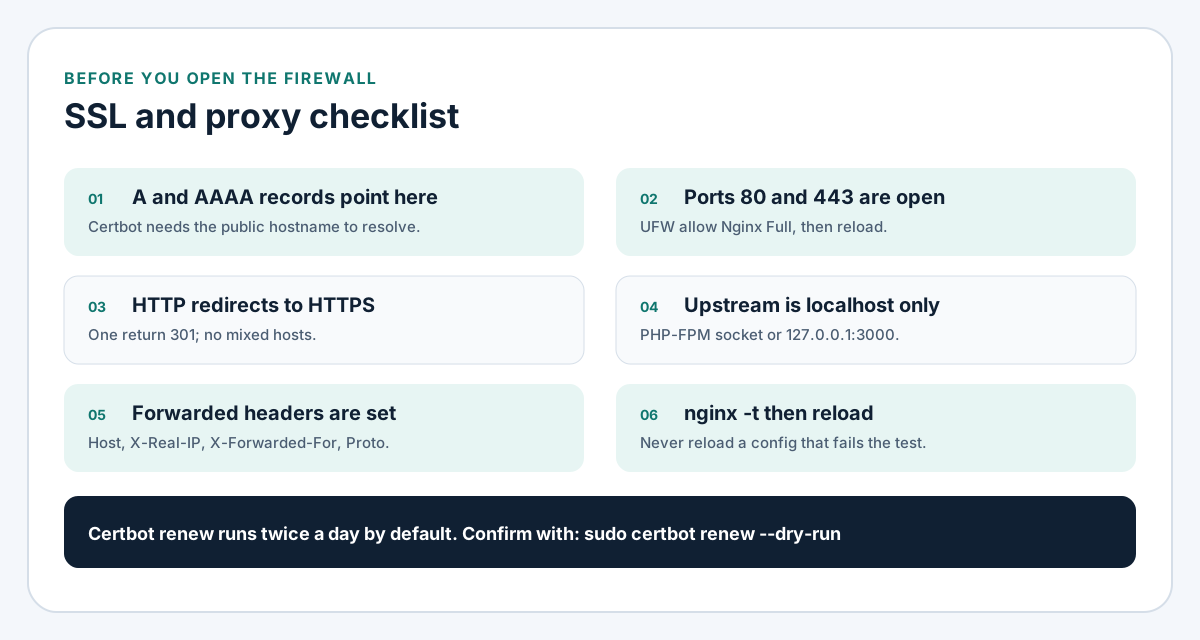
Figure 2. DNS, ports, redirect, localhost upstreams, headers, then nginx -t.
One VPS, two hostnames
When Laravel and Next.js share a machine, give each app its own server_name. Do not put both document roots under one default server and hope path prefixes stay tidy. Separate hostnames keep certificate names, access logs, and deploy scripts readable.
A practical layout:
| Piece | Laravel | Next.js |
|---|---|---|
| Public host | api.example.com or app.example.com | www.example.com |
| Upstream | unix:/run/php/php8.3-fpm.sock | http://127.0.0.1:3000 |
| Deploy artifact | php artisan release in /var/www/... | npm run build + pm2 restart |
| Health check | curl -I https://host + php-fpm status | curl -I https://host + pm2 status |
Static assets for Laravel still come from public/. Next.js serves its own /_next/static through the same proxy_pass. I do not put a second CDN rule in this guide; get the origin correct first.
Hardening and common failures
Permissions and the web root
The PHP-FPM pool user (often www-data) must read the Laravel tree and write storage/ and bootstrap/cache/. A deploy user can own the files; the FPM user still needs group write on those two directories. If uploads fail with 500s and an empty nginx error log, check the Laravel log and directory ownership before rewriting the server block.
Body size and timeouts
Large uploads and slow artisan or Node handlers need explicit limits:
client_max_body_size 32m;
proxy_read_timeout 120s;
fastcgi_read_timeout 120s;
Put them in the server or location that needs them. A global 1m default is why logo uploads die with 413.
What I check when HTTPS works but the app does not
curl -I http://127.0.0.1:3000from the VPS for Next.js, or a PHP info probe through FPM for Laravel.sudo tail -n 50 /var/log/nginx/error.log.- That
server_namematches the certificate and the browser host exactly. - That only one site owns the default catch-all if you still have the Ubuntu default enabled.
FAQ
Do I need a reverse proxy if Next.js can listen on 443?
I still put nginx in front. It terminates TLS with Certbot, hosts multiple apps on one IP, and keeps the Node process off the public interface. Listening on 443 from Node alone works for a single toy deploy. It is a weaker pattern for production on a shared VPS.
Can Laravel and Next.js share one hostname?
They can, with path-based location blocks, but I avoid it unless the product truly needs one origin. Separate hostnames keep deploys and certificates simpler. When the marketing site is WordPress instead of Next.js, the same idea applies under WordPress development: one vhost, one document root, one certificate name.
Where does ecommerce checkout fit?
Checkout traffic still hits nginx first. Stripe and similar gateways care about HTTPS and stable callback URLs. The payment application code lives in Laravel or WooCommerce; the TLS and proxy layer is this guide. Platform choice is covered in the ecommerce platform comparison. Implementation work sits under ecommerce development.
Is this a replacement for Laravel Forge?
No. Forge (and similar panels) automate much of this nginx setup. This page is the manual baseline I use when a client already has a bare Ubuntu VPS, or when I need to see every directive before I automate it. Use Forge when the cost of the panel is cheaper than the hours of babysitting deploys.
Ship the VPS, then the app
Once nginx -t is clean and both hostnames return 200 over HTTPS, move on to the application checklist: env vars, queues, scheduled tasks, and the SEO pass linked above. I wire this reverse proxy layer as part of Laravel development engagements from Lahore. Bring the hostname list and whether the second app is Next.js or only PHP. I will start from the server blocks on this page, then reload only after nginx -t passes.