
Blog
Technical SEO Audit: What a Real Audit Includes (Free Template)
Walk through a technical SEO audit deliverable: crawl, index, render, vitals, schema, links, redirects, spam cleanup, and a free template.
Muhammad Zubair Akhtar
A technical SEO audit is the written deliverable I hand a site owner after I have looked at one property: what a crawler can fetch, what should be stored, and what I would change first. I am Zubair Akhtar, a senior software engineer in Lahore, Pakistan. This guide walks through that deliverable section by section, and it includes a free template you can copy into a doc.
The technical SEO checklist is the order of checks and the code I paste into a repository. This page is the report for one property: findings, evidence, and the order I would fix them. If you want that report produced and then implemented, that is my technical SEO services work.
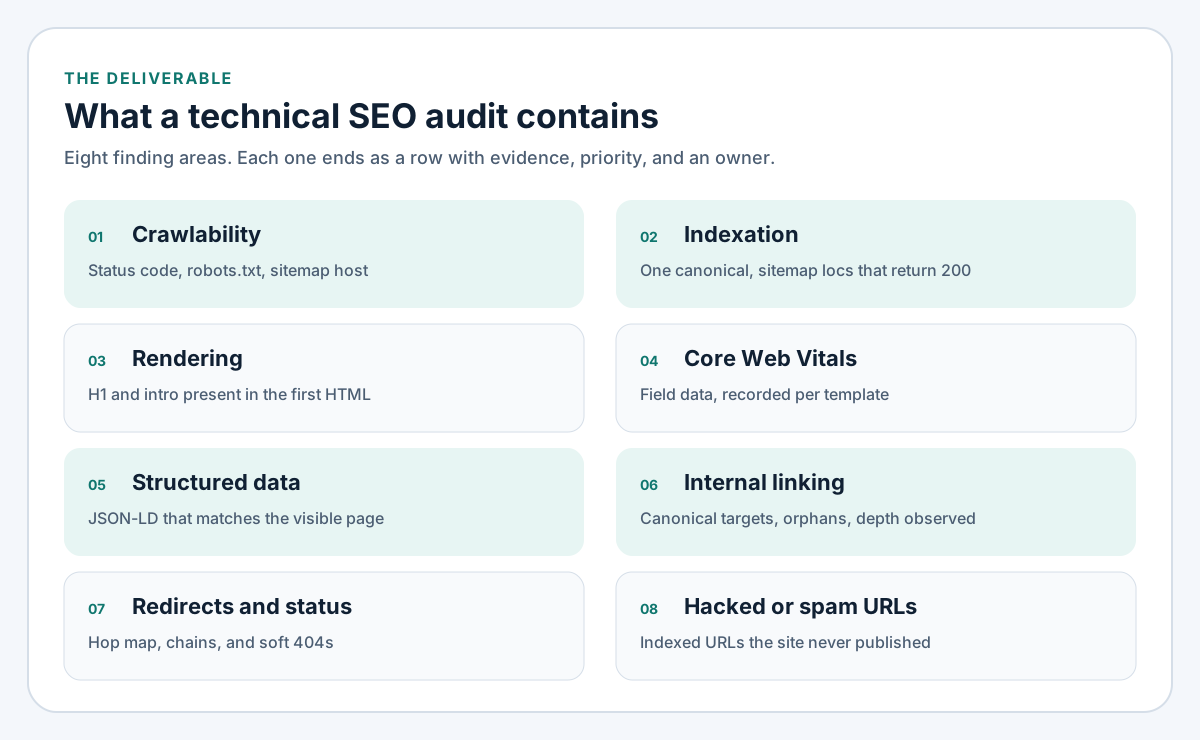
Figure 1. Eight finding areas. Each one becomes a row: evidence, impact, priority, and an owner.
What a technical SEO audit includes
How the report differs from the checklist
A checklist can be true of many sites at once. An audit is true of one host, on one date. I name the URLs I requested, the status codes I got back, and the template each finding belongs to. A sentence that could be copied onto any marketing site does not belong in the finding table.
The checklist stops at five implementation passes: crawl, index, render, Core Web Vitals, and schema. The audit uses those passes and adds the parts that only show up once you are writing about a real property: internal linking, a redirect map, hacked or spam URLs, and a priority order someone can schedule.
What I agree before I crawl
The cover of the report is filled in before the crawl, so the scope does not grow halfway through.
- Property: the canonical host, and the Search Console property that matches it.
- Stack: Laravel, WordPress, Next.js, or a mix, because the recommended change has to name the layer that owns the bug.
- Sample: the homepage, each template that should rank, one article, any archive the CMS generates, and every URL in the sitemap. I sample templates. I do not pretend to open every filtered URL by hand.
- Spot check: the same few URLs requested again with a Googlebot user agent.
- Indexed export: the URL list from Search Console, subtracted from the sitemap and from the templates the site actually publishes.
- Out of scope, unless we wrote it into the cover: keyword research, link building, a visual redesign, and ad accounts. A missing H1 in the HTML is in scope. A rewrite of a blog archive for tone is not.
Crawlability
Crawlability rows answer a fetch question. For each URL in the sample I record the status code, the final URL after any redirects, and whether robots.txt would have allowed that fetch. I repeat a short sample with a Googlebot user agent. If the status changes between the two requests, that row goes to the top. The rest of the audit would otherwise describe a different site from the one Google fetched.
I also read robots.txt as a file. The row records three facts: whether public HTML is allowed, whether CSS and JavaScript are allowed, and whether the Sitemap line uses the production host. A disallow left over from staging is a P1. A disallow aimed at a spam path is also a row. The recommended change is to remove that disallow and answer the path with 410 Gone, so the crawler can see the status. I wrote up why a disallow hides the cleanup on this domain in how I removed hacked spam URLs from Google.
The file I would ship, and the Laravel route I use when robots.txt comes from config, already sits in the technical SEO checklist. The audit links that page from the recommended-change cell. It does not paste the file again.
Indexation
Indexation rows answer a storage question. For each template that should rank, which single URL is the one Google should keep?
I request the variants the site can already emit: http and https, www and the apex, with and without a trailing slash, and parameters the templates themselves link to. I record the status, the canonical, and whether the sitemap includes that URL. The finding is any set of URLs that disagree. Two canonicals in one response are their own row. A canonical that still carries a tracking parameter is its own row.
On WordPress I note when an SEO plugin and the theme both print a canonical. The recommended change is to keep one of them. On a Next.js or Laravel app that has no tag yet, the recommended change points at the metadata or middleware pattern in the checklist, with this site's path filled in. The audit quotes the live href. It does not ship a second copy of the snippet.
Sitemap rows are a pass over the loc list. Every loc should return 200, should be indexable, and should use the canonical host. I list the locs that fail. I leave lastmod out of the report unless I know the content actually changed on that date.
Rendering
Rendering rows answer a source question. I request the URL and look in that response for the H1 and the opening paragraph. If they are missing, the finding is that the primary content is not in the first HTML, and I name the template. I leave schema and vitals for that template until this row is fixed. Markup and speed scores describe a page the server has not sent yet.
The recommended change depends on who renders the document. A Next.js page should already contain the words in the server response. A WordPress theme should print the article in PHP. A builder that loads the article in a second request gets a row aimed at the theme, which is WordPress development work. A Laravel page that ships an empty shell and waits for a client bundle gets a row aimed at the Blade layout, which is Laravel development work.
Core Web Vitals
Core Web Vitals rows are field data for a template. I open the field result for mobile and for desktop and I write whether LCP, INP, and CLS are good, need improvement, or are poor. I name the template, because a shared header fails everywhere it is used. I name the element or script the lab trace points at, so the row tells a developer where to look.
Definitions, thresholds, and the fix list by stack are in the Core Web Vitals guide. I do not copy them into the audit. A single Lighthouse score on my laptop does not close the row. The field result does.
Structured data
Structured data rows compare the JSON-LD in the production HTML with what a visitor can see. I list the types on the URL. A type is a finding when it describes something that is not on the page, or when a visible block we meant to describe has no type at all. The words in the script have to match the words in the HTML. I do not add a type to chase a search feature.
The checklist already covers how I validate a script and why I skip FAQ markup that the page does not show. The audit only records the mismatch on this property: which template, which type, which sentence disagrees. On this blog, the page template already emits BlogPosting, so an audit row would say to leave a second Article node out of the body.
Internal linking
Internal linking is the part a header checklist does not hold, so the website technical audit gives it a table of its own.
For each template that should rank I record:
- The canonical URL.
- Whether the main navigation and the footer link to that exact string.
- Whether in-content links point at the canonical, or at a variant that redirects.
- Whether any indexable page links to it at all.
- The click depth I counted from the homepage.
I write the depth I counted. I do not apply a maximum. A service page that is linked only from the sitemap is a finding, whatever depth some other page happens to sit at.
I also list URLs the templates generate that are not pages we want stored: faceted filters, date archives, attachment URLs. The recommended change is usually to stop linking them, or to noindex them while leaving them crawlable. The checklist shows the WordPress filter I use for archives. The audit names the archive on this site.
Anchors that say "read more" or paste a raw URL get a content row. The destination is unclear to a reader. I do not treat that row as a ranking promise. The owner is content, and the change is a specific label.
Redirects and status codes
The artifact here is a map.
| From | Hops | Final status | Final URL | Canonical of the final URL |
|---|---|---|---|---|
| The request I sent | How many responses it took | Status of the last response | Where it landed | Canonical on that final URL |
A finding is a chain of more than one hop, a loop, two hosts that both return 200, a slash policy that disagrees with the canonical, or a 200 whose body is a not-found page. The recommended change is one hop onto the canonical URL. The checklist lists how I treat individual status codes. The audit only needs the row: this request, this result, this change.
Retired marketing URLs and spam URLs do not belong on this map as redirects to the homepage. They belong in the next section.
Hacked and spam URLs
I export the indexed URL list from Search Console. I subtract the sitemap, then I subtract the templates the site publishes. What remains is the finding, grouped by pattern: junk query strings, stray paths, and old slugs in languages the site does not use.
The recommended change for those patterns is 410 Gone, with the path left crawlable so Google can fetch the status. The implementation I run on this domain, including the allowlist that keeps real posts indexable, is the case study linked above. The audit's job is the inventory and the pattern. It is not a second copy of that write-up.
When the export is full of spam because the site was compromised, the audit says that in the summary and stops treating a status code as the whole repair. On WordPress, the next document is the WordPress security checklist: updates, access, and a backup that has been restored. Removing URLs from the index while the files stay infected puts the same patterns back.
Reporting and prioritisation
The finished report has four parts.
- A cover: property, date, canonical host, stack, what I crawled, what I sampled, and what I left out.
- A short summary: one sentence per P1 finding. No score.
- The finding table.
- Two appendices: the redirect map, and the indexed URLs that are not in the sitemap.
Priority bands
| Priority | When I use it |
|---|---|
| P1 | A URL that should be indexed cannot be fetched, or is told not to be stored. |
| P2 | Crawl is wasted, or two URLs compete for the same page. |
| P3 | The page can be indexed. The remaining work is field vitals, markup, or clearer internal links. |
I schedule P1 before P2, and P2 before P3. Each row names one owner: development, content, hosting, or SEO follow-up. SEO follow-up means Search Console work such as a removal or a fresh inspection, after the response code is already correct. The recommended change is one sentence a developer can implement without another meeting.
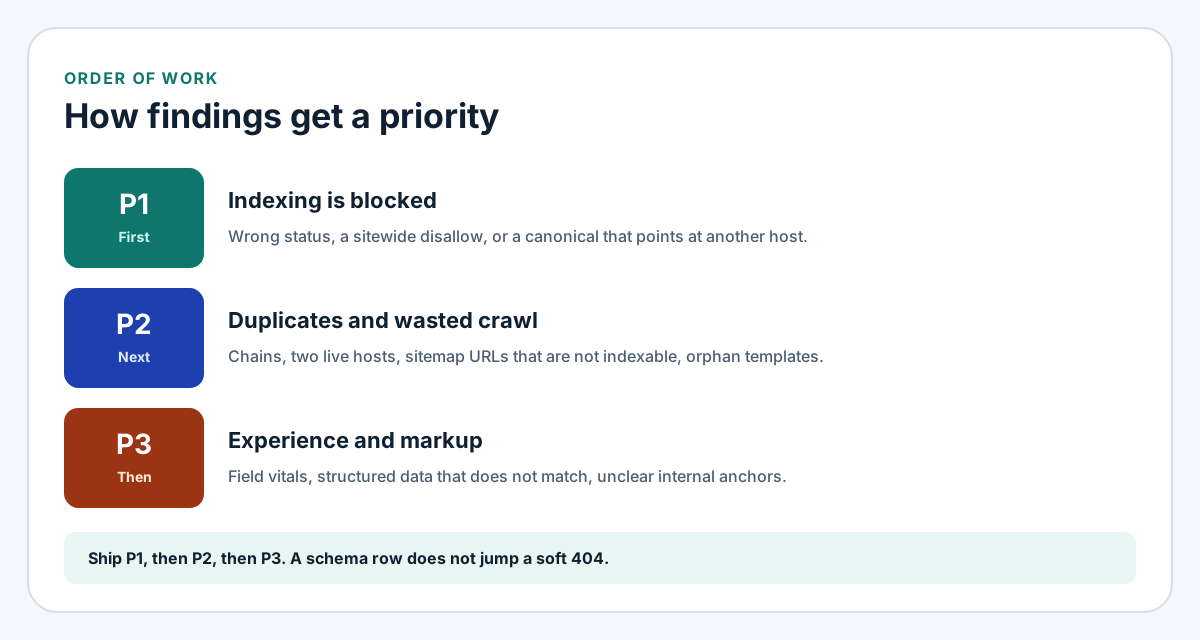
Figure 2. Priority bands. Indexing failures go before duplicate URLs, and duplicate URLs go before schema and vitals.
A free technical SEO audit template
Copy the block below into a doc or a markdown file. Delete any row you did not actually observe. An empty row is not a finding.
Column guide
| Column | What goes in the cell |
|---|---|
| ID | A number the summary can point at. |
| Area | One of the eight finding areas in this guide. |
| URL or template | The canonical URL, or the template name when every page of that type fails the same way. |
| Evidence | The status, header, robots rule, or Search Console report you opened. |
| Impact | Which outcome fails: fetch, index, render, experience, or trust. |
| Priority | P1, P2, or P3, using the bands above. |
| Recommended change | One sentence a developer can implement. |
| Owner | Development, content, hosting, or SEO follow-up. |
Copy-paste template
# Technical SEO audit

- Property:
- Date:
- Canonical host:
- Stack:
- Search Console property:
- Sample (templates, not every URL):
- Googlebot user-agent spot check:
- Indexed URL export compared with the sitemap:
- Out of scope:

## Summary

One sentence per P1. No score.

## Findings

| ID | Area | URL or template | Evidence | Impact | Priority | Recommended change | Owner |
| --- | --- | --- | --- | --- | --- | --- | --- |
| 1 | Crawlability |  |  |  |  |  |  |
| 2 | Indexation |  |  |  |  |  |  |
| 3 | Rendering |  |  |  |  |  |  |
| 4 | Core Web Vitals |  |  |  |  |  |  |
| 5 | Structured data |  |  |  |  |  |  |
| 6 | Internal linking |  |  |  |  |  |  |
| 7 | Redirects and status codes |  |  |  |  |  |  |
| 8 | Hacked or spam URLs |  |  |  |  |  |  |

## Redirect map

| From | Hops | Final status | Final URL | Canonical of the final URL |
| --- | --- | --- | --- | --- |
|  |  |  |  |  |

## Indexed URLs that are not in the sitemap

| Pattern | Example URL | Recommended response | Crawlable? |
| --- | --- | --- | --- |
|  |  | 410 Gone | Yes |

## Priority

- P1 first: the page cannot be fetched, or must not be stored, and it should be.
- P2 next: duplicate URLs or wasted crawl.
- P3 last: field vitals, structured data, and internal anchors.
Fill it in one sitting
- Write the cover before you request anything, and keep the sample on templates.
- Fill crawl, index, and render for the homepage, one service page, and one article before you open another report.
- Export indexed URLs and subtract the sitemap. Group what remains by pattern.
- Fill the redirect map for protocol, host, and trailing slash.
- Open field vitals only for templates whose render row passed.
- Assign priority and owner. Sort the table by priority.
- Send the table. A narrative that hides the rows is a different document from this audit.
FAQ
What should a technical SEO audit include?
The cover, a summary of P1 findings, and a table covering crawlability, indexation, rendering, Core Web Vitals, structured data, internal linking, redirects and status codes, and hacked or spam URLs. Appendices hold the redirect map and the indexed URLs that are not in the sitemap. Each row has evidence, a priority, an owner, and one recommended change.
How is this report different from the technical SEO checklist?
The checklist is the order of checks and the code. This report is the pass on one property: the URLs, the evidence, and the sequence of commits. Use the checklist when you are implementing a row. Use this page when you are writing the row down.
What is a website technical audit?
On this page it means the same deliverable: a technical look at fetch, index, render, speed, markup, links, redirects, and unwanted URLs. It is not a content audit and it is not a backlink report. Those can sit beside it. They are separate documents with a different kind of evidence.
When should I hire a technical SEO consultant?
Use the template yourself when you can request the URLs, read robots.txt, and open Search Console. Hire a technical SEO consultant when the findings are already visible and the next step is a change in the theme, the framework, or the edge. That is the point where the row has to become a commit. I do that work from Lahore on Laravel, WordPress, and Next.js sites.
Where do hacked URLs sit in the audit?
They are their own area, fed by the indexed URL export. The recommendation is a crawlable 410 for patterns the site never published. If the files were compromised, the audit names that and hands the hardening work to a security pass. The status code does not remove the infection.
Technical SEO audit services
I write this report and then I implement the P1 and P2 rows in the repository. That engagement is technical SEO audit services: the response a crawler gets, the canonical, the sitemap, and the templates that fail field vitals.
When the row is a WordPress theme that never prints the article, the implementation is WordPress development. When the row is Laravel middleware, a canonical, or a sitemap built from the routes that should rank, the implementation is Laravel development. Bring the Search Console property and the host. I will start with the cover, then the P1 rows.