
Blog
WordPress Speed Optimization: The Fixes That Actually Work
WordPress speed optimization for page and Redis object caching, images, plugin bloat, PHP and hosting, database cleanup, scripts, and WooCommerce stores.
Muhammad Zubair Akhtar
WordPress speed optimization is a WordPress problem. The request either returns cached HTML, or it boots PHP, loads every autoloaded option, and runs every active plugin before a product image is considered. I am Zubair Akhtar, a senior software engineer in Lahore, Pakistan. This pass stays on WordPress and WooCommerce. Compression, fonts, and the same ideas on Laravel and Next.js are the guide to improving website speed. LCP, INP, and CLS, and how field data differs from a lab run, are the Core Web Vitals guide. If you want the pass done on a site you already run, that work is WordPress development.
I am not publishing a measured before-and-after. Where a number appears, it is a threshold or a limit from Google, WordPress, PHP, or WooCommerce, and the sentence links the page.
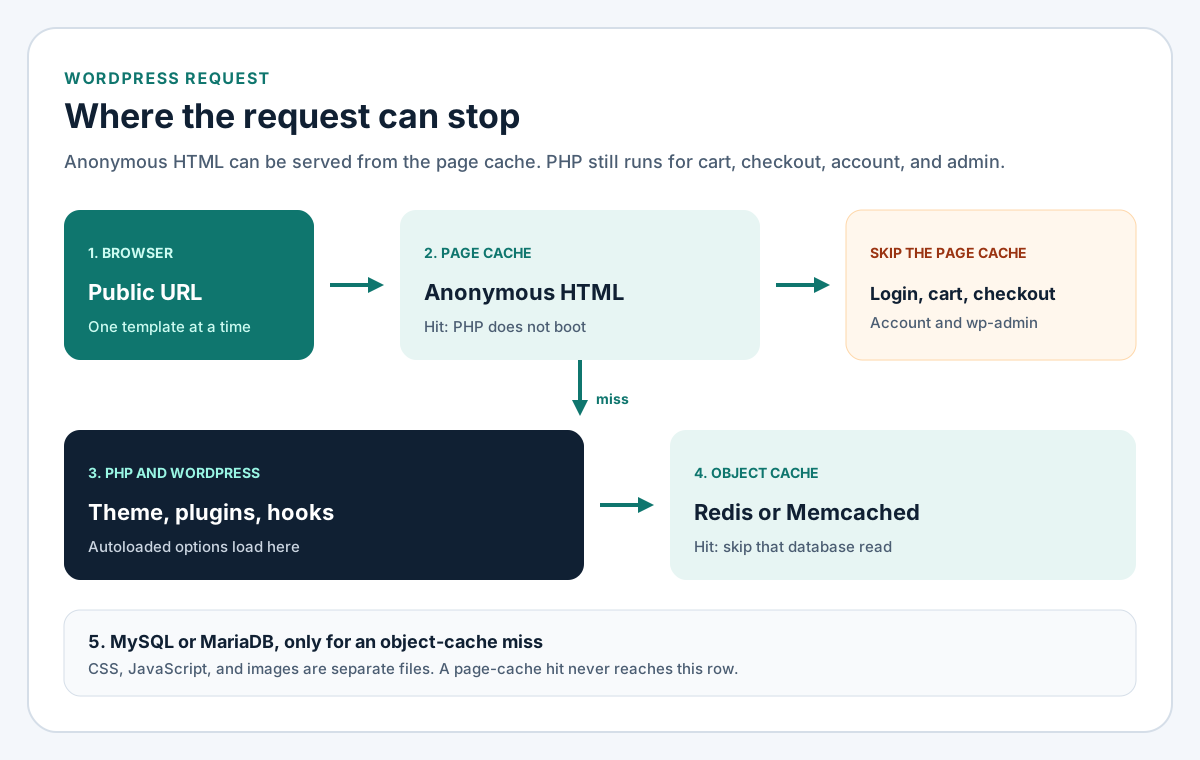
Figure 1. A page-cache hit never boots PHP. Cart, checkout, account, and wp-admin are supposed to miss.
Read one URL before you edit a plugin
PageSpeed Insights is the outcome
Open PageSpeed Insights on one mobile URL: the homepage, a post, a product, or checkout. Google's description of the tool splits the report. The top block is field data from the Chrome UX Report: real Chrome users over 28 days, at the 75th percentile. Lighthouse, underneath, is one simulated run. It names an element. It is not the result.
web.dev's Web Vitals article says a good experience means largest contentful paint within 2.5 seconds, interaction to next paint of 200 milliseconds or less, and cumulative layout shift of 0.1 or less, at that 75th percentile, on mobile and desktop separately. An empty field section means too little Chrome traffic. Use the lab block to find a cause. Do not promote the lab score into the field result.
Query Monitor names the component
Query Monitor groups queries, scripts, styles, and HTTP calls by the plugin or theme that registered them. On staging, load the same URL as an administrator and read that list. I have not timed the plugin's overhead here, so I am not claiming a cost for leaving it active. Change one thing, then reload.
WordPress speed optimization: page cache, then object cache
The WordPress optimization handbook sends a quick pass to caching, because a cached public page skips PHP. The two layers in Figure 1 are not substitutes.
| Cache | What it stores | When it helps | Leave it off |
|---|---|---|---|
| Page cache | Rendered HTML for a URL | Anonymous visitors, same public URL | Logged-in users, cart, checkout, account, wp-admin |
| Object cache | Options, posts, query results | Any request that still boots PHP | It is not an HTML cache |
Page caching for anonymous HTML
A page cache stores HTML WordPress already rendered and serves it to the next anonymous visitor, so PHP does not boot. The handbook describes plugins that write posts and pages as static files, and a server cache such as Varnish. A host "full page" switch is the same layer.
Skip login cookies, WooCommerce session cookies, cart, checkout, my-account, and wp-admin. A cached checkout is a bug. Purge on update, and keep the lifetime short enough that a missed purge expires. One owner for HTML: plugin or host, not both. Check logged out before you call the cache wrong.
Object caching with Redis
The default object cache lives in PHP memory for one request, then disappears. A persistent cache keeps it in Redis or Memcached through wp-content/object-cache.php. The handbook's example is options, which every view needs and which otherwise come from the database each time. The object cache reference lists Redis Object Cache as a plugin that needs a Redis server. The redis PHP extension is only a client.
The wp-config handbook says transients live in that cache when it exists, and in the options table when it does not. A warm cache skips the database round trip. It still builds autoloaded options in memory. Site Health's object-cache hint is a size check in core, not a timing of this URL. Ask the host whether Redis exists before you add a drop-in.
Images: registered sizes, WebP or AVIF, lazy loading
wp_get_attachment_image prints srcset from registered sizes. A template that prints the original upload in a card ignores them. sizes has to describe the slot. sizes="100vw" on a narrow card still downloads the wide file.
WordPress 6.5 adds AVIF when the host can decode it. WebP uploads were already possible, and that note says AVIF still gets srcset, fetchpriority, and lazy loading. Ship a format the server can generate.
The WordPress 6.3 image note says core sets fetchpriority="high" on the likely LCP image and omits loading="lazy" in the viewport. Those attributes never share an element. A plugin that lazy-loads the hero undoes core. Non-WordPress markup stays in the website speed guide.
Audit plugins that run on the request
The handbook says to deactivate plugins you do not need, one at a time, while you measure. An inactive plugin is not loaded on the front end. Disk leftovers are the WordPress security checklist. Speed is the active list.
On staging, name the plugin behind each heavy Query Monitor handle, deactivate that plugin, and reload. Usual finds: a builder stylesheet on every URL, a second cache plugin, a slider in the first screen. Keep a plugin whose job you can name. A combiner that rewrites every stylesheet can break checkout after HTML is already cached.
WordPress performance optimization on the server
The requirements page, last modified 7 May 2026, recommends PHP 8.3 or greater, MariaDB 10.11 or greater or MySQL 8.0 or greater, HTTPS, and nginx or Apache. It also says WordPress still runs on PHP 7.4 and newer, and that those older versions have reached end of life. Site Health, under Info and then Server, shows the version this site is on.
OPcache keeps precompiled PHP bytecode in shared memory. It helps a page-cache miss, the cart, and wp-admin. It does not store HTML. Shared hosts often hide the switch. A VPS lets you turn it on. TLS and fastcgi_pass are the nginx setup guide. I am not comparing host prices.
Clean the tables WordPress still reads
Revisions
WordPress keeps a copy of each edit. The wp-config handbook lets you disable that or cap it. The handbook's example cap is 3. It applies only to revisions saved afterward. Existing rows stay until you delete them from a backup. I have not run that cleanup on a production database for this article, and I am not pasting a delete command.
define( 'WP_POST_REVISIONS', 3 );Put it above the "stop editing" line in wp-config.php. false also removes the undo history. Editors who use revisions should keep a small integer.
Transients
Without a persistent object cache, transients are rows in the options table. WP-CLI deletes expired ones with wp transient delete --expired. delete_expired_transients does nothing when an external object cache is in use, unless you force a database cleanup. A transient wipe is not a page-cache purge. Plugins recreate values they still need.
Autoloaded options
Autoloaded options load on every request the page cache cannot serve. The optimization handbook, last modified 14 October 2026, says to keep that set under 800 KB. Site Health flags a set past the core threshold. I would rather remove the plugin that wrote a huge option than flip the autoload column by hand. An object cache makes the read cheaper. PHP still builds the array.
Scripts and CSS WordPress prints
Defer scripts that can wait
WordPress 6.3 accepts a loading strategy on wp_register_script and wp_enqueue_script:
wp_register_script(
    'foo',
    '/path/to/foo.js',
    array(),
    '1.0.0',
    array(
        'strategy' => 'defer',
    )
);
WordPress may ignore defer when a dependency would run out of order. async does not keep order. Defer a theme file that can wait. Leave checkout and the menu blocking if a late run would break them.
Unused CSS, without guessing
Stop enqueueing a builder handle on templates that do not use it. Deleting rules by guesswork breaks a layout you did not open. Query Monitor's Styles panel is the list. Critical CSS stays in the website speed guide.
Third-party scripts
Chat, heatmaps, tag managers, and remote font stylesheets show up as a plugin's scripts. Name an owner before you remove one. Analytics the business reads can stay. A widget nobody opens can go, or load only on the template that needs it. A chat bubble on checkout competes with the payment fields.
WooCommerce speed optimization
Gateway setup, including scripts that belong on checkout, is the WooCommerce payment gateway guide. This section is only when those pages do extra work.
Cart fragments
Cart fragments call admin-ajax.php to refresh a mini cart. That URL is PHP, so the page cache must not store it. Since WooCommerce 7.8, wc-cart-fragments loads only when the Mini Cart widget renders, when something depends on the handle, or when code enqueues it. Storefront hard-codes the widget. The Mini Cart block is the alternative in that note. If the widget stays, the note limits the script to shop, cart, and checkout, and warns a cached page can show a stale count.
Product images
Use WooCommerce's catalog size with wp_get_attachment_image so srcset and the 6.3 loading attributes still apply. The original file in a product grid is the usual oversized download. Later gallery images can stay lazy. Let core prioritize the first product image.
Action Scheduler
WooCommerce uses Action Scheduler for webhooks and scheduled actions. The cleaner passes a one-month default to action_scheduler_retention_period. Its comment says failed actions are removed after three months, via action_scheduler_retention_period_for_failed. Pending rows that never finish usually mean cron is not running. Confirm that before you delete anything.
Checkout scripts
Gateway JavaScript belongs on checkout. A plugin that enqueues a card field or another method on the homepage pays that cost on every URL. Query Monitor shows the handle and the component. The condition to look for is checkout.
A short checklist
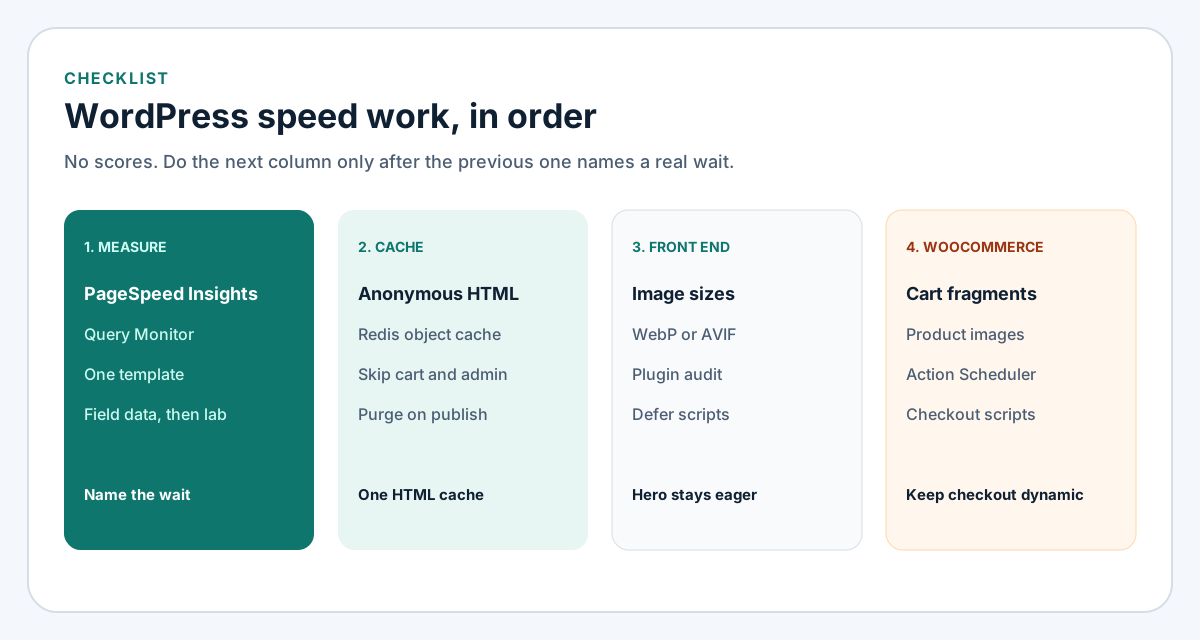
Figure 2. Order is the point. A store tweak does not fix an uncached homepage.
- One mobile URL in PageSpeed Insights. Note whether field data exists.
- The same URL in Query Monitor on staging. Name the plugin behind the slow query and the extra script.
- One page cache for anonymous HTML. Exclude login, cart, checkout, account, and admin.
- Redis, when the host runs it, as the object cache. Confirm the drop-in, not only the PHP extension.
- Hero image not lazy-loaded. Other images at a registered size, WebP or AVIF when the server can encode them.
- An active plugin list you can explain. Deactivate on staging, one plugin at a time.
- PHP on the version the requirements page recommends, with OPcache enabled.
- Revisions capped, expired transients reviewed, autoloaded options under the handbook's 800 KB line.
- Theme scripts that can wait, registered with
defer. Third-party scripts owned or removed. - WooCommerce: fragments only where the mini cart needs them, catalog image sizes, Action Scheduler running, gateway scripts on checkout.
When to hire a WordPress speed optimization service
Run the list yourself with staging, a backup, and one URL you can retest. Hire it when you cannot map the active plugins, when WooCommerce and a builder both print CSS on every URL, or when the host cache and a plugin cache disagree on purge. Redis is a host question as well as a plugin. I take that work as WordPress development. Send the PageSpeed Insights link and say whether field data is present.
FAQ
Will a caching plugin finish the job?
It removes PHP from anonymous HTML. It does not resize a product image, remove a chat widget, or fix a lazy hero. Exclude cart, checkout, account, and admin.
How do page caching and object caching differ?
The page cache stores guest HTML. The object cache stores values PHP already looked up. Cart and wp-admin still need the object cache, because those screens stay uncached.
Should unused plugins be deleted?
Delete plugins you cannot explain, on staging, after Query Monitor shows what they enqueue. Inactive plugins do not run on the request. Keep payments, security, and backups.
What is specific to a WooCommerce store?
Fragments on every URL, full-size catalog images, a stuck Action Scheduler queue, and gateway scripts on the homepage. Checkout stays dynamic.
What should I send if I want the pass done?
The URL, whether PageSpeed Insights shows field data, and whether staging exists. The page for the work is WordPress development.
Start with the request, then the template
Fix the cache in front of PHP, then the work PHP still does: autoloaded options, active plugins, image sizes, and store pages that must stay dynamic. I do that as WordPress development from Lahore. On Laravel or Next.js, use the website speed guide.