
Blog
WooCommerce Payment Gateway Integration: Complete Guide
WooCommerce payment integration for Stripe, PayPal, JazzCash and Easypaisa: webhooks, currency, test keys, refunds, SCA and checkout caching.
Muhammad Zubair Akhtar
WooCommerce payment integration is where a store either gets paid or quietly loses the order. I am Zubair Akhtar, a senior software engineer in Lahore, Pakistan, and I wire payment gateways into WooCommerce for stores that sell locally and abroad. Collecting the card, the wallet approval, or the PayPal click is the small part. The work is proving the payment, keeping test keys out of live mode, charging a currency the account can settle, and stopping a cache or a second plugin from breaking checkout.
If you want this ecommerce payment integration built or reviewed on a live store, start at ecommerce and payment integration. The rest of this guide is the method I use.
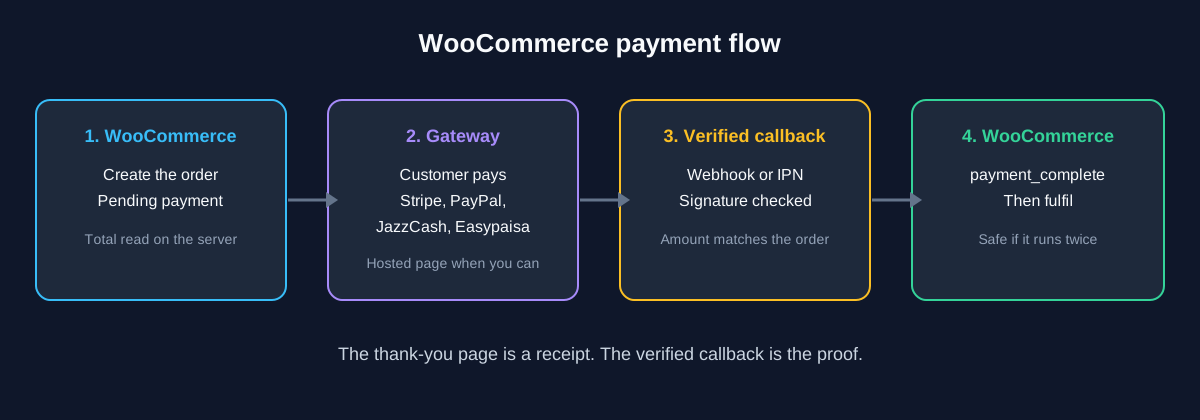
Figure 1. The thank-you page is a receipt. The verified callback is the proof that the order was paid.
What this WooCommerce payment integration covers
Versions this was written against
I checked the public listings and docs on 17 October 2026:
- WooCommerce 11.2.1, released 9 October 2026. The WordPress.org listing requires WordPress 7.0 or higher and PHP 7.4 or higher.
- WooCommerce Stripe Payment Gateway 11.1.1, released 16 October 2026. It requires WordPress 6.9 or higher and PHP 7.4 or higher. The changelog set the Stripe API version and the Stripe.js release train to
2026-03-25(dahlia) in 10.9.0, and I did not see a later API bump through 11.1.1. - WooCommerce PayPal Payments 4.1.3, released 9 September 2026. The directory meta requires WordPress 6.5 or higher and PHP 7.4 or higher. The installation section requires WooCommerce 9.6 or newer.
I have not installed these plugins or placed an order for this article. Run the flow in each gateway's test mode before you save live keys. Labels move between releases.
This payment gateway integration guide follows those official plugins and the callback that marks an order paid. The matching Laravel Cashier walkthrough is a separate article. Platform choice is in my ecommerce platform comparison. When checkout rules outgrow WooCommerce, that choice is in Laravel vs WordPress, and the application work is Laravel development.
How the payment actually completes
WooCommerce creates the order, the customer pays at the gateway, and the gateway tells your server the result. The browser landing on the thank-you page is not that message. A customer can close the tab, and anyone can open an order-received URL.
The Payment Gateway API is the status rule I follow. When payment is complete, call payment_complete(). WooCommerce sets Processing or Completed and handles stock. When a person still has to confirm the money, use On hold. When the attempt failed and the order already exists, set Failed.
$order->payment_complete( $transaction_id );Put that call in the callback, after you have checked the gateway's signature or hash and matched the amount and the order reference. If the order is already paid, acknowledge the callback and do not ship twice. I have not executed this line for this post.
That API doc also splits gateways into redirects, iframes, fields on your checkout, and offline methods such as bank transfer. Fields on your own page need TLS and can pull card data into PCI scope, so I use the provider's hosted page or hosted fields.
| Gateway | What I checked | What confirms payment |
|---|---|---|
| Stripe | Official Stripe gateway 11.1.1 | Webhook at ?wc-api=wc_stripe |
| PayPal | Official PayPal Payments 4.1.3 | Webhooks registered at onboarding |
| JazzCash | Sandbox docs: plugin or hosted checkout | Verified return URL and server callback |
| Easypaisa | Their page lists a WooCommerce plugin | Their guide, then a verified callback |
Stripe on WooCommerce
Use the official plugin. A second Stripe plugin is a conflict. The settings guide has a Live tab and a Test tab, each with its own connection.
Connect test mode, enable Enable test mode, and pay with the cards on Stripe's testing page. The WooCommerce testing guide covers that switch. Run a success, a decline, and a 3D Secure challenge, then turn test mode off and take one small live payment you refund. Keys stay in the plugin connection, not in the theme and not in git. Rotate any secret that has been in a screenshot or a repository.
Open Stripe's global availability page before you promise Stripe. On 17 October 2026 the account-registration links there did not include Pakistan. The plugin description says Stripe is available for merchants in 46 countries. I use the availability page to decide whether the business can sign up.
Webhooks, SCA, and refunds
Since version 8.6.1 the extension creates webhooks on connect. The webhook guide says to open Stripe settings, choose Configure connection, and confirm both tabs show Configured. Reconfigure webhooks recreates a deleted endpoint. The documented URL is:
https://example.com/?wc-api=wc_stripeA webhook on http://, on the wrong host, or behind a cache that swallows the request leaves a paid customer on Pending payment. The 11.1.0 changelog records fixes for dropped webhooks and double processing when two requests race.
The extension supports 3D Secure on checkout and on the pay-for-order page. Test the challenge with Stripe's 3D Secure cards in test mode. The order is not finished when the challenge opens.
Refund from the WooCommerce order screen so the extension tells Stripe. The refund guide says a refund often takes 5 to 10 business days to appear on the card statement, and that an uncaptured authorization is not a refund. The order status guide says setting Refunded or Cancelled does not return the money. If the shopper cancels before a required 3D Secure result comes back, the extension can auto-refund through the filter wc_stripe_auto_refund_cancelled_order.
PayPal on WooCommerce
Connect WooCommerce PayPal Payments under WooCommerce, Settings, Payments. The account setup guide prefers onboarding, which creates the REST app. Manual setup uses a Client ID and Secret from the PayPal developer dashboard, with separate sandbox and live apps. Prove the buttons, the capture, and the webhook in sandbox first.
The webhook documentation says this plugin uses webhooks instead of IPN, that onboarding registers them, and that Webhooks Status can resubscribe and simulate a delivery. That page is titled as the legacy UI, so confirm the labels on 4.1.3. It also says some alternative methods are captured only after the webhook arrives.
The 4.1.3 listing still calls Cart and Checkout block support experimental. Place the sandbox order on the same checkout block the store uses.
PayPal Standard is the older gateway. The PayPal Standard subscription guide says support is limited, that Standard is hidden on new installs since WooCommerce 5.5.0, and that existing Standard subscriptions still renew through IPN. A maintenance-mode plugin can swallow that IPN by redirecting PayPal, and one PayPal account has one IPN URL. Keep a single PayPal path. If old subscriptions still renew on Standard, leave that IPN in place until they move.
On 17 October 2026 Pakistan was absent from PayPal's country list and from the REST country codes. I would not promise a local PayPal account to a Pakistan-registered business until PayPal's own list includes it.
JazzCash and Easypaisa
JazzCash and Easypaisa are the wallets many customers in Pakistan already use. I integrate them through hosted checkout or a plugin the provider stands behind, and I verify the callback before the order changes. I will not invent endpoint paths, hash fields, or fees that are not on a current official page.
JazzCash
The JazzCash sandbox documentation describes self-registration, credentials generated after you supply a return URL, testing, and go-live. The modes it lists are HTTP POST page redirection, an API, hosted payment checkout (v1.1 and v2.0), and a mobile SDK. On WooCommerce I use hosted checkout or a plugin JazzCash supplies for page redirection. Their hosted-checkout notes say the merchant does not store the customer's payment details, which keeps card data off WordPress.
That page lists card, mobile account, and voucher as redirection types. The merchant agreement may not enable all three. Test each type you will show, on sandbox credentials. At go-live, swap in live credentials and point the return URL at the production https host.
Copy the return URL and any server callback from the plugin or portal. Verify it the way JazzCash's current guide describes, match the amount and reference, then call payment_complete. A browser return with no verified server message stays unpaid until the merchant portal shows the transaction.
Easypaisa
Easypaisa's gateway page says a business with a live site or app can apply, pass KYC, integrate, and accept payments. It lists a mobile-account mode and an OTC token paid at an Easypaisa shop, and plugins for WordPress/WooCommerce, OpenCart, Magento, and PrestaShop. Use the integration guide their merchant team sends, and the plugin they point you to.
That page says there is no annual or installation charge, only a per-transaction charge. Checked on 17 October 2026:
| Method | Charge, inclusive of taxes | Settlement on that page |
|---|---|---|
| easypaisa mobile account | 1% | Daily and instant |
| OTC (Easypaisa token) | 2% | 7 working days |
Re-read the page before you quote the rates. An unpaid token is not a paid order, and a seven-day settlement changes when you can ship. Register the HTTPS URLs the plugin shows, verify the notification, match the amount, and ignore a repeat notification once the order is paid.
Currency, keys, and order status
Set WooCommerce, Settings, General to a currency the gateway account settles. A multi-currency plugin that changes the number on screen, while the gateway charges the original amount, creates orders you cannot reconcile. Stripe's settings guide documents Adaptive Pricing, inside the Optimized Checkout Suite, for showing a local currency. The order is still paid only from a verified webhook, and the captured amount still has to match the stored order. For JazzCash or Easypaisa, confirm PKR in the merchant agreement.
Sandbox credentials and live credentials are different secrets. Going live means new keys, a callback on the production host, one small real payment, and a refund of that payment.
Pending payment means the success is not verified yet. Processing or Completed comes from payment_complete. On hold fits a bank transfer and any callback you do not trust yet. Refunded in the dropdown is a label until the gateway accepts the refund. The thank-you page can render while the order is still pending, so the copy there should say the payment is confirming. Send the paid email from the status change.
Pitfalls that leave a paid customer on a pending order
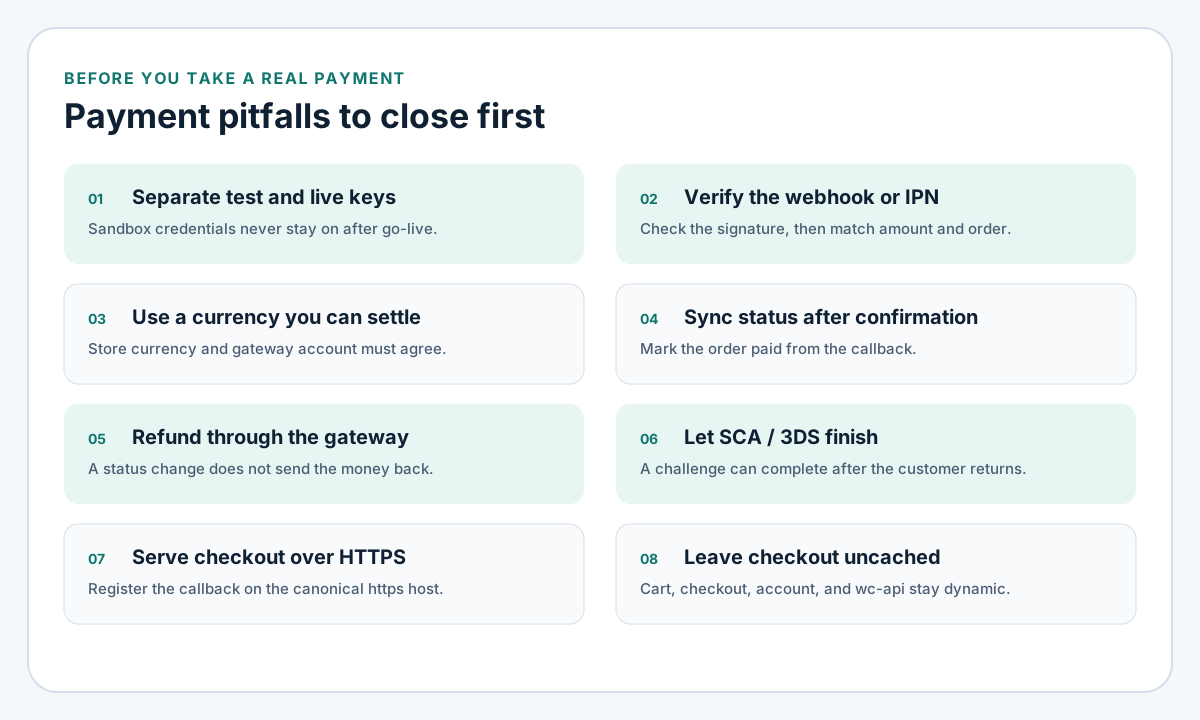
Figure 2. Close these before the first real payment. A cached checkout or a mismatched key leaves a paid customer on a pending order.
HTTPS and the callback host
The Payment Gateway API says a direct gateway needs SSL. Hosted gateways still call a public URL. Serve checkout over HTTPS, redirect HTTP to HTTPS, and register the callback on the canonical host. www and the bare domain are different targets. A bad certificate, a login wall, or a maintenance plugin that redirects the callback looks like a failed payment after the customer has paid. Allow that URL through the firewall and any security plugin. The PayPal Standard note about maintenance mode blocking IPN is the same class of failure.
Leave checkout uncached
The caching guide says cart, checkout, and My Account must stay dynamic. Exclude them in the cache plugin and on the host or CDN if that layer ignores WordPress. Also exclude ?wc-api= and ?add-to-cart=. A rule that skips only /checkout/ and still caches /checkout/order-received/ can show another customer's order.
Keep the checkout template thin. Sliders and extra tag managers there are how the payment page fails Core Web Vitals while it also has to stay uncached.
Plugin conflicts
Payment plugins are a high-value target. The baseline is my WordPress security checklist: update them, and delete the ones you do not use.
I look for a second plugin for the same provider, a firewall blocking ?wc-api=, and a field editor that removes the billing country. Stripe 11.1.0 fixed classic checkout for a missing billing country with Adaptive Pricing on, so retest after field changes. Version 10.9.0 added a fallback when another plugin loads an older Stripe.js. Ship one copy, from the official plugin. If checkout breaks after an update, disable other plugins on staging before rewriting the gateway.
The store around the checkout is the work I take as a WooCommerce developer: a short plugin list, an uncached checkout, and payment plugins kept current. That sits under WordPress and WooCommerce development.
FAQ
What should a WooCommerce payment integration start with?
The official plugin for a gateway the business can open. Where Stripe lists the country, use the Stripe gateway with test and live webhooks configured. For PayPal, use WooCommerce PayPal Payments in sandbox first. For a Pakistan-registered business, recheck those country lists, then use JazzCash or Easypaisa with hosted checkout or the provider's plugin.
How do I know the payment succeeded?
A verified webhook, IPN, or server callback that matches the amount and the order reference, then payment_complete. The thank-you page only means the browser returned.
Why do test orders pass while live orders stay pending?
The live webhook is still on the test secret or the wrong host, test mode is still on, the callback URL is still the sandbox, or a cache, firewall, or maintenance plugin is swallowing ?wc-api=. Fix the Live connection, then take one small live payment.
Can a business in Pakistan use Stripe or PayPal?
Only while that country is on the provider's own list. On 17 October 2026, Stripe's availability page and PayPal's country list did not include Pakistan. Check both pages again before you scope the project.
Does marking an order Refunded return the money?
Use the order's refund action so the plugin calls the gateway. The Stripe docs say a status change alone does not send the money back. Do the same for PayPal and for local wallets, and restock only when the goods are back.
Should the checkout page be cached?
Leave cart, checkout, My Account, and the gateway callback URLs out of the cache. A cached checkout leaks one customer's payment state, and a cached callback never updates the order.
Have the gateway wired properly
I set up and review these WooCommerce flows: webhooks, currency, refunds, and the paths where a paid customer stays pending. Start at ecommerce and payment integration. For the WordPress store around that checkout, see WordPress and WooCommerce development. Bring gateway access and a staging site. I connect test mode first and show a verified callback before a live key is saved.