
Blog
Ecommerce Web Development in 2026: WooCommerce vs Laravel vs Shopify
Ecommerce web development compared: WooCommerce vs Laravel vs Shopify by business size, total cost of ownership, and when a custom build is worth it.
Muhammad Zubair Akhtar
Ecommerce web development starts with one decision that is hard to undo: which platform will run the store. I am Zubair Akhtar, a senior software engineer in Lahore, Pakistan, and I build on WooCommerce and on custom Laravel. I also get called in to untangle Shopify stores that outgrew their apps. This guide compares WooCommerce vs Laravel vs Shopify by business size, total cost of ownership, and the point where custom development pays off. It does not crown a winner, because the right answer depends on your catalog, your checkout rules, and who will run the store on a Tuesday afternoon.
If you already know you need help building or fixing a store, start at ecommerce web development. The rest of this post is how I decide.
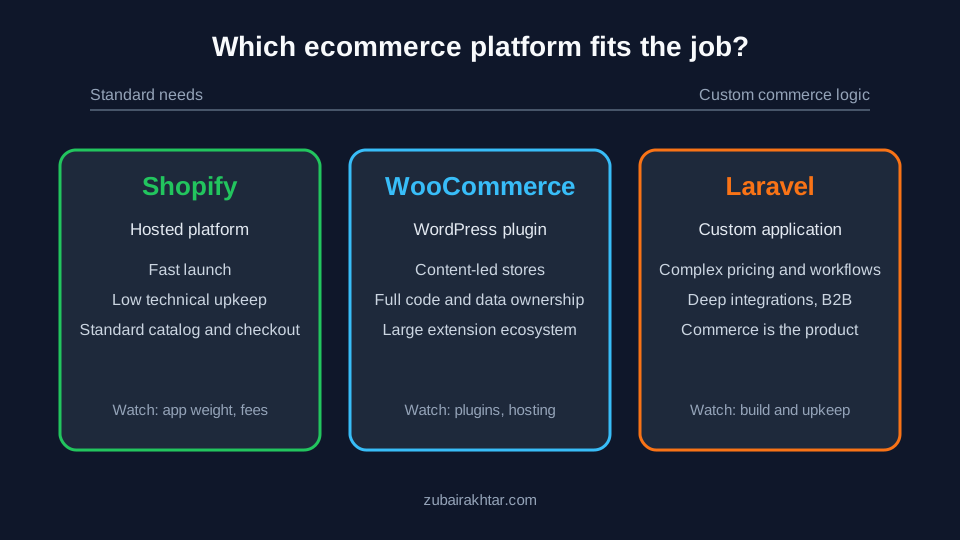
Figure 1. Where each platform usually fits, from "launch quickly with standard needs" to "the commerce logic is the product."
The short version
- Shopify is a hosted platform. You rent the store, the checkout, and the hosting, and you work inside its model. It is usually the fastest route to a standard store with little technical upkeep.
- WooCommerce is a plugin that turns WordPress into a store. You host it, you own the code and data, and you extend it with plugins and custom PHP. It suits content-led stores and teams that already live in WordPress.
- Laravel is a PHP application framework, not a store. You build exactly the commerce behavior you need, or start from an open-source Laravel ecommerce package. It suits stores where pricing, inventory, checkout, or integrations are the competitive edge.
None of the three is "best." The costly mistakes are choosing Laravel for a simple catalog because it feels serious, or forcing a rule-heavy business into a platform that was never designed for it.
What you are really choosing
You are not picking software. You are picking who carries each of these responsibilities.
| Responsibility | Shopify | WooCommerce | Laravel (custom) |
|---|---|---|---|
| Hosting and uptime | The platform | You or your host | You or your host |
| Security patching | Platform handles the core; you manage apps and theme code | You patch core, theme, and every plugin | You patch the framework and every dependency |
| Checkout behavior | Fixed model with allowed extension points | Flexible through hooks and extensions | Whatever you build |
| Data ownership and portability | Export through the platform's tools and APIs | Full database access | Full database access |
| Editing content and products | Built-in admin | WordPress editor plus WooCommerce admin | A custom or package admin you maintain |
| Who fixes it when it breaks | Platform support for the core; you for apps and custom code | Your developer or agency | Your developer or agency |
Read that table as a list of jobs. If you do not want a job, rent it. If you need control over a job, own it.
Shopify: when renting is the right call
Shopify fits businesses that want to sell, not operate software. The admin is polished, checkout is hosted and well understood by shoppers, and the core platform is maintained for you. For a store with a normal catalog, standard shipping, and a small team, it is often the lowest-friction start.
The trade-offs show up later:
- Fees stack. A subscription, app subscriptions, and payment or transaction fees all apply, and the mix depends on your plan and payment provider. Read the current pricing page for your country before you model costs; I do not quote numbers here because they change.
- Apps add weight. Each app can inject scripts into the storefront. A store with many apps needs the same performance discipline as any other site; see my Core Web Vitals guide.
- You work inside its model. Complex pricing rules, unusual checkout flows, or deep back-office integrations can mean workarounds, higher-tier plans, or custom apps.
- Payments depend on country. Which payment providers are available, and whether the platform's own payment product is offered, depends on where the business is registered. Confirm this first if you sell from Pakistan or another market with local gateways.
WooCommerce: when content and commerce live together
WooCommerce shines when the store sits next to serious content: guides, reviews, a blog that drives search traffic. You get the WordPress editor, a huge extension ecosystem, and full ownership of code and data. That is why many content-led brands choose it.
What you take on:
- Plugin discipline. Every extension is code that runs on your server. Keep the list short, remove what you do not use, and update on a schedule. Security and speed both degrade as the plugin count rises.
- Hosting and caching. Store pages, carts, and checkout cannot all be cached the same way. A cheap shared host that is fine for a blog often struggles with a busy store.
- Customization limits. WooCommerce bends a long way through hooks and custom plugins. Past a point you are maintaining a bespoke commerce engine on top of WordPress.
I take this work under WordPress and WooCommerce development: lean themes, a short plugin list, payment gateway setup, and the technical SEO that keeps product and category pages crawlable. The broader trade-off between the two PHP worlds is in my Laravel vs WordPress comparison.
Laravel: when the commerce logic is the product
Custom does not mean "better." It means you pay to build and maintain what a platform would have given you, in exchange for fitting your business exactly. That trade makes sense in specific situations:
- Pricing and promotion rules that depend on customer type, contract, region, or quantity in ways standard carts cannot express.
- Inventory and fulfillment tied to warehouses, suppliers, or manufacturing steps that need real workflows and queues.
- Multi-vendor or marketplace models, subscriptions with unusual billing, or B2B ordering with approvals and quotes.
- Deep integrations with an ERP, accounting system, or logistics provider where reliability and audit trails matter.
- A product that is more than a store, such as a customer portal, dashboards, or APIs that the store is only one part of.
Laravel gives you authentication, policies, queues, scheduled jobs, testing, and a clean place for payment code. You can build from scratch or start from an open-source Laravel ecommerce package and extend it. You can also pair Laravel with a hosted checkout from a payment provider so that card data stays off your servers. That reduces your compliance burden, but you still own the order logic around it.
If this is where your project sits, my Laravel development services cover the application side, and the hiring checklist shows what to verify before you sign with any Laravel developer.
Fit by business size and stage
Treat these as tendencies, not rules.
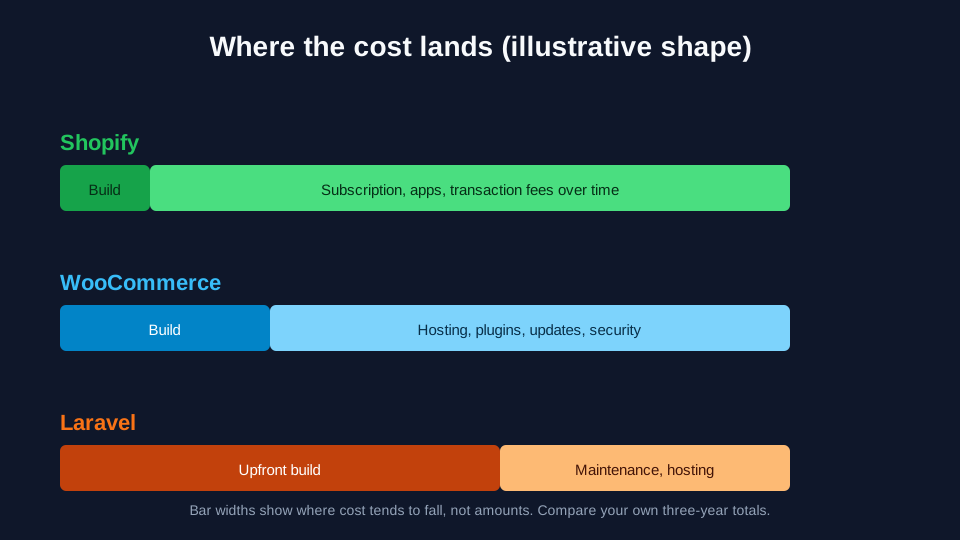
Figure 2. The shape of cost, not a price list. Shopify front-loads convenience and charges over time, WooCommerce spreads cost across maintenance, and Laravel front-loads the build.
Just starting, small catalog. Shopify or WooCommerce. Pick Shopify if you want the least technical upkeep. Pick WooCommerce if you already run a WordPress site or content is your main traffic source. A custom build at this stage usually spends money on problems you do not have yet.
Growing, a few thousand orders a month, a small team. Shopify and WooCommerce both work. The deciding factors are the number of apps or plugins you depend on, how much you have bent the checkout, and how much someone on your side can maintain.
Established, complex rules. This is where a custom Laravel build starts to compete. If you are paying for apps or plugins that only approximate a rule, or an employee exports spreadsheets to bridge two systems, you are already paying for custom software, just in a worse form.
Marketplace, B2B, or subscription-heavy models. Check whether a platform feature or extension covers your model before you build. If it does not, custom is likely cheaper than a pile of workarounds.
Total cost of ownership, without invented numbers
Platform prices and developer rates change, so I will not print a rate card. Here is how to compare honestly.
For each platform, list the cost over three years in these buckets:
- Build. Design, theme or storefront work, integrations, data migration, and testing.
- Platform. Subscription, hosting, CDN, and any paid themes or extensions.
- Payments. Gateway fees and any additional transaction fees from the platform. Get these from the providers for your country.
- Maintenance. Updates, security patching, backups, monitoring, and bug fixes. For WooCommerce and Laravel, someone must own this. For Shopify, it is smaller but not zero.
- Change. What it costs to add the next feature, such as a new shipping rule, a loyalty program, or a new market.
- Exit. What it takes to move away: data export, URL redirects, and lost SEO if URLs change.
Custom builds often look expensive in bucket 1 and cheap in bucket 5. Hosted platforms are the reverse. Whichever column hurts you more over three years is the one to weigh, not the first invoice.
SEO and speed on all three
Search performance is not decided by the logo on the platform. It is decided by clean URLs, one canonical per page, fast templates, sensible category structure, and product schema that matches what is on the page.
- Shopify gives you a solid baseline but limits some URL patterns and template control. Watch app scripts and duplicate collection or product paths.
- WooCommerce gives full control, and full responsibility. Filtered and faceted URLs, tag archives, and plugin output can create duplicate or thin pages if left alone.
- Laravel gives complete control over HTML, headers, and structured data, but nothing is automatic. You must build canonical rules, sitemaps, and schema yourself.
On any platform, run the same pass: crawlable category pages, canonical tags on filtered variants, product structured data, and good Core Web Vitals on mobile. My technical SEO checklist covers that pass, and if you want it done for a store, see SEO services.
A decision path I use
- Write down the twelve-month list of workflows, not the homepage design: pricing rules, shipping, tax, returns, integrations, roles.
- Mark each item as "standard in the platform," "available as a maintained extension," or "custom logic."
- If most items are standard, choose between Shopify and WooCommerce based on who will maintain the store and whether content drives your traffic.
- If several items are custom and central to how you make money, price a Laravel build next to the workaround cost.
- Name the owner of updates, security, and backups before launch. Platforms without an owner decay.
- Plan the migration and redirects up front. URL changes without redirects are the quickest way to lose rankings.
FAQ
Is WooCommerce cheaper than Shopify?
It depends on the bucket. WooCommerce has no platform subscription, but you pay for hosting, extensions, and maintenance. Shopify charges a subscription and fees but reduces hosting and upkeep work. Compare three-year totals for your own catalog and traffic.
Is Laravel good for ecommerce?
Yes, when the commerce logic is complex or the store is part of a larger application. For a standard catalog with a normal checkout, a hosted platform or WooCommerce is usually faster and cheaper to launch.
When is a custom ecommerce build worth it?
When you are already paying for workarounds: apps that approximate your pricing rules, spreadsheets bridging systems, or manual steps your platform cannot automate. If the commerce logic is how you differentiate, owning it can be worth the build.
Can I move from Shopify or WooCommerce to Laravel later?
Yes, but it is a migration project: products, customers, orders, redirects, and a period where both systems are accurate about what they own. Keep clean product data and stable URLs from the start to make that move cheaper.
Which platform is best for SEO?
None by default. Each can rank well when URLs are clean, duplicates are controlled, pages are fast, and structured data is correct. Choose the platform whose SEO controls your team will actually maintain.
If you want help choosing, or building
I build stores on WooCommerce and custom Laravel from Lahore, and I help teams decide before they commit. Start at ecommerce web development, or send me your workflow list and I will tell you which column each item falls in and what I would ship first. For the WordPress side, see WooCommerce and WordPress development. For custom commerce applications, see Laravel development.