
Blog
Laravel vs WordPress: Which Should Power Your Business Website?
Laravel vs WordPress is not a religion war. Here is an honest decision matrix on cost, speed, flexibility, and maintenance from someone who ships both.
Muhammad Zubair Akhtar
Laravel vs WordPress shows up in almost every discovery call I take. The brief is "a business website," and someone on the call already has a stack preference. I am Zubair Akhtar, a senior full-stack engineer in Lahore, and I ship both. This is the decision matrix I walk through with buyers: cost, speed to launch, flexibility, maintenance, editor experience, performance control, security surface, and hiring pool. It is not a scorecard that crowns a winner. It is a way to match the stack to the next year of work, not to the stack someone likes on Twitter.
If you already know you need a custom application, start at Laravel development services. If the job is a marketing site, a content system, or custom WordPress work, start at custom WordPress development. The rest of this post is how I tell those two jobs apart.
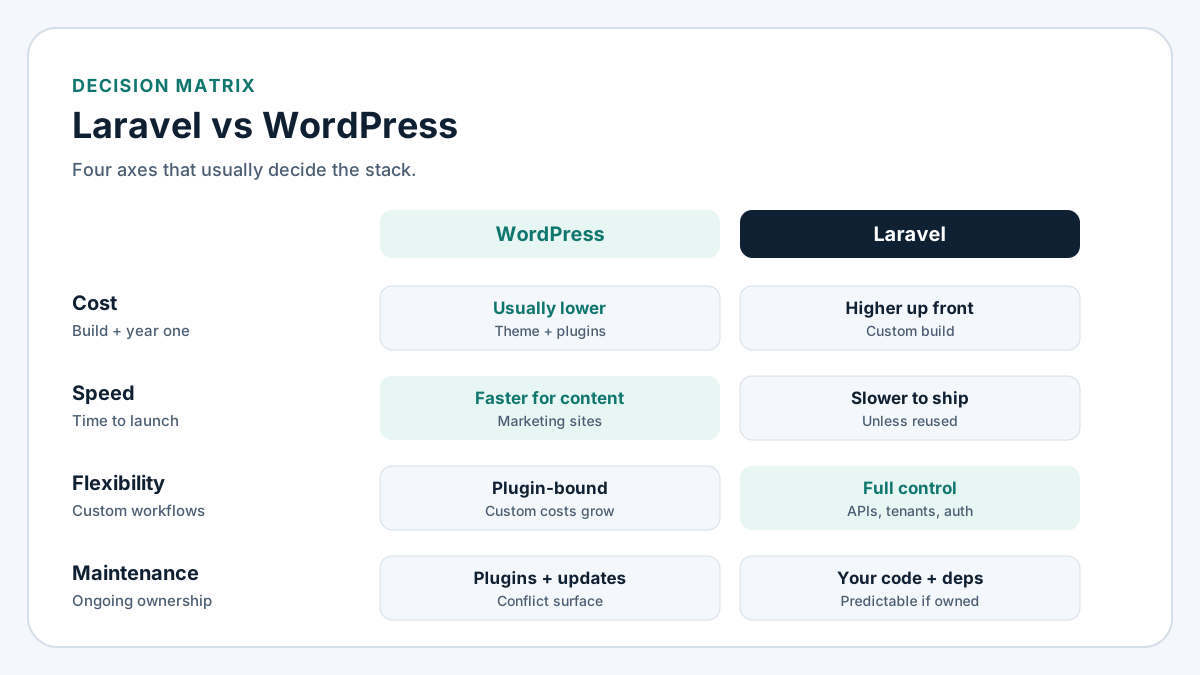
Figure 1. Four axes that usually decide the stack: cost, speed to launch, flexibility, and maintenance.
What "business website" actually means
The phrase hides three different products.
- A marketing site with a handful of service pages, a blog, and a contact form.
- A content or membership property where non-developers publish every week.
- An application: dashboards, roles, workflows, APIs, billing, or multi-tenant logic.
WordPress is built for the first two. Laravel is built for the third. The expensive projects I inherit are the ones that started as category 1 and quietly became category 3 without changing the stack. A plugin maze that simulates a CRM is still a CRM. It just has a higher failure rate.
The decision matrix
I score the choice on eight axes. None of them is a fake benchmark. The "winner" column is the stack that usually wins that axis for a typical business site, not a guarantee for yours.
| Axis | WordPress usually wins when… | Laravel usually wins when… |
|---|---|---|
| Cost to first launch | You need a credible site from a theme or a builder, not a custom product | You already know the domain model and will rebuild plugins as code anyway |
| Speed to launch | Pages, posts, forms, and SEO plugins cover the brief | You reuse an existing Laravel app, API, or admin you already own |
| Flexibility | The feature exists as a maintained plugin | Workflows, tenants, queues, and permissions are the product |
| Maintenance | One steward updates core, theme, and a short plugin list | You own the codebase, the deploy, and the dependency set |
| Editor experience | Marketing or content people publish without a developer | Editors work in a custom admin you designed for the job |
| Performance control | Traffic is modest and caching is in place | Every millisecond is your query plan and your JavaScript, not a plugin tax |
| Security surface | You keep plugins few, update them, and lock down auth | Auth, policies, and input validation are first-class in the app |
| Hiring pool | Many freelancers know themes and builders | You need someone who can review a pull request and own production |
Cost ranges stay qualitative on purpose. A brochure site on WordPress is usually cheaper to open than a custom Laravel app. A WordPress build that grows into bookings, memberships, custom checkout, and three page builders is not cheaper than Laravel. It only looked cheaper in month one. I do not publish invented rate tables; compare the number you were quoted against the scope the way I describe in my hire Laravel developer checklist.
When WordPress wins
Marketing sites and content
If the site is mostly pages and posts, WordPress is the right default. Gutenberg (or a builder your editors already know) lets non-developers ship copy without opening a pull request. SEO plugins, forms, and analytics integrations exist and are maintained. That is the job WordPress was designed for.
Plugin fit without custom code
A form tool, an SEO suite, a simple shop, a cookie banner, and a redirect manager cover a large share of business sites. When the brief maps onto maintained plugins, custom WordPress development is mostly theme work, performance, and technical SEO, not inventing a CMS.
Budget and calendar
A credible marketing site can launch in weeks on WordPress. A Laravel application that does the same public pages plus a half-finished admin is slower and more expensive for the same public result. If the next quarter is "get the company online and publishing," WordPress wins.
Non-dev editors
If the marketing team will edit landing pages every week, give them a CMS they already understand. Training a content person on a custom Laravel Filament panel is possible. It is rarely the fastest path when Gutenberg already does the job.
I take that work under WordPress development: themes that stay lean, plugins that earn their place, and the Core Web Vitals and indexing fixes that keep the site worth ranking.
When Laravel wins
Custom workflows and APIs
Orders that move through states, staff with different permissions, webhooks into accounting, background jobs for mail and imports: that is application work. In Laravel it is models, policies, form requests, queues, and tests. In WordPress it is often a pile of plugins glued with custom PHP that nobody wants to own two years later.
Multi-tenant SaaS and complex auth
Tenants, invitations, role trees, API tokens, and "this user may see that row" rules belong in an application framework. Laravel's auth, policies, and gates are built for that. WordPress roles were built for authors and admins on a single site. You can stretch them. I would rather not.
Long-term control
When the product is the software, you want the domain model in your repository. You want a deploy you can roll back, feature tests on the paths that print money, and a developer who can open a pull request. That is Laravel development services in the sense I publish them: applications, APIs, CRMs, and business platforms.
Performance as your code
On Laravel, a slow page is usually your query, your cache miss, or your frontend bundle. You can fix it. On a WordPress site with a page builder, a slider, a popup plugin, and three trackers, the same slow page is a negotiation with other people's code. My Core Web Vitals guide walks through the fixes on both stacks; the difference is how many layers sit between you and the fix.
Hybrid cases I actually ship
The honest middle is common.
- WordPress for the public site, Laravel for the app. Marketing and blog on WordPress. Customer portal, API, or admin on Laravel. Share auth carefully (SSO or a clear session boundary). Do not pretend one login cookie across two stacks is free.
- Headless WordPress with a Laravel or Next.js front. Useful when editors need Gutenberg and the frontend needs a different performance or design system. You pay for two deploy pipelines. Worth it when both sides are real requirements.
- Laravel with a thin CMS. Filament, Nova, or a small custom admin for pages that change rarely. Fine when "blog" means a dozen posts a year, not a newsroom.
What I refuse is the hybrid that is really avoidance: a WordPress site stuffed with custom post types and ACF until it is an undocumented CRM. At that point you are paying Laravel prices for WordPress constraints. Rebuild the application in Laravel and leave WordPress for content, or commit to WordPress properly with a senior developer who will delete plugins instead of adding them.
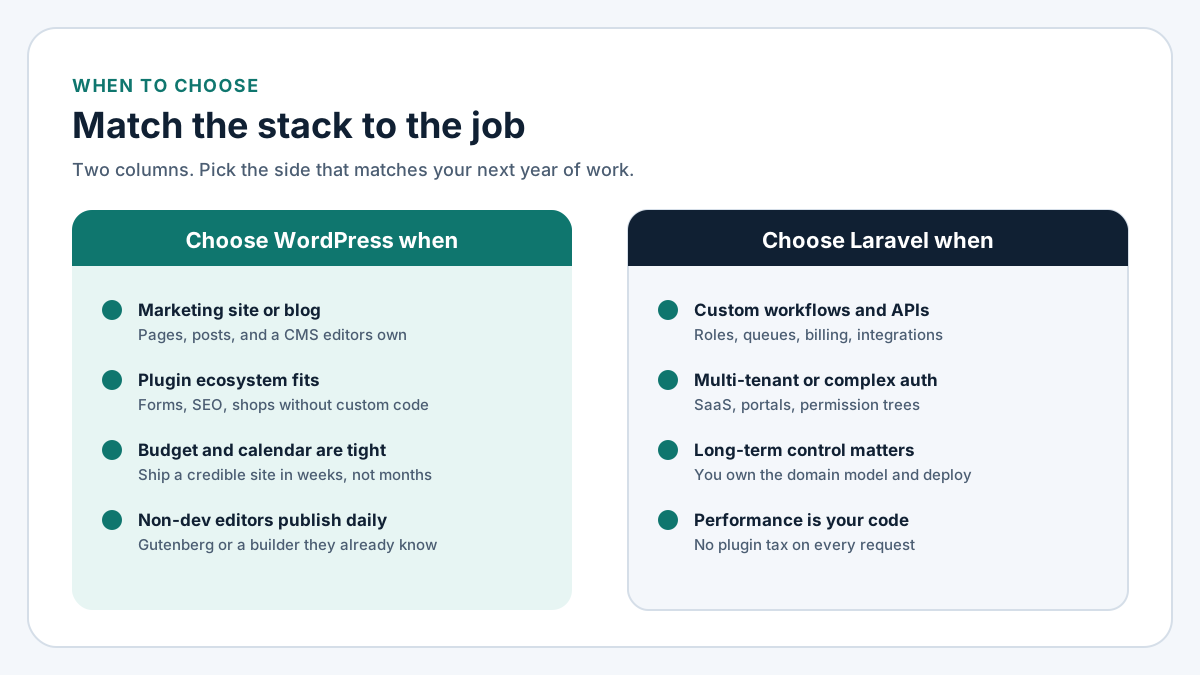
Figure 2. Match the stack to the job. Two columns, not a popularity contest.
Cost, without fake numbers
Order-of-magnitude only:
- Brochure / service site. WordPress is usually the cheaper path to a public URL with editable pages.
- Content-heavy property. WordPress still wins on editor cost, even if you pay for custom theme work.
- Custom workflow product. Laravel is usually cheaper over a year because you stop renting unfinished behavior from plugins.
- Migration. Moving a living WordPress mess into Laravel is a project, not a weekend. Budget discovery, data mapping, redirects, and a period where both systems are honest about what they own.
Hosting is rarely the deciding line. A well-cached WordPress site on modest hosting outperforms a careless Laravel app on an expensive VPS. Fix the application shape first; tune hosting second. For crawl and index health on either stack, my technical SEO checklist is the pass I run after the product decision.
Maintenance and security surface
WordPress maintenance is core, theme, and plugins on a schedule, plus watching for abandoned extensions. The security surface grows with every plugin that can run PHP on every request. Keep the list short, remove what you do not use, and treat updates as part of the product.
Laravel maintenance is your dependencies (composer / npm), your migrations, and your own code. The security surface is smaller in count and larger in responsibility: you wrote the policies, so you own the holes. That is a feature when you have a developer who reviews pull requests. It is a liability when nobody is on the repository.
Neither stack is "more secure" in the abstract. An unpatched WordPress plugin and an open Laravel mass-assignment bug are the same class of failure: someone skipped ownership.
Editor experience and hiring
Editors decide WordPress more often than CTOs admit. If the person who writes landing pages cannot publish without Slack-ing a developer, you chose wrong for a marketing site. If the product is an internal tool used by staff who will never touch Gutenberg, a Laravel admin is often clearer.
Hiring follows the same split. WordPress freelancers are easy to find and uneven in quality; you need someone who can say no to plugins. Laravel developers who can show a real pull request, a policy, and a feature test are fewer; the checklist I use before signing is public. On either side, hire for the repository you will own in twelve months, not for the demo you saw on the sales call.
How I decide on a call
- List the screens and workflows for the next twelve months, not the homepage mood board.
- Mark each item as "content/CMS," "plugin already solves it," or "custom application logic."
- If most marks are content or plugins, choose WordPress.
- If most marks are custom logic, choose Laravel.
- If both columns are full, plan a hybrid with a hard boundary, or sequence the work: marketing site first, application second.
- Write the decision down with the cost and maintenance owner named. Stack debates without an owner reopen every quarter.
FAQ
Is Laravel better than WordPress for SEO?
Neither framework ranks pages by itself. Clean URLs, one canonical, fast templates, and real content do. WordPress has more off-the-shelf SEO plugins. Laravel gives you full control of the HTML and the response headers. I have ranked sites on both. The stack that is easier to keep fast and crawlable for your team is the better SEO choice.
Can WordPress handle a custom web application?
It can stretch a long way with custom plugins and tables. Past a certain point you are maintaining an undocumented framework on top of WordPress. If the product is the application, start in Laravel.
Can Laravel replace WordPress for a blog?
Yes, with a custom admin or a package. For a company that publishes weekly and wants a familiar editor, WordPress is still the lower-friction CMS. Use Laravel when the blog is secondary to an application, or when headless content is a deliberate architecture choice.
What about WooCommerce vs a Laravel shop?
WooCommerce wins when the catalog and checkout are standard and the business is content-led. A Laravel or purpose-built ecommerce stack wins when pricing rules, inventory, or checkout are the product. Do not pick Laravel only because someone dislikes WordPress.
Should I rebuild my WordPress site in Laravel?
Only if the pain is application logic, not theme aesthetics. A slow WordPress marketing site usually needs caching, fewer plugins, and better templates, not a rewrite. A WordPress site that has become a CRM usually does need an application framework.
If you want help choosing, or shipping
I build on both stacks from Lahore. If the work is an application, an API, or a business platform, start at Laravel development services. If the work is a marketing site, a content system, or custom WordPress development, start at WordPress development.
Send the list of screens and workflows for the next year. I will tell you which column they fall in, whether a hybrid is honest, and what I would ship first. If you are hiring someone else for the Laravel side, use the hire Laravel developer checklist before you sign. If performance is already the complaint, read the Core Web Vitals guide and bring the failing URLs.