
Blog
Technical SEO for Ecommerce: The Fixes That Matter
Technical SEO for ecommerce: faceted navigation, canonicals, Product structured data and crawl budget for WooCommerce and Laravel shops, and what to fix first.
Muhammad Zubair Akhtar
Technical SEO for ecommerce is the part of shop SEO that decides which URLs a crawler fetches and which ones Google keeps. I am Zubair Akhtar, a senior software engineer in Lahore, Pakistan. A shop is a few templates multiplied by filters, sort orders, variants and pages. This post covers faceted navigation, canonicals, Product structured data and crawl budget for WooCommerce and Laravel shops. I read the Google pages linked below on 28 October 2026. I am not publishing a measurement from a client store.
The general passes are in the technical SEO checklist, and the write-up for one property is the technical SEO audit guide. Which platform to build on is the ecommerce platform comparison.
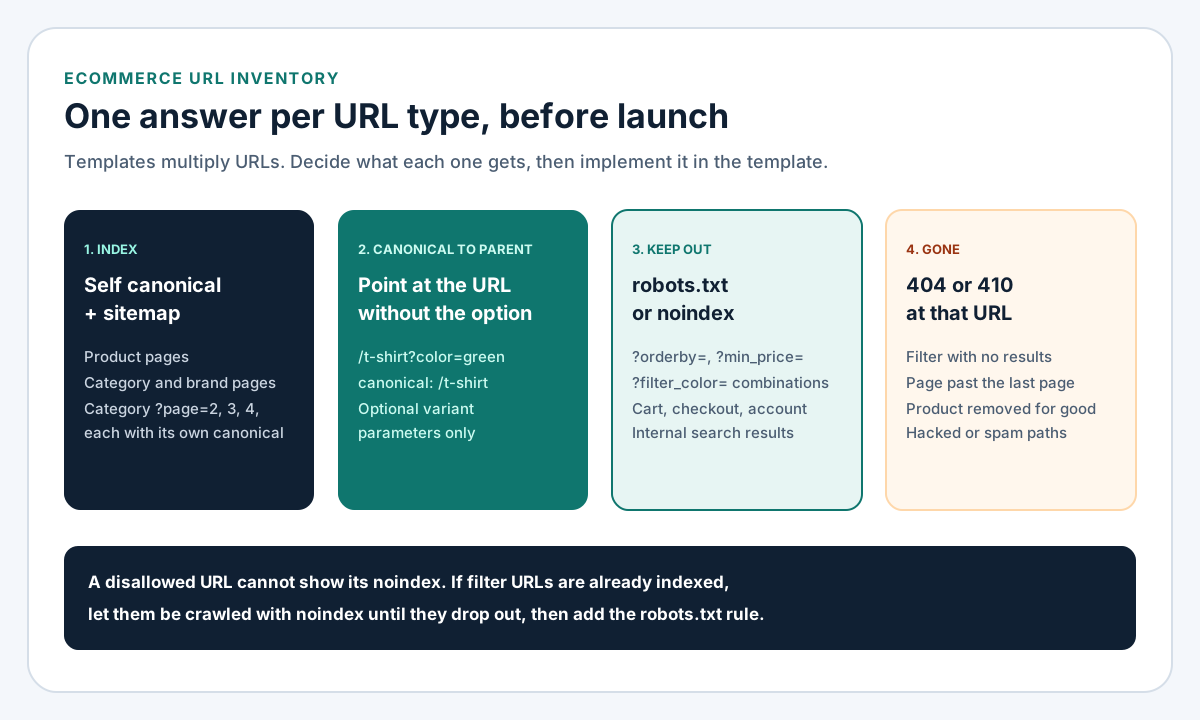
Figure 1. Every URL a shop template can emit should land in one of these four boxes before launch.
Why technical SEO for ecommerce is its own job
Google's faceted navigation page says the common parameter-based implementation can create infinite URL spaces. It names two costs: overcrawling, and slower discovery of new, useful URLs.
So the first question on a shop is the URL inventory. For each URL type the templates produce, I write down an answer:
| URL type | Default answer | Why |
|---|---|---|
| Product, category, brand page | Index, self-referencing canonical, in the sitemap | These are the pages that should rank |
| Category page 2, 3, 4 | Index, its own canonical, linked with <a href> | Google treats each page in a sequence as a separate page |
| Sort order, filter combination | Block crawling, or noindex | Same products, different order or subset |
| Variant by optional parameter | Canonical to the URL without the parameter | Google's ecommerce URL guidance |
| Cart, checkout, account | noindex | Not a search landing page |
| Empty filter, deleted product, spam path | 404 or 410 | Nothing to show |
Faceted navigation: decide before you block
The two choices Google gives
Google's faceted navigation page splits the decision in two. If you do not need filtered URLs indexed, prevent crawling: disallow the filter parameters in robots.txt, or put the filters in a URL fragment, which Google generally ignores. If you need some filtered URLs indexed, keep them crawlable and follow the rules below. Canonical tags and rel="nofollow" on filter links are listed as weaker options that are "generally less effective in the long term".
My default on a small or medium shop is to block filters and let categories rank. When a filter combination deserves to rank, I make it a real category with its own URL and copy.
If filtered URLs stay crawlable
The same page lists the rules:
- Use
&as the parameter separator. Commas, semicolons and brackets are hard for crawlers to read as separators. - If filters live in the path, such as
/shoes/red/size-9, keep the order fixed and never allow the same filter twice. - Return a real 404 when a filter combination has no results, when filters are duplicated or nonsensical, and for pagination past the last page. Do not redirect those URLs to a shared "not found" page.
An empty filter page that returns 200 with "No products found" is a soft 404, and the crawl budget page says soft 404 pages continue to be crawled.
WooCommerce filter and sort parameters
I read the WooCommerce source on the trunk branch on 28 October 2026 (the plugin readme listed stable tag 11.2.1). WC_Query reads orderby, min_price and max_price from the query string and treats any variable starting with filter_ or query_type_ as a layered navigation filter. If you have decided filtered and sorted URLs should not be crawled, the robots.txt lines follow Google's wildcard example:
User-agent: *
Disallow: /*?*orderby=
Disallow: /*?*min_price=
Disallow: /*?*max_price=
Disallow: /*?*filter_
Disallow: /*?*query_type_
Check what your theme and filter plugins actually emit first; they can use other names. Also, Google's canonical page says a URL disallowed in robots.txt can still be indexed without its content, and a crawler that cannot fetch a URL cannot see a noindex on it. If thousands of filter URLs are already indexed, I let them be crawled with noindex until they drop out, then add the disallow.
WooCommerce already marks the cart, checkout and My Account pages noindex through the wp_robots filter. Theme fixes on WordPress are WordPress development work, and gateway setup is in the WooCommerce payment gateway guide.
Laravel: build facet URLs in one place
A custom Laravel shop has no such defaults. Generate every listing URL through one helper, so the parameter order is fixed:
function listingUrl(string $category, array $filters = [], int $page = 1): string
{
    $allowed = ['brand', 'color', 'size'];
    $filters = array_intersect_key($filters, array_flip($allowed));
    ksort($filters);
    if ($page > 1) {
        $filters['page'] = $page;
    }

    return url("/c/{$category}").($filters ? '?'.http_build_query($filters) : '');
}
The category controller then returns abort(404) when a filter value does not exist or the page number is past the last page. The canonical on a filtered view points at listingUrl($category, [], $page). I have not run this helper against a live shop.
Canonicals for categories, pagination and variants
Google's canonical documentation ranks the signals: a redirect is strong, rel="canonical" is strong, sitemap inclusion is weak. They stack, so the same URL should appear in the canonical tag, the sitemap and internal links.
Pagination keeps its own canonical
The pagination page says to give each page a unique URL such as ?page=2, and not to use page 1 as the canonical for the whole sequence. Each page gets its own. Link pages with <a href>, because Google's crawlers do not click "load more" buttons. Google no longer uses rel="next" and rel="prev".
Sort orders and filters stay out of the index
The same page says to keep filter and sort variations out of the index with noindex or robots.txt. A canonical from ?orderby=price to the category is a hint Google can ignore. It is not a block.
Variants point at the parent URL
Google's ecommerce URL structure page recommends that each variant be reachable at its own URL, as a path segment or a parameter such as ?color=green. When the parameter is optional, the canonical is the URL without it.
What I do not do: use noindex to choose a canonical inside one site. Google's page says that blocks the page from Search completely and recommends rel="canonical" instead.
Product structured data that matches the page
Google has two product features with different requirements. Product snippets cover review and product pages. Merchant listings cover pages where a shopper can buy, and can show price, availability, shipping and returns.
Offer versus AggregateOffer
The merchant listing page lists name, image and offers as required on Product, and a price with a three-letter currency on the Offer. Product snippets accept an AggregateOffer. Merchant listings require an Offer, because the merchant must be the seller, and a price greater than zero.
That matters on WooCommerce. In class-wc-structured-data.php on trunk, a variable product whose variations have different prices is described with an AggregateOffer carrying lowPrice and highPrice, unless the request selects one variation, in which case it outputs a single Offer and inProductGroupWithID. If you want variants grouped for merchant listings, Google's product variant page uses ProductGroup with variesBy, hasVariant and productGroupID. Test the product URL in the Rich Results Test before replacing a plugin.
Put it in the first HTML
Google's merchant listing page recommends Product markup in the initial HTML and warns that JavaScript-generated markup can make Shopping crawls less frequent and less reliable for fast-changing price and availability. On Laravel I print the JSON-LD in the Blade layout from the same model the price label reads:
<script type="application/ld+json">
{!! json_encode([
    '@context' => 'https://schema.org',
    '@type' => 'Product',
    'name' => $product->name,
    'image' => [$product->image_url],
    'offers' => [
        '@type' => 'Offer',
        'price' => $product->price,
        'priceCurrency' => 'USD',
        'availability' => 'https://schema.org/'.($product->in_stock ? 'InStock' : 'OutOfStock'),
    ],
], JSON_UNESCAPED_SLASHES | JSON_HEX_TAG) !!}
</script>
If the markup and the visible price come from different queries, they will disagree after the next sale.
Crawl budget: who actually needs to care
Google's crawl budget guide is written for large sites with over a million unique pages changing weekly, medium sites with over 10,000 unique pages changing daily, and sites with a large share of URLs in "Discovered - currently not indexed". Google calls those rough estimates, not thresholds. Below that, the guide says keeping the sitemap current and checking the Page Indexing report is adequate.
A shop with 800 products rarely has a crawl budget problem. The same shop with crawlable combinations of a dozen filter attributes can expose far more URLs than products, which is the case the guide describes. The practices that matter on a shop:
- Consolidate duplicates, and block URLs you never want crawled with robots.txt. The guide says not to use
noindexfor this, because Google still requests the page. - Return 404 or 410 for products removed permanently. I use 410 on this site for the hacked spam paths I cleaned up in removing hacked URLs from Google.
- Fix soft 404s and long redirect chains.
- Keep responses fast and support 304 Not Modified. Crawl capacity drops when a site slows down or returns 5xx or 429. Speed as a ranking question is page speed and SEO.
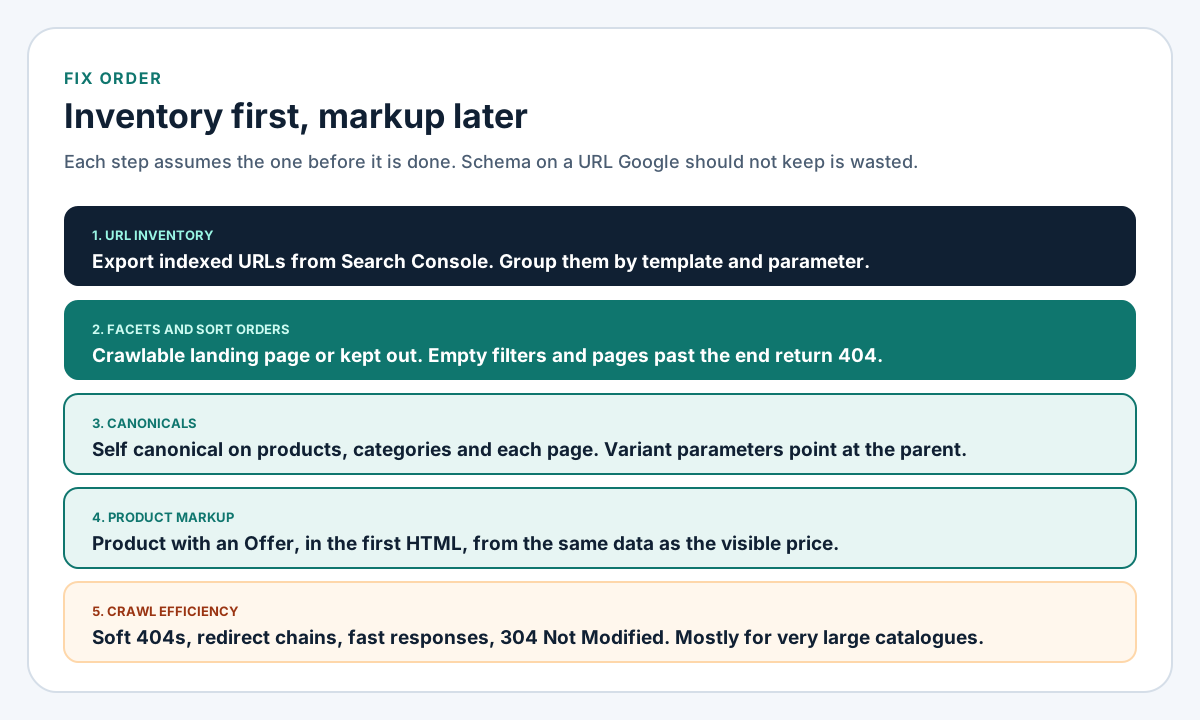
Figure 2. The order I work in. Markup on a URL Google should not keep is wasted effort.
FAQ
Should I noindex or robots.txt-block filter URLs?
Use robots.txt when you never want them crawled and they are not indexed yet. Use noindex while already-indexed filter URLs drop out, because a blocked URL cannot show its noindex. Google's pagination page accepts either for sort and filter variations.
When does a custom Laravel shop make sense for SEO?
When the catalogue needs URL rules a plugin stack cannot express cleanly. The trade-offs are in the platform comparison. Building one is ecommerce development services and Laravel development work.
Technical SEO services for shops
I do this work on WooCommerce and Laravel stores: the URL inventory, the robots rules, the canonical logic in the template, and Product markup that matches the price on the page. That is my technical SEO services. I do not promise a ranking. Send the store URL and a Search Console export of indexed pages, and I will start with the inventory.