
Blog
Custom WordPress Development vs Page Builders
Custom WordPress development versus Elementor: what each page loads, what you maintain, published license prices, and when to hire a WordPress developer.
Muhammad Zubair Akhtar
Custom WordPress development is a theme and blocks you can read in a repository. A page builder draws the page in its own editor and prints its own markup. I am Zubair Akhtar, a senior software engineer in Lahore, Pakistan. I ship both. Before I recommend one, I look at what the browser loads, what you maintain, the license Elementor publishes, and whether the job is custom. WordPress work starts at WordPress development. If the brief is becoming an application, read Laravel vs WordPress first.
I am not publishing a timed comparison. A number below is a Google threshold or a figure Elementor or WordPress published, with a link. I checked Elementor's pricing page on 23 October 2026.
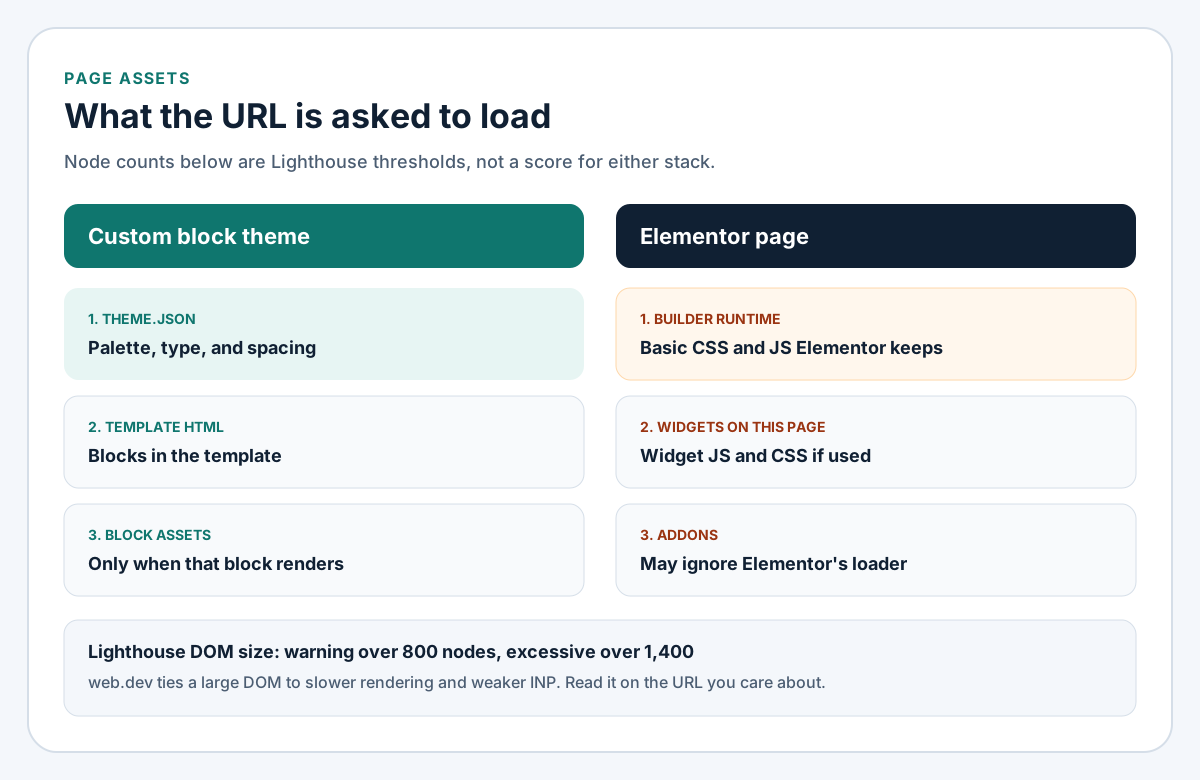
Figure 1. What each URL loads. The node counts are Lighthouse thresholds, not a score for either stack.
Custom WordPress development: theme, blocks, and theme.json
A block theme is HTML templates made of blocks. Editors change them in the Site Editor. Color, type, and spacing live in theme.json. The handbook, last modified 24 June 2026, says that file holds settings and styles for block and classic themes, and that you should set version 2. The same values show in the editor and on the front end. The file you ship is the palette and the block styles you will actually support.
Blocks, not a second editor
Register a custom block in block.json. When a theme lazy-loads assets, the handbook says style and script enqueue only if that block is on the page. Since WordPress 5.8, script, style, and viewScript can be front-end only. viewStyle was added in 6.5. A block used on one template should not ship its script on the blog.
Fields can be core blocks, a custom block, or a plugin such as ACF. Elementor documents ACF when the builder lays out data from fields. I use a native block when the layout itself is the component. Both at once is two sources of truth.
What the builder adds
Elementor Core is free. Elementor Pro, compared on 15 September 2026, adds Theme Builder, forms, popups, and more widgets. The Hello theme, updated 18 May 2026, is Elementor's blank theme. Elementor says Hello is 6KB and two server requests. That is the theme, not the builder, widgets, or addons.
Speed: DOM size, assets, and Core Web Vitals
web.dev, updated 31 October 2024, calls a good experience largest contentful paint within 2.5 seconds, interaction to next paint of 200 milliseconds or less, and cumulative layout shift of 0.1 or less, at the 75th percentile on mobile and desktop separately. Field versus lab data is the Core Web Vitals guide. Cache, images, and plugins are WordPress speed optimization. Fonts and non-WordPress cases are the website speed guide.
DOM size is not a Core Web Vital. web.dev, updated 9 May 2023, says Lighthouse warns above 800 nodes and calls the DOM excessive above 1,400. Extra nodes cost more when the page updates, which is how they hurt INP. Read the URL. Do not borrow my sentence as the result.
Optimized DOM Output, updated 1 February 2024, says Elementor removed wrappers such as .elementor-inner, .elementor-row, and .elementor-column-wrap starting in 3.0. Since 3.19 that output is core, not optional. The article has no typical node count. CSS aimed at the removed classes has to change.
Unused native widgets, updated 29 January 2024, skip their own assets except "a small amount of basic CSS and JavaScript that should not be fragmented." Addons may not. Improved Asset Loading, updated 14 April 2024, also holds back Core widget JavaScript and Swiper, and cites lightbox and screenful at about 20KB, dialog at 11KB, and share links at 3KB. Optimized Gutenberg Loading, updated 23 June 2024, keeps Gutenberg's files off Elementor URLs. Element Caching, updated 15 September 2026, stores widget HTML, ships off by default, and is the wrong switch for dynamic tags. A careful builder page can still be heavy. A custom theme can still be slow. Measure the URL.
Maintenance, lock-in, and the editor
In a block theme, pages use the block editor and templates use the Site Editor. People can change copy and the patterns you allowed. They cannot invent a layout you did not leave open. Elementor is a different editor. Pick the one the weekly publisher will still open next year.
Pro is a subscription. If you do not renew, the 3 June 2026 article says you cannot update Pro or add Pro features, and existing Pro features may be limited. The free plugin still updates. Updating it without Pro can break compatibility. Elementor renders Elementor layouts. No help page I found lists the database rows left on deactivation, so I will not invent a shortcode. Export while the license is active.
The shortcode widget (11 February 2024) embeds something WordPress already renders, and it is also how one page collects other plugins. Hello plus Elementor is one stack. A theme that is itself a builder, plus Elementor, is two.
License prices, and the rest of the bill
A custom quote depends on templates, WooCommerce, and how much the client edits alone. I will not invent one. Elementor's list is public.
On 23 October 2026 the pricing page said prices are USD unless noted, taxes extra, figures rounded, checkout possibly lower, and renewals at list price:
| Plan | Activations that day | Catalog price that day |
|---|---|---|
| Essential | 1 site | $60 a year, same at renewal ($5 a month) |
| Advanced Solo | 1 site | $84 a year, same at renewal ($7 a month) |
| Advanced | 3 sites | $108 a year, same at renewal ($9 a month) |
| Expert | 25 sites | $204 a year, same at renewal ($17 a month) |
| One | 1 site, 25,000 monthly credits | $180 now, renews at $228 ($15, then $19 a month) |
| One Agency | Unlimited sites on the card, 350,000 credits | $432 now, renews at $540 ($36, then $45 a month) |
The license article of 20 October 2026 lists Essential on 1 site, Advanced on 3, Expert on 25, and Agency unlimited. Essential omits popups, custom code, and ecommerce. One and One Agency were under their renewal price that day.
Requirements, updated 16 October 2026: WordPress 6.8+, PHP 7.4 with 8.3+ recommended, MySQL 5.6 or MariaDB 10.5+, and 256 MB memory for Elementor and Pro (512 MB recommended, 768 MB for their best case).
Add the build, renewals, update hours, and the cost of leaving. A custom theme costs more first and has no Elementor line, but it still has hosting, core, and plugins. Rebuilding in year two was not the saving.
Security and SEO
Elementor, Pro, and addons are more PHP to patch than a block theme and a short plugin list. If Pro stalls while Core moves, Elementor says the site can break. The ongoing pass is the WordPress security checklist. Custom work shortens the plugin half. It does not remove the list.
On SEO I check one H1, real headings rather than a widget that stamps H2 on every card, a DOM close to the content, and field data against the thresholds above. Hello's speed claim is about the theme, not a finished Elementor site.
| Question | Page builder | Custom build |
|---|---|---|
| Who edits a landing page? | Someone who knows Elementor | Someone in your patterns, or a developer |
| What does a URL load? | Builder runtime, widgets, addons | Theme styles, HTML, rendered block assets |
| What renews? | Pro or One, plus addons | Hosting and plugins you kept |
| If you stop paying? | Pro updates stop; features may be limited | The theme stays in the repo |
| Editor next year? | Elementor, including theme parts | Site Editor and block editor |
| Extra PHP? | Elementor, Pro, each addon | Core, the theme, fewer plugins |
When a page builder is the right call
Use Elementor when publishers need a freeform canvas, the site is marketing pages, and someone owns updates. Landing pages, a blog, and a form fit. So does a team that already knows the editor. Prefer Hello over a theme that is itself a builder. Keep only addons you can name. Do not cache dynamic widgets.
Skip it when the page is the product: a configurator, memberships, a non-WooCommerce checkout, or one design system across many templates.
When custom pays off
Custom pays off when you will keep the site, the brand lives in theme.json, and each template has a known file list. It is a weak fit if every week needs a new layout and nobody will learn blocks. Full site editing is the middle: a block theme with patterns, which a non-developer can still publish in. I start there unless the editor must be Elementor.
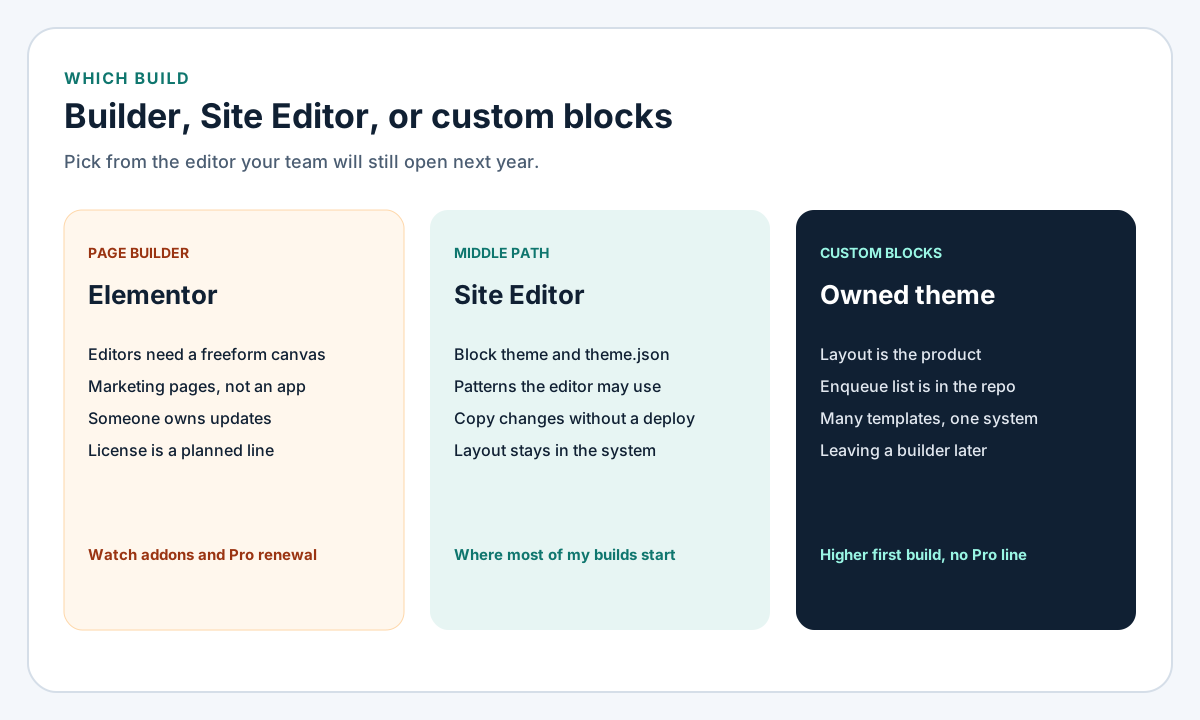
Figure 2. I start in the middle when the client can work in the Site Editor.
What to ask before you hire WordPress developer help
An Elementor developer and custom WordPress developers are different hires. Get the stack in writing.
Questions for an Elementor developer
Which plan and activation cap? Hello, or a theme that is also a builder? Which addons load CSS on pages that skip them? Are Improved Asset Loading, Optimized Gutenberg Loading, and Element Caching on, and which widgets stay uncached? What still works if Pro lapses? Who applies updates?
Questions for custom WordPress developers
Is it a block theme? Show theme.json and the blocks an editor may insert. Which blocks have a viewScript, and which templates render them? What can change without a pull request? Is a new landing page a pattern or a call to you? Where is staging, and who updates? That is WordPress development.
FAQ
Is Elementor always slower?
No. A heavy custom theme can lose to a careful Elementor page. There is no Core Web Vitals score for "an Elementor site." Read the URL.
What remains if I cancel Pro?
Pro updates stop. You cannot add Pro features, and existing ones may be limited. The free plugin continues. Updating Core without Pro can break the site. Export templates first.
Can a non-developer edit a custom theme?
Yes, inside the blocks and patterns you opened. A new layout the theme does not have still needs a developer.
What should a small site start with?
If the publisher already knows Elementor, start there with a short addon list. If the look has to hold, start with a block theme. For dashboards and roles, read the Laravel comparison first.
Own the editor you will still have next year
Custom WordPress development is the right spend when the theme, the blocks, and theme.json are what you want to own. A page builder is the right spend when editors need a canvas now and the license is a real invoice line. The WordPress work is WordPress development. If the stack is still open, start with Laravel vs WordPress.