
Blog
WordPress Plugin Development: Build a Custom Plugin
WordPress plugin development for a small custom plugin: one folder, hooks, nonces, capabilities, and a private update URI, written against WordPress 7.1.3.
Muhammad Zubair Akhtar
WordPress plugin development is a directory under wp-content/plugins with one header and callbacks on hooks you can name. I am Zubair Akhtar, a senior software engineer in Lahore, Pakistan. This article follows the Plugin Handbook for a small custom plugin: the folder, the hooks, the capability and nonce checks, and how a private plugin receives an update. I read those pages and the WordPress 7.1.3 release notes on 25 October 2026. I have not installed WordPress or activated the sample. A layout choice between a block theme and a page builder is custom WordPress versus page builders. Hardening the site is the WordPress security checklist. Cache and plugin weight are WordPress speed optimization. Building the plugin is WordPress development.
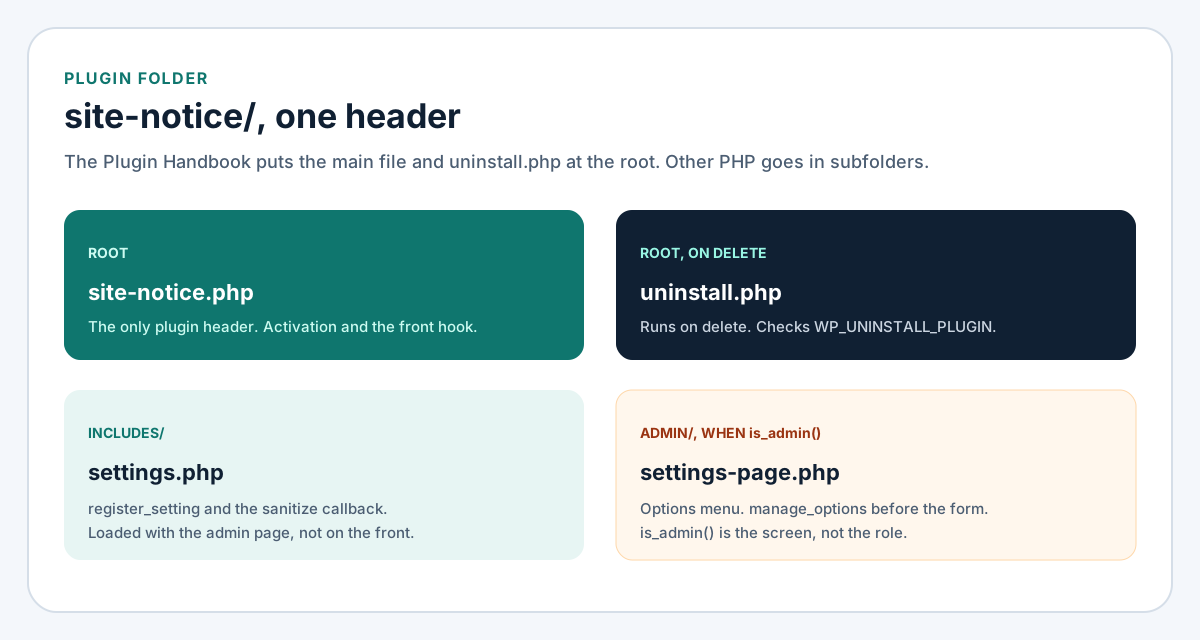
Figure 1. One header file. Admin PHP stays in a file the front request does not load.
WordPress plugin development: one folder and one header
Versions this was written against
On 25 October 2026 the release archive listed WordPress 7.1.3, released 6 October 2026, as the latest release. The 7.1.3 notes describe seven security fixes and four bug fixes. The 14 October 2026 developer post scheduled WordPress 7.2 Beta 1 for 20 October 2026 and the final release for 8 December 2026. This article is written against 7.1.3, the release the download archive listed on 25 October 2026.
The download page recommends PHP 8.3 or greater, and MySQL 8.0 or MariaDB 10.11 or greater. The Hosting Team note for WordPress 7.1, for the 19 August 2026 release, recommends PHP 8.4 or 8.5 for a new install and lists PHP 7.4 as the oldest version WordPress 7.1 still runs. The sample header below sets Requires at least to 7.1 and Requires PHP to 8.3, which is the download-page recommendation, not the 7.4 floor.
Handbook pages I used, with the last-updated date each page showed:
| Page | Last updated | What I took from it |
|---|---|---|
| Plugin Basics | 11 March 2026 | One directory, one header file |
| Header requirements | 11 March 2026 | Plugin Name is the minimum field |
| Best practices | 28 August 2024 | Prefix, folders, ABSPATH, is_admin() |
| Uninstall methods | 20 February 2024 | Delete data on uninstall, not on deactivate |
| Hooks | 29 January 2024 | Actions return nothing; filters return a value |
| Actions | 16 September 2024 | add_action priority defaults to 10 |
| Settings API | 29 August 2020 | Form posts to options.php |
| Security | 23 July 2026 | Do not trust input; escape on output |
| Nonces | 23 July 2026 | A nonce is not a capability check |
register_setting(), wp_body_open, and update_plugins_{$hostname} were last modified on the reference on 20 August 2026. wp_body_open was introduced in 5.2.0. The update hook was introduced in 5.8.0.
What goes in the folder
Plugin Basics says a plugin can be a single PHP file, and it recommends a directory so the files stay together. WordPress finds the plugin by reading header comments under wp-content/plugins. Only one PHP file in that directory should contain the header.
Best practices, updated 28 August 2024, puts plugin-name.php and an optional uninstall.php at the root, and puts other files in subfolders. The same page says a small, single-purpose plugin does not gain much from a class hierarchy. The sample is that size: one notice, one option, one settings screen. A larger plugin can use a class or a namespace. The prefix rule still applies to anything global.
The same page says a prefix should be at least four characters and recommends five, and it says not to start your own functions, classes, or options with wp_, WordPress, __, or _. The sample uses snote_, five characters, on functions and on the option name snote_settings.
is_admin() is how the handbook separates admin files from front files. The same paragraph says it does not mean the user is an administrator. The capability check is separate and comes later.
The main file guards direct access, registers activation, loads admin code only in the admin, and prints the notice on wp_body_open. I have not activated this file.
<?php
/**
 * Plugin Name:       Site Notice
 * Description:       Shows one plain-text notice after the opening body tag.
 * Version:           1.0.0
 * Requires at least: 7.1
 * Requires PHP:      8.3
 * Author:            Example Author
 * License:           GPL v2 or later
 * License URI:       https://www.gnu.org/licenses/gpl-2.0.html
 * Text Domain:       site-notice
 * Update URI:        https://updates.example.com/site-notice/
 */

if ( ! defined( 'ABSPATH' ) ) {
	exit;
}

register_activation_hook( __FILE__, 'snote_activate' );

function snote_activate() {
	if ( false === get_option( 'snote_settings' ) ) {
		add_option(
			'snote_settings',
			array(
				'enabled' => false,
				'message' => '',
			)
		);
	}
}

if ( is_admin() ) {
	require_once __DIR__ . '/includes/settings.php';
	require_once __DIR__ . '/admin/settings-page.php';
}

add_action( 'wp_body_open', 'snote_render_notice' );

function snote_render_notice() {
	$settings = get_option( 'snote_settings' );
	if ( ! is_array( $settings ) || empty( $settings['enabled'] ) ) {
		return;
	}

	$message = isset( $settings['message'] ) ? $settings['message'] : '';
	if ( ! is_string( $message ) || '' === $message ) {
		return;
	}

	echo '<p class="snote-notice">' . esc_html( $message ) . '</p>';
}
Activation writes the option only when get_option() returns false, which is the value for a missing option. A later deactivate and activate leaves a message the editor already saved. Header requirements say WordPress compares the Version field with PHP's version_compare(). 1.0.0 is the value that comparison will see. Update URI is there so a directory plugin with the same slug is not offered as this plugin's update. That behavior is the next section after the hooks.
Hooks the notice actually uses
Hooks, updated 29 January 2024, split the API in two. An action receives data, does work, and returns nothing. A filter receives a value, changes it, and returns it. The handbook says a filter should not print output or change globals. The notice is an action: wp_body_open is the moment core fires after the opening body tag, and the callback echoes. A filter would be the wrong hook for that print.
Actions, updated 16 September 2024, say add_action() needs the hook name and the callback. The third argument is priority. The default is 10. A smaller integer runs earlier. The fourth argument is how many parameters the callback accepts. Two callbacks on the same hook and the same priority run in the order they were registered. The sample uses the default priority. Nothing else in this plugin has to run before or after it.
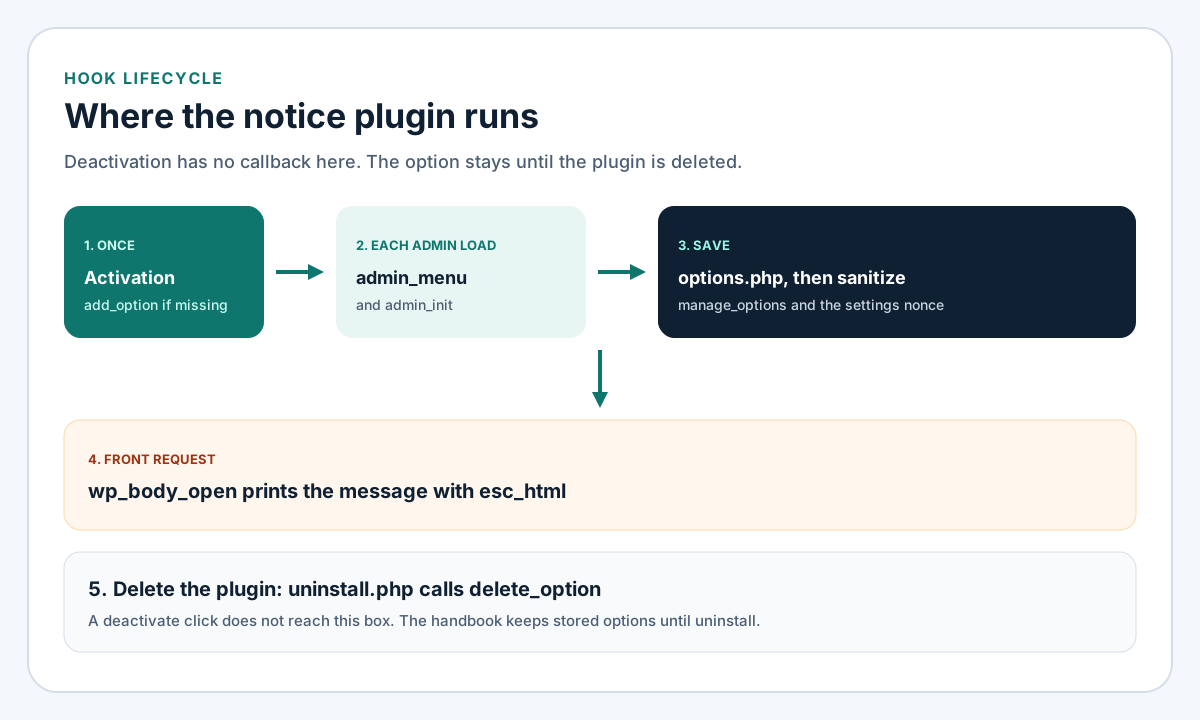
Figure 2. The option survives deactivation. Uninstall is the step that deletes it.
| Moment | Hook or file | What the sample does |
|---|---|---|
| Activate, once | register_activation_hook | add_option when the option is missing |
| Each admin load | admin_menu, admin_init | Register the page and the setting |
| Save | options.php calls the sanitize callback | Return a clean array |
| Front request | wp_body_open | Echo the message with esc_html |
| Delete | uninstall.php | delete_option |
Plugin Basics also names register_deactivation_hook() for temporary data and register_uninstall_hook() for a full cleanup. This sample uses uninstall.php instead of the uninstall hook, which is the second method on the uninstall page. It registers no deactivation callback, on purpose.
Checks inside the plugin
The security page in the Common APIs Handbook, updated 23 July 2026, says not to trust user input, to escape as late as possible, and to prefer rejecting bad input over quietly cleaning it. Those three lines are the plugin's job. Updating core, limiting logins, taking backups, and scanning files are the WordPress security checklist. I am not repeating that list here.
Capability, then the nonce
Checking user capabilities says a plugin that accepts submitted data has to check a capability. manage_options is the capability administrators have for site options. Editors do not. The settings page passes that capability to add_options_page(), and the render callback calls current_user_can() before it prints the form.
The Settings API posts the form to wp-admin/options.php. That page says the submit needs manage_options, and on Multisite a Super Admin. settings_fields() prints the hidden fields for the option group, including the nonce. The group name has to match the first argument of register_setting().
The nonces page, updated 23 July 2026, says a WordPress nonce is a hash tied to the user and the action, not a number used once. The same nonce is regenerated for that user and action until the lifetime ends. With the default lifetime the valid window is between 12 and 24 hours, because core checks the current tick and the previous one. The page says a nonce helps against CSRF and does not, by itself, authenticate or authorize. current_user_can() is the authorization check. I keep both.
Sanitize on save, escape on output
register_setting() takes the group, the option name, and an args array. The reference lists sanitize_callback and default. The callback registered here replaces the submitted value with a known array: a boolean for the checkbox, and sanitize_text_field() for the message when the field is a string. Any other shape returns the empty setting. The stored value is plain text, so the front callback escapes it with esc_html() at the echo. The settings field uses esc_attr() because the message is an attribute.
The escaping page, updated 22 May 2025, says to escape at the echo. esc_html() is for text inside an element. esc_attr() is for an attribute. esc_url() is for a URL. wp_kses() is for HTML you intend to keep. This notice is one line of text, so wp_kses() would be the wrong tool: there is no markup to preserve.
<?php
if ( ! defined( 'ABSPATH' ) ) {
	exit;
}

add_action( 'admin_init', 'snote_register_settings' );

function snote_register_settings() {
	register_setting(
		'snote_settings_group',
		'snote_settings',
		array(
			'sanitize_callback' => 'snote_sanitize_settings',
			'default'           => array(
				'enabled' => false,
				'message' => '',
			),
		)
	);

	add_settings_section(
		'snote_main',
		__( 'Notice', 'site-notice' ),
		'snote_section_callback',
		'site-notice'
	);

	add_settings_field(
		'snote_message',
		__( 'Message', 'site-notice' ),
		'snote_field_message',
		'site-notice',
		'snote_main'
	);
}

function snote_section_callback() {
}

function snote_sanitize_settings( $input ) {
	$clean = array(
		'enabled' => false,
		'message' => '',
	);

	if ( ! is_array( $input ) ) {
		return $clean;
	}

	$clean['enabled'] = ! empty( $input['enabled'] );

	if ( isset( $input['message'] ) && is_string( $input['message'] ) ) {
		$clean['message'] = sanitize_text_field( $input['message'] );
	}

	return $clean;
}

function snote_field_message() {
	$settings = get_option( 'snote_settings' );
	$message  = '';

	if ( is_array( $settings ) && isset( $settings['message'] ) && is_string( $settings['message'] ) ) {
		$message = $settings['message'];
	}

	echo '<input type="text" class="regular-text" name="snote_settings[message]" value="' . esc_attr( $message ) . '" />';
	echo '<input type="hidden" name="snote_settings[enabled]" value="0" />';
	echo '<label><input type="checkbox" name="snote_settings[enabled]" value="1"';
	if ( is_array( $settings ) && ! empty( $settings['enabled'] ) ) {
		echo ' checked="checked"';
	}
	echo ' /> ' . esc_html__( 'Show the notice', 'site-notice' ) . '</label>';
}
The hidden enabled field is 0, and the checkbox that follows uses the same name with value 1. When the box is checked, PHP keeps the later value. When it is not, the sanitize callback sees 0 and stores false. I have not submitted this form.
The screen that hosts the form:
<?php
if ( ! defined( 'ABSPATH' ) ) {
	exit;
}

add_action( 'admin_menu', 'snote_add_menu' );

function snote_add_menu() {
	add_options_page(
		__( 'Site Notice', 'site-notice' ),
		__( 'Site Notice', 'site-notice' ),
		'manage_options',
		'site-notice',
		'snote_render_page'
	);
}

function snote_render_page() {
	if ( ! current_user_can( 'manage_options' ) ) {
		wp_die( esc_html__( 'You cannot manage this notice.', 'site-notice' ) );
	}

	echo '<div class="wrap">';
	echo '<h1>' . esc_html__( 'Site Notice', 'site-notice' ) . '</h1>';
	echo '<form action="options.php" method="post">';
	settings_fields( 'snote_settings_group' );
	do_settings_sections( 'site-notice' );
	submit_button();
	echo '</form></div>';
}
Uninstall, updates, and what this plugin does not load
Uninstall methods, updated 20 February 2024, draw a line the handbook says people miss. Deactivation is for temporary data, flushed rewrite rules, and cache. Uninstall, which runs after deactivate and then Delete, is for options and custom tables. The sample stores one option the editor meant to keep, so deactivation deletes nothing.
uninstall.php has to live at the plugin root. The handbook says to stop unless WP_UNINSTALL_PLUGIN is defined. WordPress defines that constant when it loads this file. The constant is not defined for register_uninstall_hook(), so this file and that hook are two different paths. The sample uses the file. On a Multisite network, delete_option() clears the current site. The handbook warns that looping every site to delete options can be heavy. This file does not loop.
<?php
if ( ! defined( 'WP_UNINSTALL_PLUGIN' ) ) {
	die;
}

delete_option( 'snote_settings' );
A private update
Header requirements include Update URI so a plugin that is not in the directory is not replaced by a directory plugin of a similar name. The sample sets it to https://updates.example.com/site-notice/. The reference for update_plugins_{$hostname}, last modified 20 August 2026, says the hostname in that header is the dynamic part of the hook. For this URI the hook name is update_plugins_updates.example.com. The filter receives the update array or false, the parsed headers, the plugin file, and installed locales. Returning false means no update package.
add_filter(
	'update_plugins_updates.example.com',
	'snote_update',
	10,
	3
);

function snote_update( $update, $plugin_data, $plugin_file ) {
	if ( 'site-notice/site-notice.php' !== $plugin_file ) {
		return $update;
	}

	$remote = '1.0.0';

	if ( version_compare( $remote, $plugin_data['Version'], '<=' ) ) {
		return false;
	}

	return array(
		'slug'        => 'site-notice',
		'version'     => $remote,
		'url'         => 'https://updates.example.com/site-notice/',
		'package'     => 'https://updates.example.com/site-notice/site-notice.zip',
		'requires_php'=> '8.3',
	);
}
$remote in a real plugin is a version you read from your own server. The package value has to be a zip you host. I have not requested an update from WordPress, and updates.example.com is a placeholder host. version_compare() is the comparison header requirements say WordPress uses on plugin version strings. A directory plugin does not need this header. The October 2026 developer post says WordPress.org now runs an automated security review during the release cooldown for directory releases, and that high-risk releases can be blocked. That review is for the directory. It does not scan a private zip on your host.
What belongs in the speed article
The admin files are loaded inside is_admin(), so a front request does not include the settings page. The front callback prints one paragraph and does not enqueue a stylesheet. A notice that is the same for every anonymous visitor can sit in a cached page. A notice that changes per user is a different URL, and that URL should skip the page cache. How the page cache, the object cache, and a long plugin list behave is WordPress speed optimization. I am not measuring this sample, because it has not been activated.
When to hire a WordPress plugin developer
Hire a WordPress plugin developer when the behavior has to survive a theme change, when the code in functions.php has no prefix and no uninstall, or when a private plugin shares a folder name with the directory and has no Update URI. A WordPress plugin developer should be able to point at the header, the hook, the capability, the sanitize callback, and the file that runs on delete.
The layout of the templates is a different decision, covered in custom WordPress versus page builders. I take plugin work as part of WordPress development from Lahore. Bring the behavior you want, the WordPress version the site is on, and whether the plugin is only for that site or will be updated on more than one. I will start from a folder like the one on this page, on a staging site, and I will not call it done from a reading of the files.
FAQ
Can this live in the theme instead?
A theme functions.php can call the same hooks. Switching themes drops that file. A plugin stays active across the switch. Use the theme for presentation. Use the plugin for the notice, the option, and the settings screen.
Does the nonce replace the capability check?
No. The nonces page says not to rely on a nonce for authentication, authorization, or access control. The settings form uses manage_options and the nonce that settings_fields() prints.
Which PHP version should the header require?
For a new plugin aimed at WordPress 7.1.3, I would set Requires PHP to 8.3 because that is what the download page recommends today. A site stuck on 7.4 can still run WordPress 7.1, according to the hosting note, and it cannot activate a plugin that declares 8.3. Match the header to the versions you are willing to run, and name them.
Was this plugin activated for this article?
No. I read the handbook pages and the 7.1.3 release notes on 25 October 2026. I did not install WordPress, submit the settings form, or run an update check. I did run php -l on each sample with PHP 8.3.6, and each file parsed. Parsing is not activation.