
Blog
WordPress Hacked? A Step-by-Step Recovery Playbook
WordPress hacked? Triage, malware cleanup, credential rotation, hardening, and Google re-indexing steps after a compromise — a practical recovery playbook.
Muhammad Zubair Akhtar
A WordPress hacked site usually looks like spam SEO pages, a redirect you did not configure, a phishing form, a defacement, or an administrator nobody created. I am Zubair Akhtar, a senior software engineer in Lahore, Pakistan. This is the order I follow when an install is already compromised: detect it, triage what is still live, keep a forensics backup, find the malware, clean it, rotate every secret, harden the install, and get the junk URLs out of Google and Bing.
If you want that sequence done with you, start with my WordPress development services. Cleaning files does not clear the index by itself. That follow-up is the job I documented in how I removed hacked spam URLs from Google.
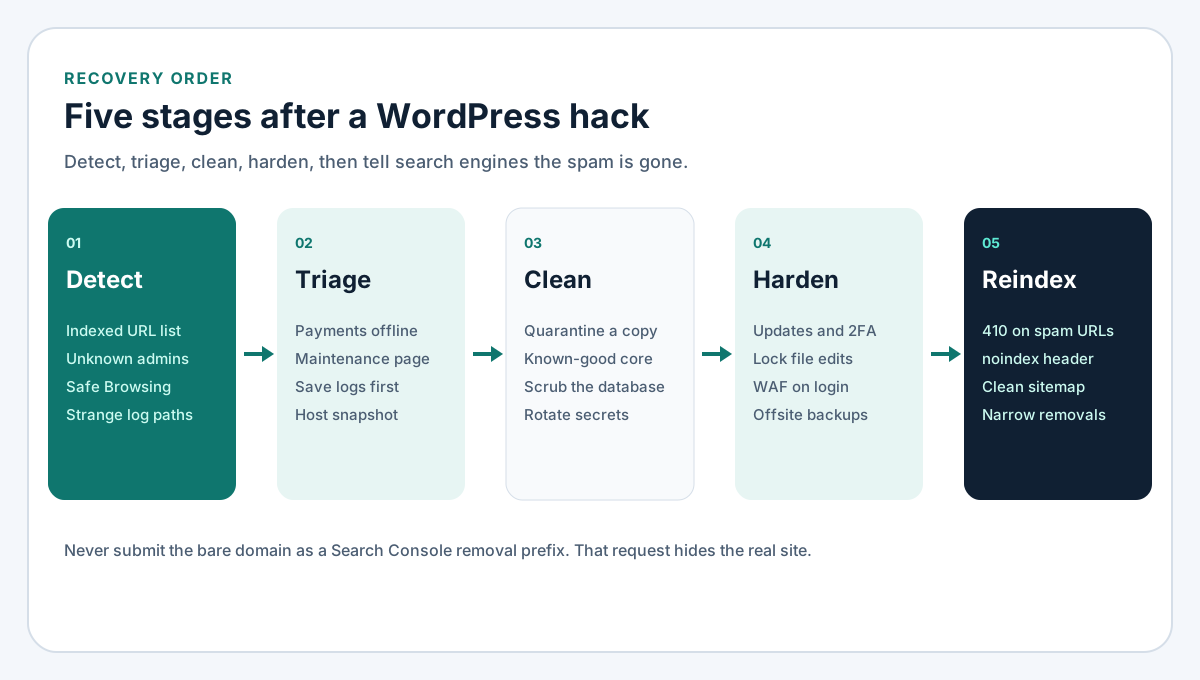
Figure 1. Detect, triage, clean, harden, and reindex. The forensics copy, the malware search, and credential rotation sit inside those stages.
Detect a WordPress hacked site
A homepage that still looks normal is how spam keeps running. One strong signal is enough to start.
Search Console and a site: search
Open Indexing, then Pages. Export the list when the indexed count is larger than the URLs you publish. Casino slugs, shop-style paths, Japanese keyword pages, and homepage URLs with junk query parameters are a familiar WordPress hacked pattern. A site:yourdomain.com search is a cross-check, not an exact count.
Under Settings, then Users and permissions, remove owners and verification tokens you do not recognise. An unknown owner can submit a sitemap of their own. Removals are in the hacked URL case study. File one only after the spam stops being served.
Users, core files, and outbound mail
Sort Users by registration date. An Administrator from a day nobody was working is enough to treat the site as compromised. Diff core against a fresh wordpress.org copy of the same version. Changes in wp-admin or wp-includes, or eval, base64_decode, a remote include, or auto_prepend_file in wp-config.php, stay suspect until you can explain them. A mail queue full of messages from a brochure site, or a new script in a checkout template, means you move to triage now.
Safe Browsing and strange paths
A Safe Browsing interstitial or a Search Console security issue means a client already hit something malicious. Check the access log for paths you never built, .php under wp-content/uploads, and redirects that fire only for some visitors or user agents. Fetch the same URL normally and as Googlebot. Different responses mean the site is still cloaking.
Triage before you keep editing
Take payments and private data offline
If the site charges cards, stores customer records, or has a customer login, take checkout offline or point the vhost at a maintenance page. A skimmer costs more every hour it stays up. A spam-only brochure site can stay reachable long enough to save logs, then it should leave the infected tree too. If the abuse desk has written, reply before the host suspends the account, and snapshot first.
Preserve evidence, then stop cleaning in place
Copy the access log, the error log, and a note of new users, example spam URLs, and surprising file times. That snapshot is for forensics. Do not restore it onto the public site if the infection had already started. Editing the live tree until a scan looks quiet hides the next backdoor. Serve the public site from a known-good tree, and keep the infected copy where PHP does not run.
Keep a forensics copy
Copy files and the database first
Export the database with the host tool or wp db export if you trust WP-CLI there. Archive wp-content, wp-config.php, .htaccess, .user.ini, and stray zip files outside the document root. backup.zip inside public_html is a path scanners already request.
Record modification times before you replace anything:
find . -type f -mtime -30 -lsGNU find can sort the same list with -printf '%T+ %p\n'. Keep it with the archive.
Quarantine the infected tree
Move the web root aside and serve maintenance from a clean directory. Keep the quarantined copy until you know the entry point. Deleting first throws away the timestamps. The web user must not execute PHP there. A prepend that still points at the old tree reinfects the new one on the next request.
Where the malware usually sits
Treat a scanner as a second opinion. No single product is the right fit for every host. Read the file behind each hit. Minified libraries throw false positives. A quiet extra admin plus a cron event throws false negatives.
mu-plugins, uploads, and themes
Must-use plugins in wp-content/mu-plugins load on every request and often skip the plugins screen. Read every PHP file there. PHP in wp-content/uploads should almost never exist. A .php, .phtml, or double extension in a month folder is a webshell until you can show otherwise. Block PHP in uploads once that folder is clean.
Open the active theme's functions.php and its includes. Look for obfuscated strings, eval, assert, gzinflate, str_rot13, remote file_get_contents, and files that are not part of the theme you installed. Check inactive themes, plugins you do not remember, typo-named plugin directories, and anything whose files changed on a day you did not update.
wp-config.php and server rules
wp-config.php should be credentials, salts, and a short list of constants. Suspect anything else: extra include lines, and auto_prepend_file in .user.ini, the PHP pool, or .htaccess. On Apache, a RewriteRule to another domain or php_value auto_prepend_file into uploads is part of the compromise. On nginx, read the vhost for an include or rewrite you did not add.
Cron, unknown admins, and options
Check WordPress cron and the system crontab. A random hook that fetches a URL is a backdoor schedule. crontab -l and /etc/cron.* should match jobs you or the host created. PHP launched from uploads every minute is not a backup.
List users with the real table prefix from $table_prefix in wp-config.php. The examples below assume wp_.
SELECT ID, user_login, user_email, user_registered
FROM wp_users
ORDER BY user_registered;

SELECT user_id, meta_value
FROM wp_usermeta
WHERE meta_key = 'wp_capabilities';
Read siteurl and home. Another host in either value is still a compromise. Sort autoloaded options by length and open anything huge you do not recognise, including widgets and theme mods, which never appear as a normal page. Search posts for the spam domains from Search Console.
Clean a WordPress hacked install
Restore a pre-infection backup when you have one
If files and a database exist from before the first bad user, the first spam URL, and the first core change, restore that pair. Check the date against the evidence. A later snapshot restores the attacker too. Restoring files does not retire a stolen password. Rotate credentials after it.
Replace core and themes from known-good packages
When you do not have that backup, rebuild in a new directory, then point the vhost at it:
- Replace
wp-adminandwp-includesfrom a wordpress.org copy of the version you intend to run. Leavewp-contentandwp-config.phpuntil you have reviewed them. - Delete plugins you cannot account for. Reinstall keepers from the official directory or the vendor you pay.
- Replace the active theme the same way. Copy back only child-theme edits you can read line by line.
- Remove PHP from uploads and every must-use plugin you did not write.
Copying those files over a live infected root lets a leftover prepend write the malware back. After the switch, request the homepage, one real inner page, and one former spam URL.
Scrub the database without a broad delete
Delete unknown administrators and their usermeta. Remove spam posts, injected widget links, and options that rewrite siteurl or home. Export again before each bulk delete, and tie those deletes to the evidence list.
If it returns, stop. A second wave means a backdoor still on disk, a writable directory, or a secret you have not rotated. Restore or rebuild instead of editing the same live tree again.
Rotate every credential
A clean file tree still needs new passwords. Database, SFTP, registrar, and API keys can put the malware back without a theme edit.
Change these, and revoke sessions as you go:
- WordPress salts and keys in
wp-config.php, from the WordPress secret-key service. New salts log every user out. - Every WordPress password, starting with Administrators and Editors. Delete users you do not know.
- Hosting, FTP, and SFTP passwords, plus any SSH key you do not recognise.
- The database password, then the matching line in
wp-config.php. - DNS and the domain registrar, with multi-factor authentication turned on.
- Mailboxes that can reset any of the above.
- API keys for payments, SMTP, the CDN, and backups. Delete the old keys in the vendor dashboard, not only inside WordPress.
- Users in Search Console, Bing Webmaster Tools, and analytics. Remove unknown owners.
If a password was reused on another property, change it there too. Note the date, so the next person knows which key is still the old one.
Harden what you just put back
The full list is my WordPress security checklist. After a cleanup, do these before you call the site back:
- Update core, themes, and plugins, and delete what you do not use. Inactive code with a known flaw is still on disk.
- Require two-factor authentication for every Administrator and Editor.
- Turn the dashboard file editor off:
define('DISALLOW_FILE_EDIT', true);Add DISALLOW_FILE_MODS only when updates are deployed outside wp-admin. If people still click Update in the dashboard, leave file mods on and rely on DISALLOW_FILE_EDIT.
- Use the host's normal permissions: directories
755, files644, andwp-config.phpas tight as that host documents, often440or400. - Put a WAF or host firewall in front of
wp-login.php, and in front ofxmlrpc.phpif you do not need it. A WAF filters probes. It does not clean a hack or replace updates. A host WAF, a CDN WAF, or a maintained plugin are examples, not a ranking. - Keep daily offsite backups of files and the database, and restore a copy on a schedule you actually keep.
- Give each person the least role that still lets them work.
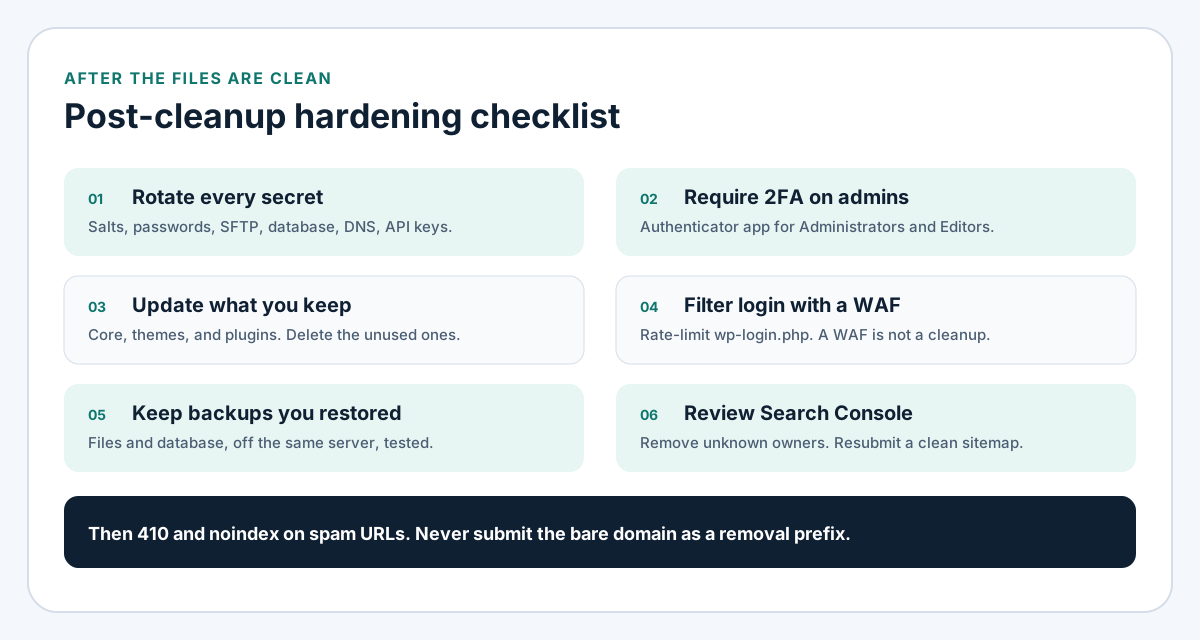
Figure 2. Rotate secrets, require 2FA, update what remains, filter login traffic, keep a backup you have restored, and review who can open Search Console.
Ask Google and Bing to drop the spam
Removing malware does not reset an index. Google and Bing keep URLs they already fetched. A spam URL that still returns 200, or that returns your homepage, can stay in results. I hit that on my own domain, in how I removed hacked spam URLs from Google. The signals are the same on WordPress. Implement them on the web server, or in a rule you have read. A plugin button does not deindex anything.
Return 410 and noindex on URLs you never want
Use 410 Gone for spam paths and junk query URLs you will never publish. A 404 means missing for now. A 410 means the removal was deliberate. For a WordPress hacked URL you never want back, send 410 and X-Robots-Tag: noindex.
Do not Disallow those paths in robots.txt. If Googlebot cannot crawl them, it never sees the 410, and the URL can stay indexed with an empty snippet. The hacked URL cleanup write-up covers that mistake, including why a 200 of your homepage is worse than a hard gone. On Apache, redirect only the spam prefixes. On nginx, return 410; for those paths only, with add_header X-Robots-Tag "noindex" always;. curl -I should show 410 and x-robots-tag: noindex on spam, and 200 on the homepage. Repeat one spam URL as Googlebot. Retire only URLs you mean to lose.
Removals need a narrow prefix
Search Console Removals hide URLs for about six months. They do not deindex forever, so ship the 410 first. That order is the point of the removal case study.
Never submit the bare domain as a prefix. https://example.com/ matches every URL, including the homepage. A prefix with ? means homepage URLs that have a query string, and it must not match the clean homepage. Read the string against pages you still want, then submit. Bing has its own removal tool. Clearing Google does not clear Bing.
Resubmit a sitemap of real URLs only
List only canonical URLs you want indexed, then resubmit in Search Console and Bing. The technical SEO checklist is the pass for status codes, canonicals, and the HTML a crawler receives. If the index is still mostly pages you never published, that remaining work is technical SEO services.
I will not quote a number of days. Former spam should move to excluded reasons. A new spam pattern means something is still publishing, including an old host the domain used to point at.
FAQ
How long until Google drops the spam URLs?
There is no honest number of days. A 410 plus noindex answers the next recrawl. Removals hide URLs for about six months and then expire, which is why the hacked URL guide treats them as temporary.
Should hacked URLs return 404 or 410?
Use 410 for spam you never want published again. A 404 leaves room for the page to return, so Google may recrawl longer. Add X-Robots-Tag: noindex, and do not block the URL in robots.txt.
Is it better to restore or to clean in place?
Restore when you can show the backup predates the bad user or the first spam URL. Otherwise rebuild from known-good packages with the infected tree quarantined. Rotate credentials either way. Cleaning the live root while the old passwords still work puts the same admin user back.
Will a security plugin fix a hack by itself?
No. A plugin can slow logins, flag a new admin, and schedule a scan. It does not replace reading mu-plugins, deleting unknown users, rotating the registrar, or returning 410 on spam URLs. Confirm a hit before you delete a theme.
When is it time to hire help?
Hire help when payments or customer data may have leaked, when the malware returns after one pass, when you cannot get a snapshot, or when you are unsure which Search Console prefix is safe. I take the recovery as WordPress development. When the files are clean and the index is still wrong, that part is SEO services.
Put the site back under your control
The order is evidence, a quarantined copy, a known-good tree, new secrets, hardening, then a clear signal to Google and Bing. If spam pages or unknown users are already live, start with WordPress development services. Bring the host login, any pre-incident backup, and a Search Console export if you have one. I start with triage, not another plugin on the compromised tree.