
Blog
HubSpot CRM Integration: A Developer's Guide
HubSpot CRM integration for Laravel: private-app or OAuth auth, contact and deal upserts, associations, signed webhooks, rate limits, and idempotent queues.
Muhammad Zubair Akhtar
HubSpot CRM integration is the work of keeping one Laravel database and one HubSpot account from inventing two copies of the same person. I am Zubair Akhtar, a senior software engineer in Lahore, Pakistan, and I build this kind of sync when a sales team already lives in HubSpot and the product already lives in Laravel. The retry, the duplicate webhook, and a contact edited on both sides are the work.
If you want that sync built or reviewed, start at Laravel development. The rest of this post is the method. Building your own system of record, instead of syncing HubSpot, is the decision in custom CRM vs off-the-shelf.
Versions this was written against
I wrote this on 20 October 2026 against HubSpot's date-based APIs and the Laravel 13 docs. I have not run the snippets against a HubSpot account or a Laravel app.
HubSpot's current CRM reference is version 2026-09. The 2026-09 overview says new work should use the latest date version, still on https://api.hubapi.com. A contact read there is GET /crm/objects/2026-09/contacts. The migration guide dates the scheme from 30 March 2026. The changelog Legacy APIs and Apps says /v1/ through /v3/ go unsupported in September 2027, and v4 ends on 30 March 2027. I do not build a new sync on v3.
The PHP package on Packagist is hubspot/api-client 15.0.0, published 15 October 2026 (commit e872dff). It requires PHP 8.1 or newer and Guzzle 7 or 8. Laravel 13 requires PHP 8.3. In codegen/Crm/Contacts/Api/BatchApi.php at that commit, batchApi()->upsert() still posts to /crm/v3/objects/contacts/batch/upsert. The date-based URLs below go through apiRequest().
What the sync has to decide first
Name a winner per field before you name an endpoint. If Laravel owns the email, a HubSpot edit to that field is a suggestion. If sales owns dealstage, the webhook is the command and your deal page is the display. A crm integration that writes both ways on every change will loop.
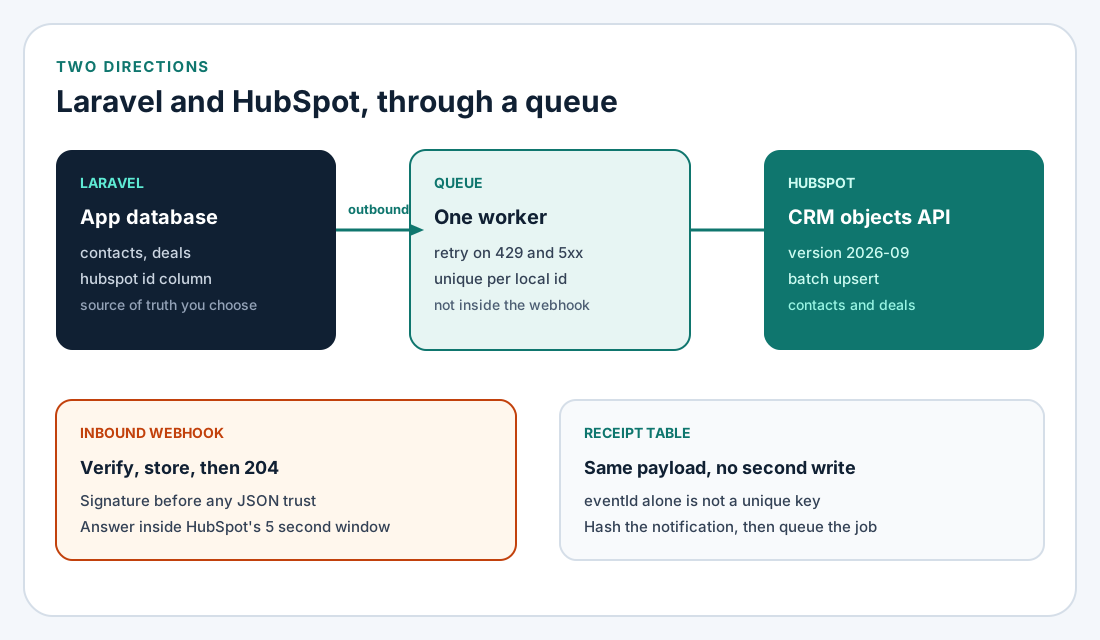
Figure 1. Outbound calls go through a queue. Inbound webhooks are verified and stored before any local write.
| Direction | Trigger | HubSpot call | Local result |
|---|---|---|---|
| Outbound contact | User created, or email changes | Contacts batch upsert by email | Store the returned record id |
| Outbound deal | Order becomes an opportunity | Deals batch upsert by your unique property | Store the id, then associate |
| Inbound | contact.propertyChange or deal.propertyChange | None while the webhook is open | Update the row in a job |
| Ignore | The value is the one you just wrote | None | 204, and no job |
Object type ids from the CRM overview: contacts are 0-1, deals are 0-3. The contacts upsert reference uses the name contacts in the path. The deals upsert reference uses 0-3.
HubSpot CRM integration: one account or many
A private app token when the account is yours
For one HubSpot account you administer, I use a private app access token. The private apps overview says a super admin creates it, calls send Authorization: Bearer [YOUR_TOKEN], and webhook subscriptions are edited in the app settings rather than the subscriptions API. The usage guidelines also allow a static auth token on a privately distributed app on platform 2025.2 or 2026.03.
The legacy scopes table says it documents legacy apps. The same names appear in the 2026-09 OAuth example.
| Scope | What the table says it covers |
|---|---|
crm.objects.contacts.read | View contacts. Required for contact webhook subscriptions. |
crm.objects.contacts.write | Create, change, and delete contacts. |
crm.objects.deals.read | View deals. Required for deal webhook subscriptions. |
crm.objects.deals.write | Create, change, and delete deals. |
crm.schemas.deals.write | Create or change deal properties, including a unique id. |
HUBSPOT_ACCESS_TOKEN=your-private-app-token
HUBSPOT_CLIENT_SECRET=your-app-client-secret
The client secret is for webhook signatures. The access token is the Bearer value. Neither belongs in git.
$hubspot = \HubSpot\Factory::createWithAccessToken(
    config('services.hubspot.token')
);
Factory::createWithAccessToken() is the constructor in the 15.0.0 README.
OAuth when other portals install the app
Use OAuth when the Laravel app is installed into accounts you do not administer. The manage OAuth tokens guide says the access token expires after 30 minutes. The documented response includes "expires_in": 1800. Exchange the install code with a form-encoded POST:
$response = \Illuminate\Support\Facades\Http::asForm()
    ->post('https://api.hubapi.com/oauth/2026-09/token', [
        'grant_type' => 'authorization_code',
        'client_id' => config('services.hubspot.client_id'),
        'client_secret' => config('services.hubspot.client_secret'),
        'redirect_uri' => config('services.hubspot.redirect'),
        'code' => $code,
    ]);
Refresh with the same URL, grant_type=refresh_token, and the stored refresh token. Keep the new access token and any new refresh token. HubSpot's token-management article says a refresh token lasts until uninstall or revocation. That article still shows /oauth/v3/token. I use the 2026-09 path. The usage guidelines say a 401 is not a reason to refresh. Refresh from expires_in, a couple of minutes early, and keep one token pair per installation.
Upsert contacts and deals on purpose
Search is a poor way to find a row you are about to write. The CRM search guide caps search at five requests per second per account, shared by every integration on that account, and a new record can take a moment to appear. Upsert by a unique property.
Contacts, by email
Contacts batch upsert is POST /crm/objects/2026-09/contacts/batch/upsert. Each input has id, properties, and optionally idProperty and objectWriteTraceId. The schema calls objectWriteTraceId a trace string for logging. It does not call it an idempotency key, so I do not use it as one.
The legacy contacts guide, modified 3 September 2026, still states rules the 2026-09 reference page does not repeat. I am citing that guide for these:
- Upsert by
emailor a custom unique property. Existing rows update. Missing rows are created. - A partial upsert is not supported when
idPropertyisemail. - A batch is limited to 100 records.
A new contact needs at least one of email, firstname, or lastname. email is the primary unique identifier, and hs_additional_emails is unique too. The properties guide allows ten unique properties per object. hasUniqueValue cannot be changed later.
$response = $hubspot->apiRequest([
    'method' => 'POST',
    'path' => '/crm/objects/2026-09/contacts/batch/upsert',
    'body' => [
        'inputs' => [
            [
                'id' => '[email protected]',
                'idProperty' => 'email',
                'properties' => [
                    'email' => '[email protected]',
                    'firstname' => 'Ada',
                    'lastname' => 'Lovelace',
                ],
            ],
        ],
    ],
]);
apiRequest() is the README escape hatch, and defaultJson defaults to true. Chunk inputs at 100 until a 2026-09 page you trust prints a different cap. The generated crm()->contacts()->batchApi()->upsert() in 15.0.0 still posts to the v3 path, and its setIdProperty() setter rejects null. I would not ship that URL in a new app this month.
HTTP 200 returns results[] with id, new, properties, createdAt, and updatedAt. new is true when HubSpot created the row. HTTP 207 means some inputs failed. Read errors before you retry. An email upsert can be repeated. A plain create cannot.
From API version 2026-09, admin validation applies to CRM writes. The 11 August 2026 changelog says a missing conditional property returns 400 MISSING_CONDITIONAL_REQUIRED_PROPERTY, and a create-form requirement returns MISSING_REQUIRED_PROPERTY. If the portal requires a phone number for a customer, the upsert has to send it.
Deals, by a property you create
Deals have no email. The properties guide creates a unique property with POST /crm/properties/2026-09/{objectType} and "hasUniqueValue": true. The example is system_a_unique, group dealinformation, type string, field type text. I store the local primary key there. Creating the property needs crm.schemas.deals.write.
The deals batch upsert reference prints:
POST /crm/objects/2026-09/0-3/batch/upsertThat page's description calls idProperty a query parameter. The body schema also puts idProperty on each input, and the parameter list in the spec I read is empty. I send it in the body, matching contacts, and I would read a failing response before adding a query string. I have not called the endpoint.
$hubspot->apiRequest([
    'method' => 'POST',
    'path' => '/crm/objects/2026-09/0-3/batch/upsert',
    'body' => [
        'inputs' => [
            [
                'id' => (string) $deal->id,
                'idProperty' => 'system_a_unique',
                'properties' => [
                    'dealname' => $deal->name,
                    'amount' => (string) $deal->amount,
                    'dealstage' => 'appointmentscheduled',
                    'system_a_unique' => (string) $deal->id,
                ],
            ],
        ],
    ],
]);
Values in that schema are strings, so the amount is cast. Save results[0].id on the local deal. The properties guide reads the same row by name rather than by 0-3: GET /crm/objects/2026-09/deals/abc?idProperty=system_a_unique.
appointmentscheduled is only a common default. Read the portal's pipeline before you hard-code a stage.
Associate the deal with the contact
Create both records, then link them. The associate records guide creates one default association with:
PUT /crm/objects/2026-09/{fromObjectType}/{fromObjectId}/associations/default/{toObjectType}/{toObjectId}A batch is POST /crm/associations/2026-09/{fromObjectType}/{toObjectType}/batch/associate/default with from.id and to.id. For contacts, companies, deals, tickets, and notes, the guide allows the object name. Its type-id table lists deal-to-contact as 3 and contact-to-deal as 4. I use the default endpoint so I am not picking a label.
$hubspot->apiRequest([
    'method' => 'PUT',
    'path' => '/crm/objects/2026-09/deal/'.$deal->hubspot_id
        .'/associations/default/contact/'.$contact->hubspot_id,
]);
Association limits on that page are separate. Burst is 100, 150, or 200 requests per 10 seconds for Free/Starter, Professional/Enterprise, and the API add-on. A second add-on does not raise it. On Professional and Enterprise, daily association calls are 500,000, or 1,000,000 with the add-on. Batch create takes 2,000 inputs and batch read takes 1,000. I store the linked pair and skip the call on retry, because I have not found a documented no-op for a repeat.
Webhooks: verify, store, then return 204
For a private app, add subscriptions in the app settings. The webhooks guide reserves its management API for legacy public apps, with a developer API key on ?hapikey: PUT /app-webhooks/2026-09/{appId}/settings and POST /app-webhooks/2026-09/{appId}/subscriptions. maxConcurrentRequests must be greater than five. A project app uses src/app/webhooks/*-hsmeta.json, per the configure webhooks page.
I subscribe to contact.creation, contact.propertyChange, deal.creation, deal.propertyChange, and deal.associationChange. Contact events need crm.objects.contacts.read. Deal events need crm.objects.deals.read. hs_lastmodifieddate is not a valid property-change subscription. Settings can cache for five minutes. The default concurrency cap is 10 in-flight requests per installed account, and each body holds at most 100 events.
The body is a JSON array. I read objectId, propertyName, propertyValue, occurredAt, attemptNumber (from 0), portalId, subscriptionId, and eventId. The field table says subscriptionType. One sample on the same page uses eventType, so I accept either key. eventId is not guaranteed unique, order is not guaranteed, and the same notification can arrive twice.
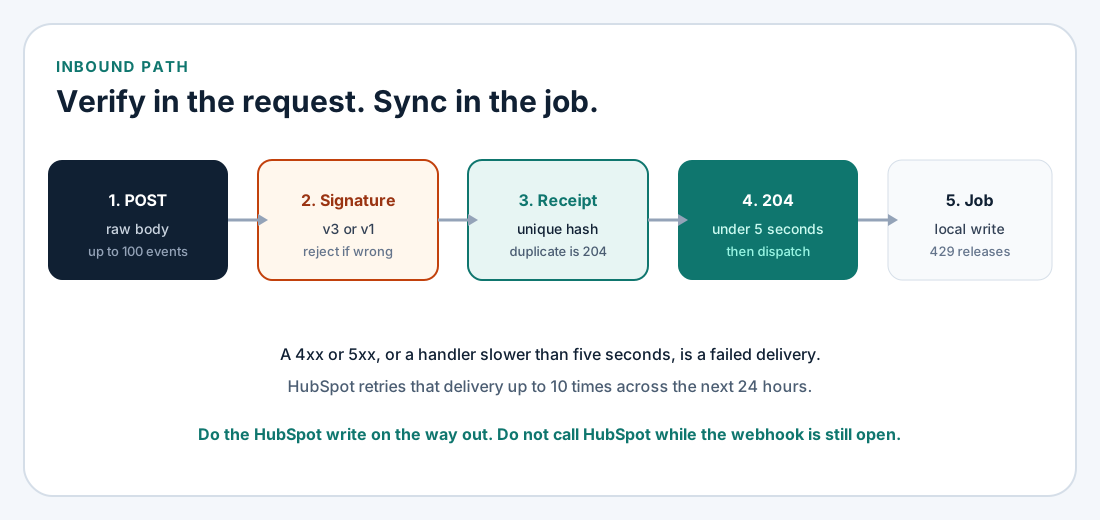
Figure 2. The HTTP request verifies and records. A slow or non-2xx response is retried.
Two signature algorithms
Read the headers you were sent. The algorithms are not interchangeable.
The webhooks guide puts a SHA-256 hex digest in X-HubSpot-Signature: client secret concatenated with the raw body. The legacy validating-requests page says CRM object deliveries include X-HubSpot-Signature-Version: v1. That is the check I expect for contact and deal changes.
The current request-validation page calls v3 the latest signature. X-HubSpot-Signature-v3 is base64 of HMAC-SHA256 over this UTF-8 string, using the client secret:
requestMethod + requestUri + requestBody + timestamptimestamp is X-HubSpot-Request-Timestamp. Reject it when it is older than five minutes. The URI is the full target URL, scheme included, fragment removed. Decode only these sequences, and only in the query string: %3A %2F %3F %40 %21 %24 %27 %28 %29 %2A %2C %3B. Compare with hash_equals. Older versions are still sent for compatibility, so I accept v3 when that header is present and v1 when the version header says v1. Anything else is a 403.
public function __invoke(Request $request)
{
    $secret = config('services.hubspot.client_secret');
    $body = $request->getContent();
    $version = $request->header('X-HubSpot-Signature-Version');
    $v3 = $request->header('X-HubSpot-Signature-v3');

    $valid = $v3
        ? $this->validV3($request, $secret, $body, $v3)
        : ($version === 'v1' && $this->validV1($request, $secret, $body));

    abort_unless($valid, 403);

    $receipt = HubspotReceipt::firstOrCreate([
        'payload_hash' => hash('sha256', $body),
    ]);

    if ($receipt->wasRecentlyCreated) {
        ProcessHubspotWebhook::dispatch($receipt->id);
    }

    return response()->noContent();
}
getContent() is the raw body. Re-encoding JSON will not match. v1 is hash_equals(hash('sha256', $secret.$body), (string) $request->header('X-HubSpot-Signature')). v3 compares base64_encode(hash_hmac('sha256', $raw, $secret, true)) after the five-minute check. The URI must be the target URL configured in HubSpot. If nginx terminates TLS, trust the proxy so the host matches. That is the nginx setup guide.
Laravel 13's CSRF docs exclude the route in bootstrap/app.php. HubSpot will not send a token. The same exclusion is how I handle Stripe in the Stripe payment integration guide.
->withMiddleware(function (Middleware $middleware): void {
    $middleware->preventRequestForgery(except: [
        'hubspot/webhook',
    ]);
})
Stay inside five seconds
The webhooks guide retries up to 10 times over 24 hours on a failed connection, a response slower than five seconds, or any 4xx or 5xx. A 403 is right for a bad signature. A 500 from a busy database will be retried, so the receipt is written before the job.
eventId is not the unique key. I hash the raw body so an identical batch collapses. A later attempt can change attemptNumber, so the job also no-ops when portalId, objectId, the event name, propertyName, and occurredAt were already applied. The REST API practices post stores a client Idempotency-Key. HubSpot does not send one. You build the key from the payload.
Do not call HubSpot inside this action. A 429 on a follow-up read would fail the webhook, and HubSpot would retry the whole batch.
Rate limits and the queue
Private-app limits from the usage guidelines cover legacy private apps and privately distributed apps on platform 2025.2 and 2026.03. Burst is per app. The daily cap is shared by every app on the account and resets at midnight in the account time zone.
| Tier | Per 10 seconds | Per day |
|---|---|---|
| Free and Starter | 100 per app | 250,000 per account |
| Professional | 190 per app | 625,000 per account |
| Enterprise | 190 per app | 1,000,000 per account |
| API limit increase | 250 per app | 1,000,000 extra per increase, two at most |
A marketplace OAuth app is 110 requests every 10 seconds per installed account. The add-on does not raise it. Search stays at five per second and is outside that 110. The 15.0.0 README still says OAuth apps are limited to 100 every 10 seconds. I follow the usage guidelines, and I treat that README sentence as stale.
A 429 uses errorType RATE_LIMIT and policyName DAILY or the secondly policy. The sample message is "You have reached your daily limit." Other responses may send X-HubSpot-RateLimit-Max, X-HubSpot-RateLimit-Remaining, X-HubSpot-RateLimit-Interval-Milliseconds, and the daily pair. The daily headers are absent on OAuth. Search omits the set. The old secondly headers are deprecated.
The SDK retries 429s, 500–503, 520–599, and some connection errors, up to five times, inside the calling process. That misses the five-second webhook budget. I upsert from a job.
Laravel 13's queue docs cover the job. ShouldBeUnique and uniqueId() keep a second copy of the same contact off the queue. #[UniqueFor(3600)], #[Tries(5)], and #[Backoff([10, 30, 60])] are the documented lock, attempt, and delay controls. Redis::throttle() plus $this->release(10) waits when the lock is busy. allow(80)->every(10) is headroom under the Free and Starter burst of 100 per 10 seconds, not a measurement.
#[Tries(5)]
#[Backoff([10, 30, 60])]
#[UniqueFor(3600)]
class UpsertHubspotContact implements ShouldQueue, ShouldBeUnique
{
    use Queueable;

    public function uniqueId(): string
    {
        return 'contact:'.$this->contactId;
    }

    public function handle(): void
    {
        Redis::throttle('hubspot-crm')->allow(80)->every(10)->then(
            function () {
                // POST /crm/objects/2026-09/contacts/batch/upsert
            },
            function () {
                $this->release(10);
            },
        );
    }
}
On a 429, read policyName. A secondly limit can wait on X-HubSpot-RateLimit-Interval-Milliseconds. A DAILY limit should fail the job and log correlationId rather than retry until midnight. The guidelines want error responses under 5 percent of daily calls for marketplace certification. Cache pipelines, owners, and property definitions instead of fetching them per row.
Production checklist
- Token and client secret stay in the environment.
- New calls use
/crm/objects/2026-09/and/crm/associations/2026-09/, not the v3 path inhubspot/api-client15.0.0. - Contacts upsert by
email. Deals upsert by ahasUniqueValueproperty holding your primary key. - Store the returned HubSpot id, and store that a contact-deal pair is already linked.
- The webhook route skips CSRF, reads the raw body, checks v1 or v3, and returns 204 inside five seconds.
- An identical body does not enqueue twice. The job is still safe when
attemptNumberchanges. - Outbound jobs stay under the published tier, and a daily 429 stops the loop.
- Email, deal stage, and amount each have a winner, and the portal's required properties are in the payload.
TLS for the public route is the nginx guide. JSON errors on your own API are the Laravel REST API post.
FAQ
Is a private app enough for HubSpot CRM integration?
Yes, for one account you administer. Send the access token as a Bearer token. Use OAuth on /oauth/2026-09/token when other portals install the app. Private-app webhook subscriptions are edited in settings, not through the public-app API.
Should I call the PHP SDK upsert method?
In hubspot/api-client 15.0.0, crm()->contacts()->batchApi()->upsert() posts to /crm/v3/objects/contacts/batch/upsert. That path goes unsupported in September 2027. I use apiRequest() and /crm/objects/2026-09/contacts/batch/upsert. After an upgrade, read the path in BatchApi.php before you trust the method.
How do I avoid duplicate contacts?
Upsert with idProperty set to email, or to a custom unique property, in batches of at most 100. Do not search and then create. Search is five requests per second per account, and a contact you just wrote may not be visible yet.
Why does the same webhook arrive twice?
The webhooks guide says duplicates happen, eventId is not unique, and a slow or non-2xx response is retried up to 10 times over 24 hours. Hash the raw body, return 204, and no-op the job when that object and property were already applied.
What if I do not want HubSpot at all?
Then you are choosing a system of record. That comparison is custom CRM vs off-the-shelf. This article assumes HubSpot stays.
If you want this built
Crm integration services, in the sense I take the work, means a winner per field, upserts that can run twice, a signature check, and a queue that survives 429s. That is Laravel development. The Laravel hiring checklist is how I want a buyer to read the repository.
Send the HubSpot tier, whether this is one portal or an installable app, and which fields sales may edit. Those three answers pick the token, the throttle, and the subscriptions.