
Blog
Custom CRM vs Off-the-Shelf: When Building Your Own Pays Off
Custom CRM or HubSpot and Zoho? A break-even method, a decision checklist and a sample Laravel CRM architecture from a senior engineer who builds both.
Muhammad Zubair Akhtar
Almost every growing business reaches the same fork. The sales team has outgrown spreadsheets, and someone asks whether to subscribe to a ready-made CRM such as HubSpot or Zoho, or to build a custom CRM that matches how the company really sells. I am Zubair Akhtar, a senior software engineer in Lahore, Pakistan, and I build custom business software in Laravel as well as integrating off-the-shelf tools. My honest answer is that off-the-shelf wins more often than developers like to admit, and a custom CRM wins in a few specific situations. This post gives you a way to tell which situation you are in, a break-even method you can run with your own numbers, and a sample Laravel architecture if you do build.
If you already know you want a custom system, see my Laravel development services. If you are still deciding, read on.
The short answer
Buy an off-the-shelf CRM when your sales process looks like most sales processes: leads come in, someone follows up, a deal moves through stages, a manager looks at a pipeline report. Build a custom CRM when the CRM is not really a contact list at all, but the operating system of your business: it has to enforce your own rules, talk to your own systems, and hold data that a generic tool cannot model.
I will not pretend that one choice is always cheaper. I am not quoting vendor prices here, because they change often. Look at the current public pricing page of any vendor you consider, and use the numbers you find there in the break-even method below.
What an off-the-shelf CRM gives you
- Speed. You can be running in days, not months.
- A mature feature set. Email logging, reminders, pipelines, reports, mobile apps and integrations already exist and have been used by thousands of teams.
- Someone else maintains it. Security patches, uptime and new features are the vendor's problem.
- A hiring advantage. New salespeople may already know the tool.
The costs are less obvious. You pay per seat, usually forever, and the bill grows with your team. You adapt your process to the tool instead of the other way round. Custom fields and workflows help, but there is always a point where the tool pushes back. And your data lives in a system you do not control, with export limits and an API you must work within.
What a custom CRM gives you
- A data model that fits. If you sell projects with phases, rentals with inventory, or policies with renewals, you can model exactly that rather than bending "deals" and "contacts" to fit.
- Your rules, enforced. Approval chains, pricing rules, territory logic and compliance checks can be code, not a convention people forget.
- Deep integration. Your CRM can share a database or queue with your billing, your product or your operations software, with no sync layer in the middle.
- A cost curve that is flat per seat. You pay to build and to run it, not for every extra user.
- Ownership. The data, the code and the roadmap are yours.
The costs are just as real. You pay upfront. You own the bugs, the security, the backups and the upgrades. Features that come free in a mature product, such as email sync or a polished mobile app, can take serious time to build, so a custom CRM should usually skip them or integrate with a service that already does them well.
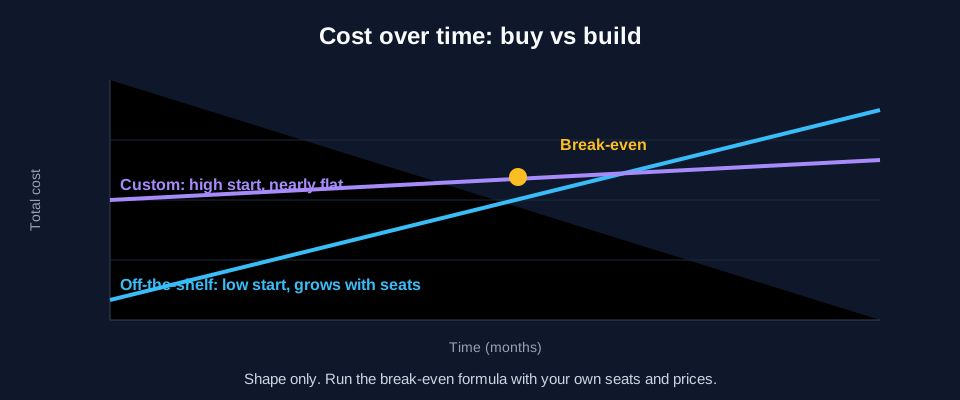
Figure 1. The shape of the decision. The exact crossing point depends on your seat count, your vendor's plan and the scope you build. The chart shows the shape, not real prices.
The break-even method
Cost comparisons go wrong when people compare a subscription price with a build quote and nothing else. Use this instead, over a fixed horizon of three years.
Off-the-shelf total cost = (seats × price per seat per month × 36) + add-ons you will need + setup and migration time + the cost of any custom integration you build around it.
Custom total cost = build cost + (hosting and monitoring × 36 months) + (maintenance time per month × 36) + the cost of the features you will have to replace with other tools.
Then add the item people forget, which is the cost of working around the tool. If your team spends an hour a week each on manual steps that a custom system would remove, multiply that by headcount, by your loaded hourly cost and by the weeks in the horizon.
Here is a small, purely hypothetical illustration of the arithmetic. These are round numbers made up for the example, not real prices:
| Line | Off-the-shelf | Custom |
|---|---|---|
| Upfront | 1 unit of setup | 20 units of build |
| Per month | 1 unit per 5 seats | 0.3 units hosting and upkeep |
| 15 seats, 36 months | 36 × 3 = 108 units, plus the setup unit | 20 + (36 × 0.3) = about 31 units |
With these invented numbers the custom system costs less over three years, but only because the team is large and the scope is small. Cut the team to three seats and the same custom build never catches up. This is why I ask for your real figures first. Run the formula with your seat count, your vendor's public price and an honest build estimate before you decide anything.
Do the same sum again at a 12-month horizon. If the custom option only wins at five years, be cautious, because a company's needs change within five years.
Seven signs that a custom CRM is worth it
- Your process is your competitive edge. If how you quote, approve or fulfil is what customers pay you for, encoding it in software is an investment, not an expense.
- The data does not fit "contacts and deals". Inventory, bookings, projects, subscriptions, assets or regulated records are all hard to force into a generic schema.
- You keep paying for seats nobody uses much. A large group of occasional users, such as field staff or partners, can make per-seat pricing painful.
- Integration is the real work. If most of the effort is syncing the CRM with billing, a product database or a local payment system, a system built around those integrations can be simpler.
- You have rules a tool cannot enforce. Discount approvals, credit limits and role-based visibility are examples.
- You have already outgrown the tool. If you keep adding workarounds, scripts and spreadsheets next to it, you are already paying for a custom system, just badly.
- You have a technical owner. Someone, in house or on retainer, must keep it alive. Without that person, a custom CRM becomes a liability.
Five signs you should buy instead
- You need to be live in weeks, and your process is standard.
- You have no one to maintain software.
- Your team is small and the seat cost is low compared with a build.
- You need mature features that are expensive to rebuild: email sync, call logging, marketing automation, mobile apps.
- You are not yet sure how you sell. Learn first, then automate. Buying a flexible tool is a cheap way to find out.
A middle path that often wins
You do not have to choose all or nothing. Many of the best setups I see use an off-the-shelf CRM for what it does well and a small custom application for the part that is unique. A custom approval portal, a quoting tool or a billing sync can sit next to a standard CRM and talk to it through its API. You keep the vendor's maturity where it is cheap and build only where it pays. I can also build the other direction: a custom core that pushes leads to a marketing tool.
A sample architecture for a custom CRM in Laravel
If you do build, keep the first version small. This is the shape I would start from. It is a design sketch, not a finished product, and I have not packaged it as a tested repository.
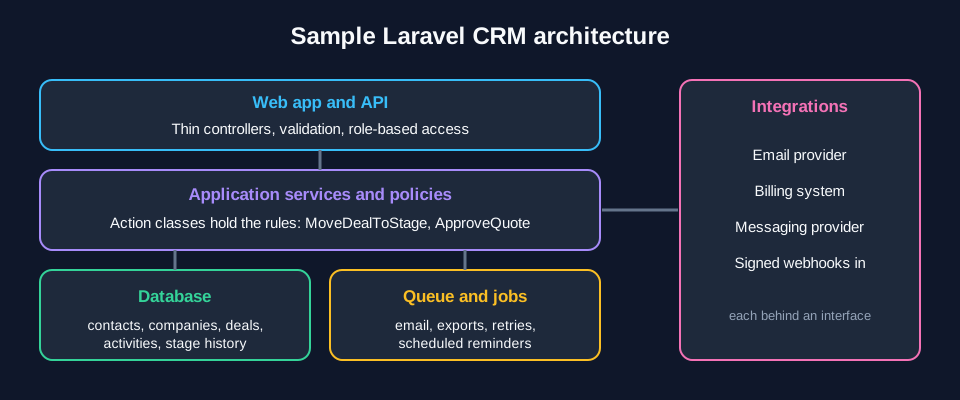
Figure 2. A sample Laravel CRM structure: thin controllers, application services that hold the rules, one database, a queue for slow work and integrations behind clear boundaries.
Core tables. Start with contacts, companies, deals, pipeline_stages, activities (calls, notes, tasks) and users with roles. Add a deal_stage_changes table early. A history of when each deal moved is what makes pipeline reports trustworthy later.
Keep rules out of controllers. Put business rules in small action classes, so the web app, the API and your queued jobs all go through the same code:
class MoveDealToStage
{
    public function handle(Deal $deal, PipelineStage $stage, User $actor): Deal
    {
        abort_unless($actor->can('move', $deal), 403);

        if ($stage->requires_approval && ! $deal->isApproved()) {
            throw new DealNeedsApproval($deal);
        }

        DB::transaction(function () use ($deal, $stage, $actor) {
            $deal->stageChanges()->create([
                'from_stage_id' => $deal->pipeline_stage_id,
                'to_stage_id' => $stage->id,
                'changed_by' => $actor->id,
            ]);

            $deal->update(['pipeline_stage_id' => $stage->id]);
        });

        DealStageChanged::dispatch($deal);

        return $deal->refresh();
    }
}
Use a queue for anything slow. Sending email, calling a third-party API and generating exports belong in queued jobs, so the page stays fast and a failed call can be retried.
Use policies for visibility. Laravel policies make "a rep sees only their own deals, a manager sees the team" a rule you can test, not a filter you hope every query remembers.
Put integrations behind interfaces. If you connect to a billing system or a messaging provider, write your own small interface and implement it once per provider. Swapping a provider later then means one class, not a rewrite. For incoming events, verify signatures and make handlers safe to run twice, the same discipline I describe in my Stripe payment integration guide.
Start with a thin slice. Contacts, deals, a pipeline board, activity notes and a basic report. Ship it to the team, watch what they actually use, and only then add the next feature. The biggest custom CRM failures I know of start by trying to rebuild an entire commercial product.
For the underlying framework choice, my comparison of Laravel and WordPress explains where each fits. If the CRM will take payments or invoices, see ecommerce and payment integration.
Questions to ask before you decide
- Which three tasks does my team repeat most, and could a tool's workflow or automation remove them without custom code?
- What would I lose if the vendor doubled the price or changed the plan next year?
- What data must I be able to export, and how easily can I leave?
- Who will fix a bug on a Friday afternoon, six months after launch?
- What is the smallest version I could build that would already beat the current process?
FAQ
Is a custom CRM more expensive than HubSpot or Zoho?
It depends on your seats, your plan and your scope. A custom CRM costs more upfront and is usually cheaper per seat after that. Use the break-even method above with your vendor's current public pricing and a real build estimate.
How long does it take to build a custom CRM?
A thin first version with contacts, deals, a pipeline and notes is a matter of weeks for a focused developer. A full replacement of a mature product takes much longer, which is why I recommend starting small.
Can a custom CRM integrate with tools I already use?
Yes. Most tools expose an API or webhooks, and a custom system can be built around them. Check that the integrations you rely on are supported before you commit.
What is the risk of a custom CRM?
Maintenance and key-person risk. You own security, backups and upgrades. Reduce the risk with clear documentation, automated tests for the rules that matter and a named person responsible.
Which framework do you recommend for a custom CRM?
I build them in Laravel, because its queues, policies, validation and database tooling suit business applications well. The same architecture ideas apply in other frameworks.
Need help deciding or building?
I can review your process, run the break-even numbers with you and tell you honestly whether to buy or build. If a custom system is the right call, I build it in Laravel. Start with my Laravel development services, or read the Laravel developer hiring checklist first to know what to verify before you sign with anyone.