
Blog
Deploy Laravel to a VPS Without Forge
Deploy Laravel to a VPS with a zero-downtime release script, then decide when Laravel Forge is worth the fee. Prices are from Forge's public pricing page.
Muhammad Zubair Akhtar
I deploy Laravel to a VPS without Forge when the project should stay on a machine I can SSH into. I am Zubair Akhtar, a senior software engineer in Lahore, Pakistan. The pattern is a releases directory, a current symlink, and a bash script that finishes composer, migrations, and cache warmup before that symlink moves. The deployment Laravel documents on the 13.x deployment page is the other half of the same job: cache config, events, routes, and views, then reload the processes that would otherwise keep running old code.
If you want that script fitted to a hostname you already pay for, that work sits with my Laravel development services. TLS, fastcgi_pass, and the server block in front of current/public are the nginx setup guide.
Versions this was written against
I wrote the script against the Laravel 13.x deployment documentation and the queue workers and deployment section. migrate --force is the flag under "Forcing Migrations to Run in Production" on the migrations page. Laravel 13 requires PHP 8.3 or newer, which is the server-requirements list on the deployment page. The Composer flags come from the Composer install command. The PHP-FPM reload is there because of opcache.validate_timestamps: when that directive is disabled, OPcache keeps compiled scripts until you reset it or restart the web server.
Forge prices later in this post are the monthly figures on Forge's public pricing page. I read that page on 21 October 2026. I did not run this script on a VPS while writing it. Read it, change the paths, check it with bash -n, and run it on a staging host before you point DNS at it. A green reading of the file is not a deploy.
Deploy Laravel to a VPS
A checkout you git pull inside the live directory is a downtime deploy. Composer and Artisan run in the folder nginx is already serving, and a request can hit a half-written vendor directory. I keep the public path stable and change only what it points at.
/var/www/laravel-app/
  current -> releases/20261021143000
  releases/
    20261021143000/
    20261021120100/
  shared/
    .env
    storage/
Nginx root is /var/www/laravel-app/current/public. The release name is a UTC timestamp so directory sort order matches deploy order. shared/.env and shared/storage sit outside every release. A new clone must not replace production secrets, logs, sessions, or uploaded files.
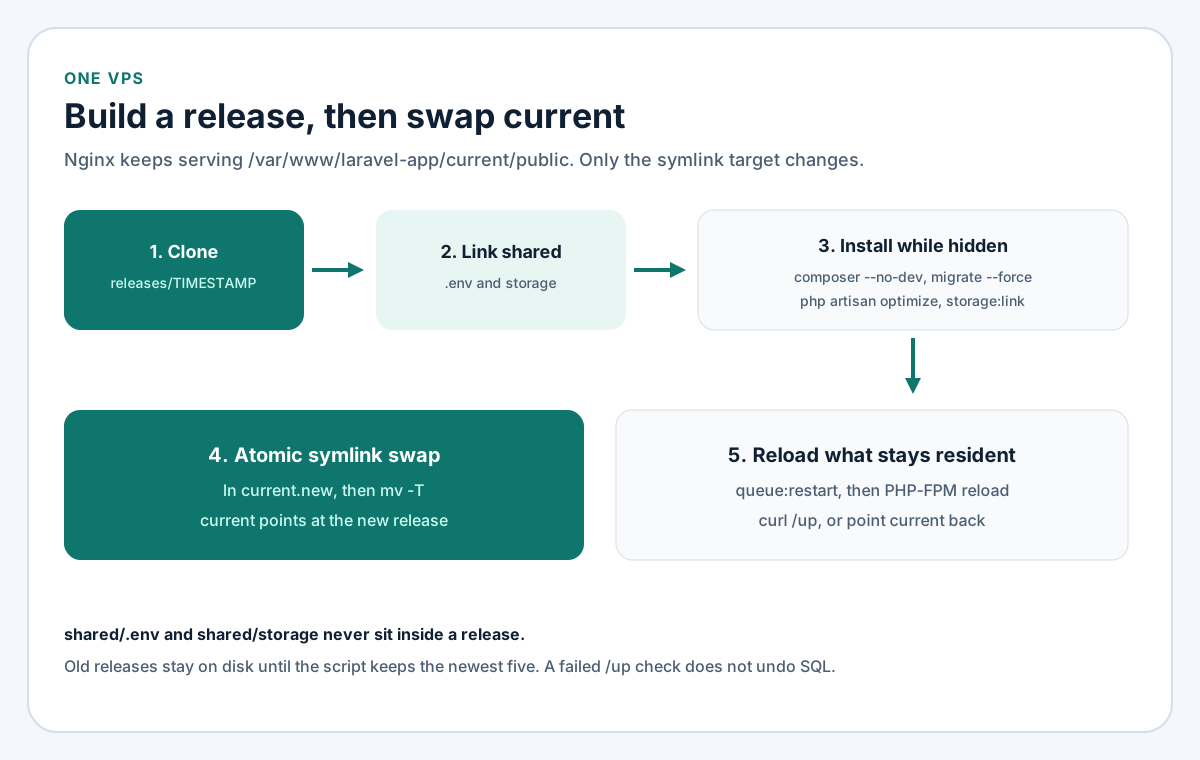
Figure 1. The URL never changes. The directory named current starts pointing at a new release only after install and migrate have finished.
What stays shared
.env lives in shared/. Each release gets a symlink to it. The deployment page says APP_DEBUG must be false in production, because a true value can expose configuration when an error page renders. I set that in the shared file once, not in the repository.
storage/ lives in shared/ for the same reason. The deployment page says the web server user needs write access to storage and bootstrap/cache. bootstrap/cache stays inside the release: php artisan optimize writes it during the deploy, and the next release gets its own cache files. Logs, sessions, and the public disk stay in the shared directory so deleting an old release does not delete uploads.
The git checkout and vendor belong to that release only. The first time you create the tree, copy Laravel's storage skeleton into shared/storage and write the production environment file to shared/.env. The script below refuses to start when either path is missing. It then deletes the clone's own storage directory and replaces it with a symlink. That delete is safe only because it runs on the fresh clone, before the symlink exists.
On Ubuntu I also put the deploy user in the www-data group and give that group write access on shared/storage, so PHP-FPM and Artisan can both write logs. That is the permission outcome the deployment page asks for. The exact chgrp and chmod on your host depend on which user PHP-FPM uses. I have not applied them from this session.
The deploy script
This is bash for Ubuntu, where mv -T and flock are available. The deploy user owns /var/www/laravel-app, can reload one PHP-FPM unit through sudo, and has a deploy key that can clone REPO. Change every path that does not match the host. I have not executed this file.
#!/usr/bin/env bash
# Written against Laravel 13.x deployment and queue docs.
# Adapt the paths. Run bash -n, then a staging host, before production.
set -euo pipefail

BASE=/var/www/laravel-app
[email protected]:example/laravel-app.git
BRANCH=main
KEEP=5
PHP_FPM=php8.3-fpm
HEALTH_URL=https://laravel.example.com/up

STAMP=$(date -u +%Y%m%d%H%M%S)
RELEASE="$BASE/releases/$STAMP"

mkdir -p "$BASE/releases"
exec 9>"$BASE/deploy.lock"
flock -n 9 || { echo "Another deploy is running." >&2; exit 1; }

if [[ ! -f "$BASE/shared/.env" || ! -d "$BASE/shared/storage" ]]; then
  echo "Create shared/.env and shared/storage before the first deploy." >&2
  exit 1
fi

PREVIOUS=""
if [[ -L "$BASE/current" ]]; then
  PREVIOUS=$(readlink -f "$BASE/current" || true)
fi

git clone --depth 1 --branch "$BRANCH" "$REPO" "$RELEASE"
ln -sfn "$BASE/shared/.env" "$RELEASE/.env"
rm -rf "$RELEASE/storage"
ln -sfn "$BASE/shared/storage" "$RELEASE/storage"

cd "$RELEASE"
composer install --no-dev --optimize-autoloader --no-interaction
php artisan migrate --force
php artisan optimize
php artisan storage:link

ln -sfn "$RELEASE" "$BASE/current.new"
mv -Tf "$BASE/current.new" "$BASE/current"

php artisan queue:restart
sudo systemctl reload "$PHP_FPM"

if ! curl -fsS --max-time 15 "$HEALTH_URL" >/dev/null; then
  echo "Health check failed for $HEALTH_URL" >&2
  if [[ -n "$PREVIOUS" ]]; then
    ln -sfn "$PREVIOUS" "$BASE/current.new"
    mv -Tf "$BASE/current.new" "$BASE/current"
    php artisan queue:restart
    sudo systemctl reload "$PHP_FPM"
  fi
  exit 1
fi

mapfile -t OLD < <(ls -1dt "$BASE/releases"/* | tail -n +"$((KEEP + 1))")
if ((${#OLD[@]} > 0)); then
  rm -rf "${OLD[@]}"
fi
ln onto current.new, then mv -T, is the swap. mv -T replaces the old symlink as a file, so a request sees the previous release or the new one. flock makes a second deploy exit while the first still holds the lock. KEEP=5 leaves older directories on disk long enough for the health-check path to point current back at one of them. --depth 1 is enough for a deploy. It is the wrong clone if you needed the history on the server.
Composer, migrations, and cache warmup
composer install is the command that reproduces composer.lock. composer update is the one that changes it, and it does not belong on the server. --no-dev skips require-dev, which is where I keep Telescope, Collision, and PHPUnit. --optimize-autoloader writes a class map. --no-interaction stops Composer from waiting on a prompt over SSH. Those three flags are documented on the Composer install page linked above.
Link .env and storage before composer install. Laravel's post-install scripts boot the framework, and a boot with no environment file fails in a way that looks like a missing PHP extension. If a package you need at runtime is still in require-dev, --no-dev will omit it. Move that package to require, or accept that production will not load it.
php artisan migrate --force is how a non-interactive shell gets past the production confirmation. The migrations page documents the flag for that prompt. The script runs it before the symlink moves. If migrate returns non-zero, set -e stops the script and current still points at the previous release.
That order is safe only when the migration still works with the code that is live during the migration. Adding a nullable column is that kind of change. Dropping a column the old release still selects is not. Renaming a column in the same deploy is not. I ship those as two releases: the first writes both the old and the new shape, and a later release removes the old shape after the symlink has moved. The migrations page also documents migrate --isolated for two servers that might migrate at once, using a cache lock. This script is one server, so I leave --isolated off.
php artisan optimize is the deployment page's single command for the four caches: configuration, events, routes, and views. After config:cache, calls to env() outside the config directory return null. The deployment page says to call env() only from config files. I treat a production bug that shows up only after optimize as that mistake until I have checked. route:cache cannot cache a route that is still a closure. When optimize stops on that error, move the closure into a controller and deploy again. Routes you add while following the Laravel REST API guide stay invisible until this cache is rebuilt.
php artisan storage:link creates public/storage inside the new release, aimed at storage/app/public. storage is already the shared symlink, so files uploaded by the previous release are still there. Do not commit public/storage. Each release creates its own link.
Deployment Laravel: caches, queues, and PHP-FPM
The symlink publishes the code. It does not restart anything that already loaded the old code into memory. That is the rest of a production deploy.
Queue restart
The queues page says workers are long-lived and will not notice a new release until they restart. php artisan queue:restart tells each worker to exit after the job it is already running, so that job is not dropped. Something has to start the worker again. The same page says the restart signal lives in the cache, and that you should have a real cache driver configured before you depend on the command. The array driver keeps that signal inside one process, which means the workers never see it. I use redis or database for the cache on any box where this line is supposed to do work.
The deployment page also documents php artisan reload, which terminates queue workers, Laravel Reverb, and Laravel Octane, and it says you still need a process monitor to start them again. The script calls queue:restart because that is the command the queues page names for queue:work. If the app runs Reverb or Octane, I add php artisan reload immediately after it. Horizon is a separate process. Restarting queue:work does not replace a horizon binary that Supervisor is watching. Match the Artisan command to the program Supervisor will actually start. I have not run queue:restart or reload from this writing session.
PHP-FPM reload
systemctl reload php8.3-fpm recycles FPM workers and keeps the service defined. I reload on every deploy, including when nginx already passes $realpath_root. The deployment page's nginx example uses $realpath_root$fastcgi_script_name so PHP executes the resolved release path rather than a stale symlink path. Reload still matters when opcache.validate_timestamps is 0. The PHP manual says that with validation disabled, OPcache serves the compiled script until you reset it or restart the web server. A reload is that reset for PHP-FPM. The unit name matches PHP 8.3 from the deployment page's requirements and from the socket in the nginx guide. If the host is on another PHP, change PHP_FPM.
Limit sudo to that one command. Confirm the binary path with command -v systemctl before you paste a sudoers rule:
deploy ALL=(root) NOPASSWD: /usr/bin/systemctl reload php8.3-fpmA deploy user who can systemctl restart arbitrary units, or who has a passwordless shell, is a larger grant than this script needs.
If /up fails, point current back
The deployment page documents a health route at /up. It returns 200 when the application boots and 500 when booting throws. You can rename it in bootstrap/app.php with the health routing argument. The script requests the public URL after the swap, which is the first moment nginx and PHP-FPM are actually serving that release.
On a failed check the script points current at the previous release, signals the workers again, and reloads PHP-FPM. Read the rollback narrowly. The migration has already been applied. Moving the symlink does not run migrate:rollback. The previous code has to boot against the new schema. That is the same backward-compatible rule as the migration section. If current was not a symlink yet, there is no previous release to restore. The script exits and leaves the new directory in place so you can read the Laravel log under shared storage. I would rather inspect a failed release than have the script delete the only copy.
Supervisor has to follow current
The queues page's Supervisor example runs php /home/forge/app.com/artisan queue:work with autorestart=true. On this layout the command has to go through the symlink. A worker started with a hardcoded release path will keep executing that release after current moves, and queue:restart will only bring the same old path back. This is that example with the path, the user, and numprocs changed. The documented sample uses numprocs=8. I start at 2 until I have seen the memory on that VPS. stopwaitsecs still has to be longer than the longest job, which is the warning in the same section, or Supervisor will kill a job the restart was trying to finish.
[program:laravel-worker]
process_name=%(program_name)s_%(process_num)02d
command=php /var/www/laravel-app/current/artisan queue:work --sleep=3 --tries=3 --max-time=3600
autostart=true
autorestart=true
stopasgroup=true
killasgroup=true
user=deploy
numprocs=2
redirect_stderr=true
stdout_logfile=/var/www/laravel-app/shared/storage/logs/worker.log
stopwaitsecs=3600
user needs to read the shared .env and write shared/storage. The log path is on the shared disk so it survives the cleanup of old releases. After you save the unit file, the queues page starts it with supervisorctl reread, supervisorctl update, and supervisorctl start "laravel-worker:*".
Point nginx at current/public
The nginx setup guide uses root /var/www/laravel-app/public for one checkout. For this layout that root becomes /var/www/laravel-app/current/public. Keep fastcgi_param SCRIPT_FILENAME $realpath_root$fastcgi_script_name;, which that guide and the Laravel nginx example both already use.
The document root stays on public. The deployment page is explicit that serving the project root exposes environment files and the rest of the application tree. try_files still falls through to index.php. Reload nginx when you edit the server block. An application deploy reloads PHP-FPM, not nginx, because the server name and the root path have not changed.
When Laravel Forge is worth it
People shop for server deployment services when they want a VPS without owning the script, the worker file, and the sudoers line. Laravel Forge is the service I compare, because the deployment page names it for exactly that case: you still have a server, and Forge installs nginx, MySQL, Redis, and the rest of the stack. The script in this post is what I write down when I want those steps in a file. Forge is what I point someone at when the person who deploys is not going to maintain bash.
These monthly prices are what Forge's pricing page showed on 21 October 2026. I am citing that page, not a review site. If the numbers move, the page wins and this table is out of date.
| Plan | Price on that page | What the plan card listed |
|---|---|---|
| Hobby | $12 per month | Unlimited Laravel VPS servers, 1 external server, unlimited sites, unlimited deployments, zero-downtime deployments, managed databases, community support, server monitoring |
| Growth | $19 per month | Unlimited servers, a 5% discount on Laravel VPS, unlimited sites and deployments, zero-downtime deployments, managed databases, standard support, server monitoring |
| Business | $39 per month | Unlimited servers, a 15% discount on Laravel VPS, unlimited sites and deployments, zero-downtime deployments, managed databases, advanced support, server monitoring |
Every card also listed hosted Forge domains and sharing servers with teammates. The page says the subscription is flat-rate and that you still pay the cloud provider for the machine. I am not adding a Laravel VPS hourly rate, because that page did not show me one. Hobby's unlimited servers are Laravel VPS servers. An external server, a machine at another provider, is capped at one on Hobby. Growth and Business list unlimited servers and drop that external-server line.
The FAQ on the same page, read the same day, says new Forge subscriptions include zero-downtime deployments for a single server. It also says Forge's zero-downtime is one server, and that Envoyer remains the tool for deploying one project to many servers. I would not buy the Hobby plan expecting it to replace a multi-server pipeline. The same FAQ gives support goals in business days: Growth's standard support at a 24-hour response goal, Business's advanced support at an 8-hour response goal, and community support on Hobby with no fixed response time. Those are Forge's stated goals, not times I have measured.
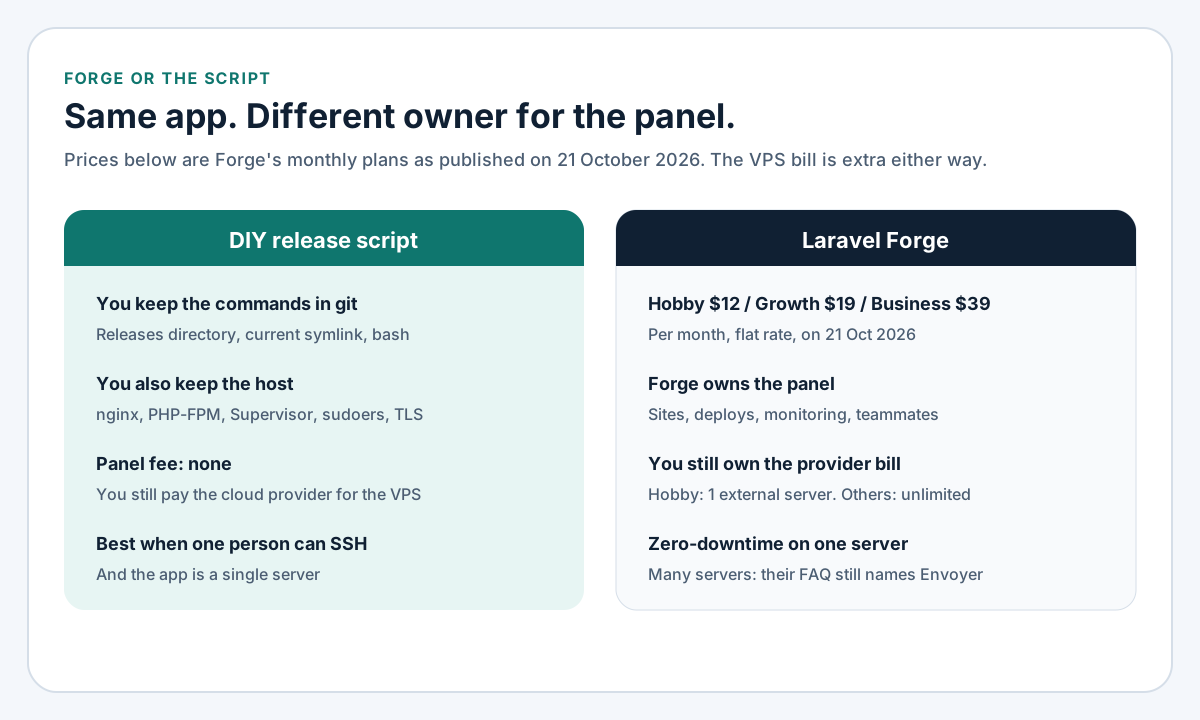
Figure 2. The subscription is the panel. The provider invoice and the application code are yours on both sides.
Where I would keep the script
Use the script when the host already has nginx, PHP 8.3-FPM, Composer, and a database, which is the machine the nginx guide builds. Use it when you want the deploy diff in git next to the app. Use it when the same VPS also runs a process Forge's Laravel defaults are a poor fit for. This site is a Next.js app with its own Node process. I would not put that through a Laravel server panel only to gain a deploy button. Use it when zero-downtime, for you, means one server and this symlink. Forge's FAQ draws that same single-server line for the feature they include.
Where I would pay for Forge
Pay for Forge when nobody on the team wants PHP upgrades, certificate renewal, or a worker that died without a log line anyone noticed. Pay for it when more than one person deploys and you want the teammate sharing the pricing page lists, instead of a shared SSH key. Pay for it when $12, $19, or $39 a month is less than the time you would spend the first time this script meets a real database. I am not putting an hourly number on that time. The comparison is those hours against that invoice, plus the VPS invoice you pay either way.
Server deployment services sell the panel and the defaults. They do not sell a migration that is safe while the previous release is still answering requests. A migration that locks a large table, or drops a column the live code still reads, will hurt visitors on Forge too, because both releases share one database during the swap. The release directory makes the code switch short. It does not make the schema switch clever.
FAQ
Does this script guarantee zero downtime?
It makes the code switch a symlink, which is the short part. A migration that locks a busy table, a Composer install that never reaches the health check, or a worker Supervisor does not start again will still interrupt people. The script stops before the swap when migrate fails. It cannot make a bad migration fast. Forge's pricing page says new subscriptions include zero-downtime deployments, and the same page limits that feature to one server. The limit is a useful reminder: the phrase is about the code swap, not about every failure mode.
Do I have to reload PHP-FPM on every deploy?
I do, in this script. With opcache.validate_timestamps=0, the PHP manual says compiled files stay in OPcache until a reset or a web server restart. Reloading PHP-FPM is that reset. If timestamp validation is left on, PHP notices new files after the revalidate interval, and $realpath_root still matters so FPM does not keep executing the previous release's path. I would not delete the reload to save a second.
Is Laravel Forge required to deploy Laravel?
No. The deployment page treats Forge as the option for people who would rather not configure nginx, MySQL, and Redis themselves. A VPS, the nginx guide, PHP-FPM, and this script are enough for one application. Forge's own pricing FAQ says you do not need to run Laravel to use Forge. The panel is optional in both directions.
Are the Forge prices in this post still current?
They were the monthly prices on 21 October 2026 at the URL in the table: Hobby $12, Growth $19, and Business $39, plus whatever the cloud provider charges for the server. I am not listing an annual price. The monthly view is what that page showed me. Open the page again before you put a number in a proposal or an invoice.
Where does an API deploy fit?
The same script. New routes from the REST API practices are the ones route:cache picks up inside php artisan optimize. API jobs pick up new code when queue:restart runs, and only if Supervisor's command is current/artisan rather than a release directory you have since deleted.
Put the script on a real host
Create shared/.env and shared/storage, point nginx at current/public, and deploy to a staging hostname first. Request /up after the swap, then deploy a second time so you know the previous release is still there if the health check fails. I set this release layout up as part of Laravel development from Lahore when the app should stay on a VPS you control. Bring the repository URL and whether Supervisor is starting queue:work or Horizon. I will start from the script on this page, on a staging host, and I will not call that host done until /up returns 200 after a second deploy.